
Most Shopify merchants set their shipping rates once during setup and never look at them again. That is usually the moment a store starts losing money on every order under a certain weight, or scares off carts at checkout with a shipping number nobody priced in advance. Getting Shopify shipping settings right is less about clicking through the menus correctly and more about knowing which rate type fits your catalog and what each one actually costs you per order.
This is a full walkthrough of Shopify shipping configuration: zones, rate types, the plan limits that catch people off guard, free shipping threshold math, and the third-party apps worth installing when Shopify’s native tools fall short.
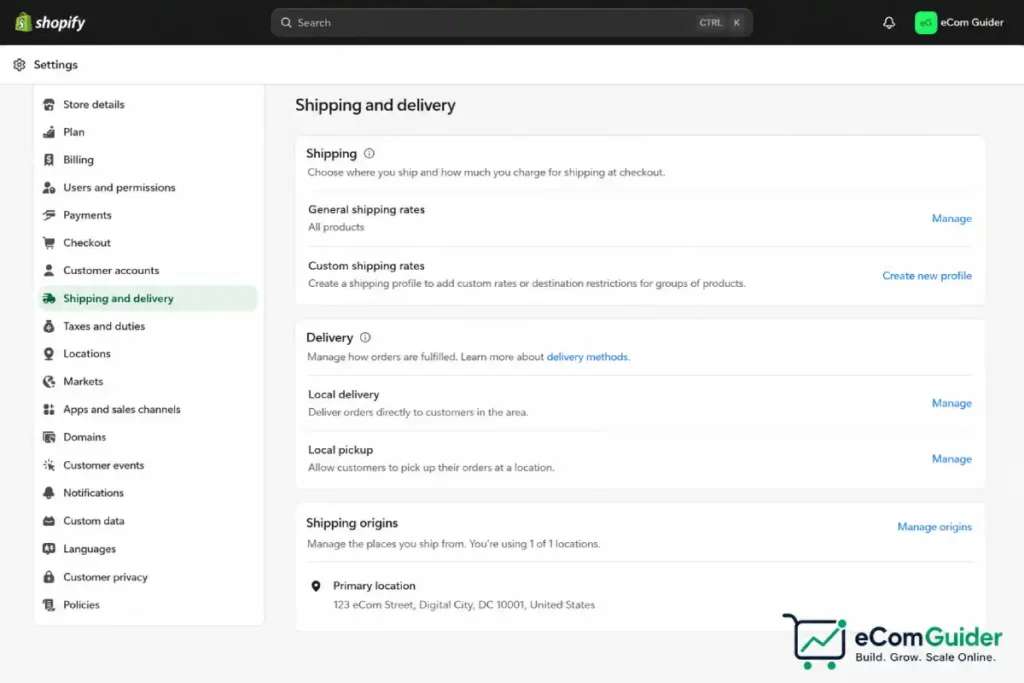
The four ways Shopify lets you charge for shipping
Every Shopify shipping setup is built from some combination of four rate types, configured per shipping zone:
- Flat rate. A fixed dollar amount per order, optionally varied by order value or weight. Simple, predictable, and the easiest for customers to understand at checkout.
- Calculated rates (Shopify’s built-in carriers). Shopify pulls a live rate from its own carrier integrations, USPS in the US or Canada Post in Canada, based on weight and destination. Available on every plan, including Basic.
- Third-party carrier-calculated rates. This connects your own UPS, FedEx, or USPS account so checkout shows your negotiated rate in real time. This tier requires the Advanced plan or Shopify Plus, or the Grow plan if you are on annual billing or pay an added monthly fee. It is not available on Basic or Starter at all.
- Free shipping. Set as its own rate, usually gated behind a minimum order value.
Most stores end up running a mix: flat rates for light, predictable items, calculated rates for anything with variable weight, and free shipping above a threshold to lift average order value.
Step 1: Set your shipping origin
Go to Settings, then Shipping and delivery (Shopify’s own shipping rates documentation covers the menu paths in full if your admin layout looks different from what’s described here). Before anything else, confirm your shipping origin address under your store’s locations. This is the address Shopify uses to calculate every carrier rate, and it defaults to whatever address you entered when you first created the store, which is not always where you actually ship from. If your fulfillment location changed since launch and nobody updated this field, every calculated rate at checkout has been wrong the entire time.
Step 2: Build your shipping profiles and zones
A shipping profile groups products that ship under the same rules.
Most stores only need the default “General shipping rates” profile, but if you sell something that ships differently, oversized furniture, perishable food, items requiring freight, create a separate profile for those products so they do not inherit your standard rates by mistake.
Inside each profile, a shipping zone is a country or region grouping that shares the same rate set.
Click Add zone, name it something you will recognize later (Domestic, Canada, EU), and select the countries it covers.
A product can only ship to a country if that country is also part of an active Shopify Market, so if a calculated rate refuses to show up at checkout, an inactive market is the first thing to check, not the shipping zone itself.
Step 3: Add rates to each zone
For each zone, click Add shipping option and pick a rate type.
Flat rate example: $6.99 flat for orders under $50, free for orders $50 and over. This is the simplest setup and works well for stores with a narrow weight range across the catalog.
Calculated rate example: Shopify’s built-in USPS integration is genuinely competitive for light parcels. A package under roughly 1 pound that qualifies for USPS Cubic pricing through Shopify Shipping can ship coast to coast in the US for under $5, which beats flat UPS Ground or standard Priority Mail pricing for the same weight class by a meaningful margin. If your catalog skews light (apparel, jewelry, small accessories), calculated rates through Shopify’s native USPS integration are usually the cheapest default before you even look at a third-party app.
Where calculated rates work against you: a $4.22 calculated rate at checkout looks fussy and arbitrary to a customer used to round numbers. If your products are light and cheap to ship, a flat $5.99 often converts better than the exact calculated number, even when the calculated number would technically save you a few cents.
Shopify shipping plan requirements: when the upgrade is worth it
This is the setting that trips up the most merchants. If you want your own negotiated UPS or FedEx rates shown at checkout, instead of Shopify’s built-in USPS rates, you need third-party carrier-calculated shipping, which is locked behind specific plans:
- Not available at all on Basic or Starter.
- Available on Grow only with annual billing, or by paying an additional monthly fee on top of the $105/month base price.
- Included by default on Advanced ($399/month) and Shopify Plus.
Here is the actual math: if your monthly shipping volume is low, paying $399/month for Advanced just to unlock carrier-calculated shipping rarely pencils out.
A merchant shipping 150 orders a month is far better served staying on Basic or Grow and using Shopify’s native USPS calculated rates or a free third-party app like Pirate Ship to pull discounted commercial rates without paying for a plan upgrade at all.
The Advanced plan upgrade starts making sense once your order volume is high enough, and your package weights varied enough, that the lower per-transaction fee and the access to your own negotiated carrier contracts save you more than the roughly $300/month jump from Grow.
Step 5: Set up your free shipping threshold correctly
A free shipping threshold is one of the most consequential settings on this entire page, and also one of the easiest to set without doing the math.
Unexpected shipping costs are the single biggest cause of cart abandonment in ecommerce, ahead of price and account-creation friction. Hiding the true shipping cost until checkout is what drives people to bail, not the existence of a shipping fee itself.
A clearly stated free shipping threshold, set at the right number, commonly lifts average order value by 15 to 25 percent because it gives shoppers a concrete reason to add one more item instead of abandoning the cart at the shipping screen.
The threshold itself needs to be priced against your margin, not picked as a round number. If your average order value is $42 and your average shipping cost to fulfill an order is $7, setting the free shipping threshold at $50 means you are absorbing that $7 on every order that clears the bar, which is fine if the resulting AOV lift covers it, but it needs to actually be tested, not assumed.
Run the threshold at two or three price points ($45, $55, $65) over a few weeks and track total revenue per visitor, not just AOV, since a higher threshold can lift AOV while quietly reducing how many people convert at all.
Step 6: Decide if a third-party shipping app earns its place
Shopify Shipping is good enough for most domestic, US-based stores once you are using calculated rates correctly. A third-party shipping app starts earning its cost in three specific situations:
- You ship from outside the US or need carrier coverage Shopify Shipping does not include. Shopify Shipping is not available in most of Southeast Asia or EMEA outside a short list of supported countries. Apps like Easyship aggregate hundreds of regional couriers in markets Shopify does not directly support.
- You already have negotiated carrier contracts you want to keep using. Tools like ShipStation let you connect your own UPS or FedEx account and apply your existing rates instead of starting over with Shopify’s discounted rates.
- You want zero monthly fee and just need discounted US labels. Pirate Ship is free to use and passes through discounted USPS and UPS commercial rates without a subscription or markup, which makes it a reasonable default for small US stores that have not yet hit the volume where Shopify’s own plan-tier discounts (up to 88 percent off published rates on Grow, more on Advanced) clearly outperform it.
Run your own numbers before installing anything. A free app that still charges per label can end up costing more at high volume than Shopify’s built-in discount once you are on the Grow or Advanced plan, since Shopify’s own carrier discounts scale with your plan tier specifically to compete with these tools.
Common mistakes that show up at checkout
Product weights left at the default. Calculated rates are only accurate if every product’s weight field is filled in correctly, including packaging. A 1-pound product shipped in a box with padding might actually weigh 1.5 pounds, and if that is not reflected in your settings, you eat the difference on every order using calculated rates.
No backup rate configured. When a third-party app or carrier-calculated zone fails to return a rate at checkout, Shopify is supposed to fall back to a backup rate automatically so the customer is not blocked from completing the order. If backup rates have been removed or customized down to nothing, a failed rate lookup means no shipping option shows at checkout at all, and the cart simply cannot be completed.
Restricted countries left in a shipping zone. Certain product categories (electronics, cosmetics, some food items) cannot legally ship to specific countries. If a zone includes a country your product cannot legally enter, you will not find out until a customs hold or a return, not at checkout.
Who needs which setup
A new, single-location US store under 200 orders a month is well served by Basic or Grow, Shopify’s native USPS calculated rates, and a free shipping threshold tested against actual margin.
A store doing meaningful international volume or carrying negotiated carrier contracts is the one where Advanced’s third-party carrier-calculated shipping, or a dedicated app like Easyship or ShipStation, starts to justify its cost. Set the configuration to match your actual order volume and weight profile, not the setup your competitor happens to be running.
Startups
Perfect for early stage businesses looking to quickly launch an online store with minimal upfront investment. Shopify offers easy setup, customizable templates, and integrated payment processing to help startups get selling fast.
Enterprise
Scalable solution for large businesses requiring robust features, advanced analytics, and multi-channel selling capabilities. Shopify Plus provides high performance, dedicated support, and extensive customization to meet enterprise-level needs.
Agencies
Manage multiple clients’ stores with ease using Shopify’s comprehensive tools. Agencies can customize themes, optimize store performance, and leverage Shopify’s Partner Program to grow their service offerings efficiently.
Developers
API-first approach allows developers to build custom integrations, apps, and themes. Shopify’s extensive API documentation and developer tools empower developers to create tailored e-commerce solutions and enhance store functionality.
Frequently Asked Questions
Does Shopify Basic include carrier-calculated shipping?
Basic includes Shopify’s own built-in calculated rates through USPS in the US and Canada Post in Canada. It does not include third-party carrier-calculated shipping, which lets you connect your own UPS or FedEx account; that requires Advanced, Plus, or Grow with annual billing or an added fee.
What free shipping threshold should I set?
There is no universal number. Price it against your average shipping cost and average order value, then test two or three thresholds over several weeks while tracking total revenue per visitor, not just average order value alone.
Will a third-party shipping app save me money over Shopify Shipping?
It depends on your plan tier and order volume. Shopify’s own carrier discounts scale up with plan tier, reaching steep discounts on Advanced, so a free app with per-label fees can end up costing more once you are above Basic. Apps earn their place mainly for non-US carriers Shopify Shipping does not support, or when you already have your own negotiated carrier contracts to plug in.
Why is a calculated rate showing $0 or no rate at all at checkout?
The most common causes are missing product weight, an inactive market for that country, or a third-party rate provider that failed to return a quote and has no backup rate configured to fall back on.
Related reading: Best Shipping Solutions for eCommerce Stores, How to Reduce Shipping Costs for Your eCommerce Store, and the full Shopify Platform Intelligence Report.