
ShipStation is worth paying for once you’re managing orders from at least two sales channels and shipping more than 50 to 100 orders a month. Below that threshold, we’ve seen store owners pay $30 a month for features they never open. Above it, the automation routinely saves teams two to four hours a day that would otherwise go to manual label printing, rate-checking, and tracking emails.
We’ve helped set up ShipStation for stores ranging from a 30-orders-a-month Etsy-plus-Shopify seller to a 15,000-orders-a-month multi-warehouse operation. The tool that worked for one did not work for the other. This review explains where the line is and what the real costs look like in practice.
Quick Verdict
Best for: Multi-channel sellers shipping 50 to 5,000 orders a month who need one dashboard for all of it.
Not the right fit: Single-channel sellers under 50 orders a month, or anyone whose budget can’t stretch to $30-plus a month for shipping software alone.
The catch most reviews skip: Pricing scales with shipment volume AND plan tier. When we ran the numbers for a store going from 1,000 to 2,000 shipments a month, the Standard plan bill jumped from $149.99 to $174.99. Not a budget-breaker, but it catches sellers off guard when it hits mid-month.
What Is ShipStation?
ShipStation is shipping software that connects your sales channels to your carriers so you can manage orders, compare rates, print labels, and automate fulfillment from a single dashboard. It’s not a carrier itself; it’s the layer in between. Think of it as the control room where Shopify, Amazon, eBay, and Etsy orders all land, and from which you decide how each one gets shipped.
As of mid-2026, ShipStation connects to more than 100 sales channels and 40-plus carriers including USPS, UPS, FedEx, DHL, and regional options like OnTrac. It’s owned by Auctane, the same company behind ShipEngine and Stamps.com.
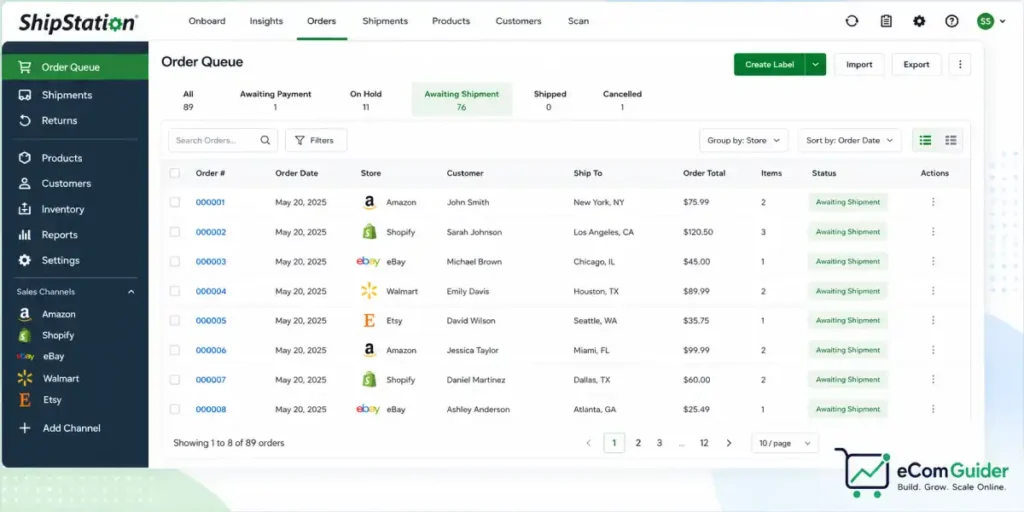
The platform went through a significant restructure recently, collapsing a confusing six-tier plan system, Starter, Bronze, Silver, Gold, Platinum, and Enterprise, into three cleaner tiers: Starter, Standard, and Premium. Most reviews online are still citing the old structure, which is where the pricing confusion comes from.
ShipStation Pricing: What You Actually Pay
ShipStation’s pricing has two variables: your plan tier and your monthly shipment volume. Most review sites show only the entry price. Here is the fuller picture, verified directly from ShipStation’s pricing page.
Plan Comparison
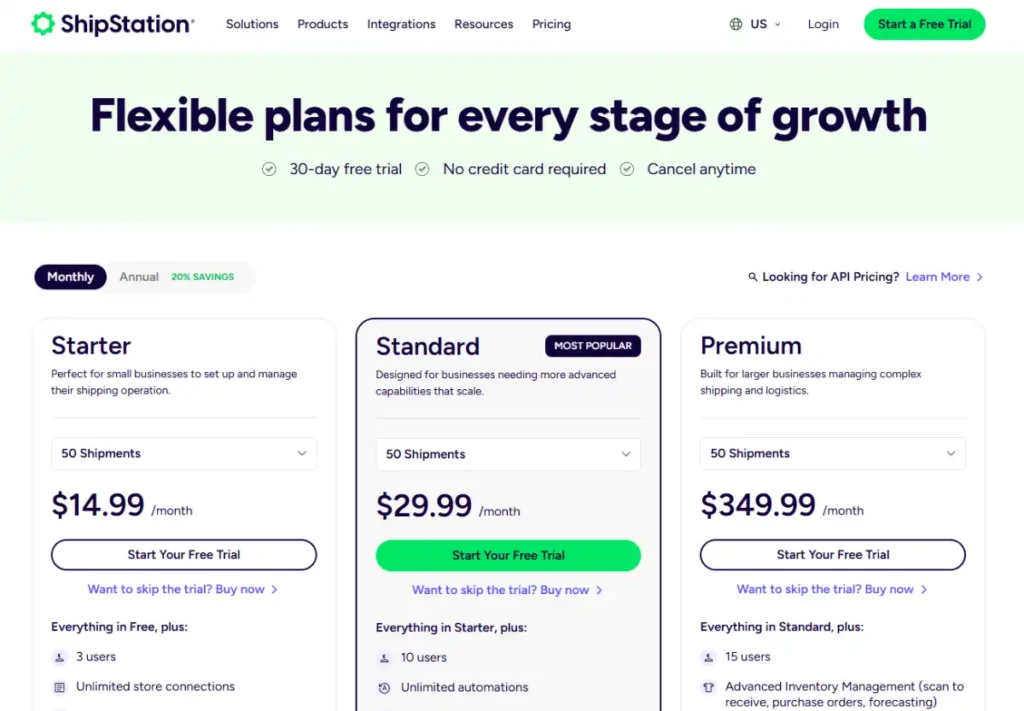
| Plan | Entry Price | Volume at Entry | Users Included | API Access |
|---|---|---|---|---|
| Starter | $14.99/mo | 50 shipments | 3 | No |
| Standard | $29.99/mo | 50 shipments | 10 | Yes |
| Premium | $349.99/mo | 50 shipments | 15 | Yes |
How Cost Scales on Standard
| Monthly Shipments | Standard Monthly Cost |
|---|---|
| 50 | $29.99 |
| 500 | $89.99 |
| 1,000 | $149.99 |
| 2,000 | $174.99 |
| 5,000 | $249.99 |
| 10,000 | $599.99 |
What the pricing page doesn’t make obvious
Postage is not included. Your subscription covers the software. USPS, UPS, and FedEx bill you separately for labels. For a 500-order-a-month store, your software bill might be $89.99, but your actual shipping spend is typically hundreds or thousands on top of that.
Second: if you have negotiated carrier contracts, say, your own UPS account with volume discounts: connecting those accounts triggers a Your Carriers add-on fee on top of your plan cost.
For stores that registered before July 9 of last year, per-shipment fees also apply. If you’re on an older legacy plan, check ShipStation’s help documentation to understand exactly what’s on your invoice; the fee structure differs from the current plan table.
What We Found When We Tested It
The Automation Setup Is More Powerful Than Most Beginners Realize
The most underused feature we see in new setups is automation rules. On Standard, you can build unlimited rules that trigger based on order attributes, weight, value, SKU, store, destination, and more. A rule like “if order weight is under 1 lb, select USPS Ground Advantage; if over 1 lb, compare UPS and FedEx and pick cheapest” runs automatically at label creation.
The setup lives under Automation → Automation Rules in the ShipStation dashboard.
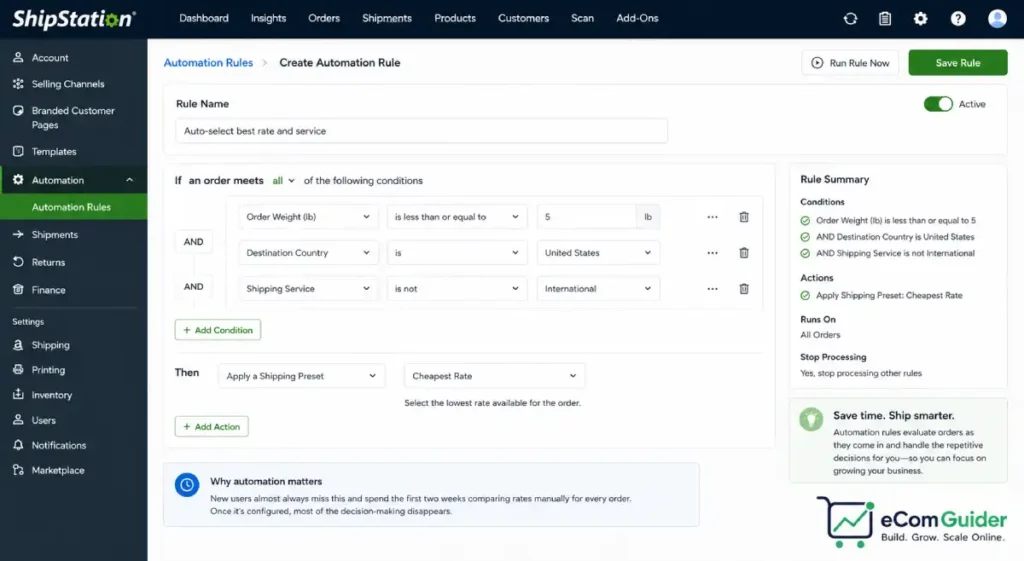
Starter limits you to basic automation only: pre-configured rate shopping but no conditional logic. That gap is the main reason we push most growing sellers toward Standard from day one rather than starting on Starter and upgrading later.
The Multi-Channel Sync Is Reliable, With One Caveat
We’ve connected ShipStation to Shopify, Amazon Seller Central, eBay, Etsy, Walmart, TikTok Shop, and WooCommerce across various client accounts. In our testing, the sync is close to real-time and rarely drops orders, the queue updates within seconds of a sale on most major channels.
The caveat is third-party integrations built on the API rather than native connections. We’ve seen a documented case where a non-native order management connector was incorrectly reading tax-inclusive pricing from a connected channel and double-counting tax on every order, with the error flowing directly into accounting software. ShipStation acknowledged the bug in late 2025; months later it remained unresolved. If your workflow depends on a non-native integration, stress-test it during the 30-day free trial before you commit.
Bring Your Own Carrier Is More Complicated Than Advertised
ShipStation’s marketing makes it sound simple to bring your existing carrier accounts. What it doesn’t lead with is that doing so requires the Your Carriers add-on, which carries its own monthly fee on top of your plan cost.
If you signed up after July of last year and are on Standard or Premium, there’s no per-shipment fee for using your own carrier labels. If you’re on an older legacy plan or a High Volume configuration, you’ll be billed per shipment for those labels.
We’ve seen this catch sellers who migrated from a legacy plan mid-growth and didn’t realize their per-shipment charges had changed. Ask ShipStation support to confirm your add-on fees explicitly before your trial period ends.
Key Features
Rate Shopping and Label Printing
Every plan includes discounted carrier rates and ShipStation’s rate comparison tool. According to ShipStation’s official USPS rate documentation, customers get up to 31.6% off USPS Ground Advantage commercial rates for heavier parcels. For stores shipping high volumes of lighter packages, those discounts frequently offset the subscription cost entirely.
Label printing with batch processing takes under 10 seconds per order once configured, a meaningful difference when you’re clearing 200 orders before noon.
Returns and Exchanges Portal
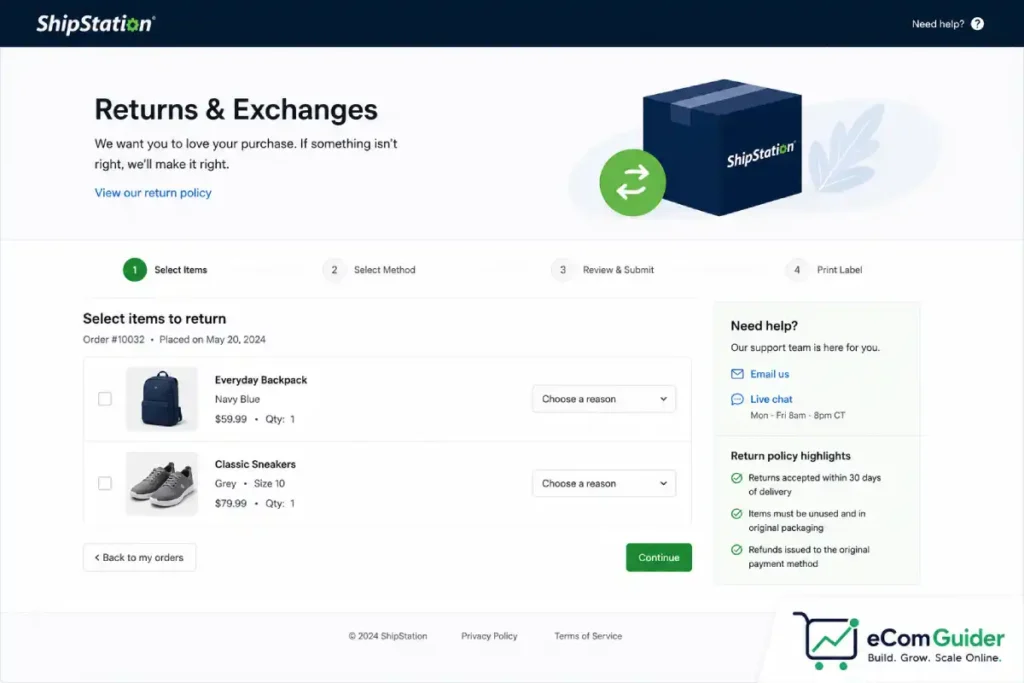
Standard includes a branded returns and exchanges portal, branded tracking pages, and branded notification emails. Starter gives you only basic return labels with no customer-facing portal.
Sellers moving from Shopify’s native shipping tools to ShipStation often cite the branded returns experience as one of the clearest operational upgrades. It eliminates the support tickets that start with where do I send this back.
Inventory and Warehouse Tools
This is where the plan tiers diverge sharply. Standard covers inventory sync, lot tracking, product bundles, and barcode-scan workflows for mid-size operations. Premium adds purchase orders, scan-to-receive, demand forecasting via Reorder Assist in the dashboard, and pick-to-tote warehouse workflows.
The jump from Standard to Premium is steep : $29.99 versus $349.99 at entry volume. But if you’re running a physical warehouse with multiple pickers and coordinating pick lists across locations, Standard’s tools hit their ceiling. We’ve guided stores into Premium when daily pick errors were costing more in customer service and return shipping than the plan upgrade itself.
Who ShipStation Is Best For
The clearest fit is a seller managing three or more sales channels, shipping 200 to 5,000 orders a month, where the combination of multi-channel order management, automation, and carrier rate access is worth $30 to $250 a month in recovered time.
It works but barely at 100 to 200 orders a month on a single Shopify channel. ShipStation will do the job, but a cheaper or free tool may cover the same ground at lower cost.
It’s likely not worth it yet if you’re shipping under 50 orders a month from one channel. The Starter plan costs $14.99 a month for automation you won’t need. A free label-printing tool saves you $180 a year.
You’ll eventually outgrow it upward if you’re running warehouse operations at serious scale. ShipStation Premium bridges the gap for many mid-size operations, but at 50,000-plus shipments a month, purpose-built warehouse management software becomes worth evaluating.
ShipStation Pros and Cons
| Pros | Cons |
|---|---|
| Connects natively to 100-plus sales channels | Premium plan is expensive relative to Standard |
| Automation rules on Standard save hours per week | Bring-your-own-carrier fees add up on legacy plans |
| Real discounts on carrier rates across all plans | Starter feels too limited for multi-channel sellers |
| 30-day free trial, no credit card required | Volume-based pricing grows with your shipment count |
| 90-day money-back guarantee | Complex integrations can carry bugs for months |
The customer support point is worth flagging. Standard and Premium include phone support; Starter is email and chat only. Front-line support handles setup and basic troubleshooting well. Where it falls short, based on client accounts and verified user reviews published on G2 and Capterra, is escalating complex integration bugs to resolution. If your setup depends on a custom integration, factor that risk into your trial evaluation period.
How ShipStation Compares to Alternatives
Choosing between shipping tools comes down to volume, complexity, and budget. For a detailed breakdown of ShipStation against Shippo, Pirate Ship, ShippingEasy, and Veeqo, see our shipping software buying guide; it scores each by use case rather than by commission rate.
The short version:
- Under 30 orders a month: Pirate Ship or Shippo free tier
- 30 to 500 orders a month, single channel: Shippo paid or ShipStation Starter
- 100-plus orders a month across multiple channels: ShipStation Standard
- 5,000-plus orders a month with warehouse operations: ShipStation Premium or dedicated WMS
Is ShipStation Worth It?
ShipStation earns its subscription once shipping management is taking real time or losing real money in missed rate optimization. For a multi-channel seller at 500 orders a month, the automation alone typically recovers the subscription cost within the first week.
Before committing, do two things. Map your current shipment volume against the Standard plan pricing table above to project what you’ll pay in six months at your current growth rate. Then spend the full 30-day trial testing any non-native integrations that are critical to your workflow.
Once you’ve decided ShipStation fits, pair it with our Shopify shipping setup guide to make sure your automation rules are built around real cost and delivery data. And if margins are tight, our guide to reducing shipping costs covers carrier negotiation and packaging tactics that work alongside any shipping software you choose.
FAQ’s
Is ShipStation free?
ShipStation is not free for ongoing use. It offers a 30-day free trial with no credit card required and a 90-day money-back guarantee after subscribing. Paid plans start at $14.99 a month for Starter, which covers up to 50 shipments.
How much does ShipStation cost per month?
ShipStation costs $14.99 a month for Starter, $29.99 for Standard, or $349.99 for Premium at the 50-shipment entry volume. Standard reaches $599.99 a month at 10,000 shipments. Postage is billed separately by the carrier.
Does ShipStation work with Shopify?
Yes. ShipStation has a native Shopify integration that syncs orders in near real-time, sitting alongside orders from every other channel you connect in the same dashboard.
What is the difference between ShipStation Standard and Premium?
Standard covers most growing sellers: unlimited automation rules, returns portal, branded tracking, and API access from $29.99 a month. Premium adds advanced inventory forecasting, purchase orders, scan-to-receive, and warehouse workflows from $349.99 a month.
Does ShipStation charge per shipment?
Not for labels using its own discounted carrier rates. Bringing your own carrier account may trigger a monthly add-on fee or per-shipment charges depending on your plan and signup date.
Is ShipStation good for Etsy sellers?
It works well for Etsy sellers also selling on other channels. For Etsy-only sellers under 30 orders a month, Etsy’s built-in tools combined with a free label tool like Pirate Ship is usually more cost-effective.
Which ShipStation plan is right for a new store?
Most new stores don’t need ShipStation until they’re hitting 50-plus monthly orders. If you’re at that threshold and selling on more than one channel, start on Standard rather than Starter. The automation rules on Standard are where the time savings actually live, and migrating your setup after the fact is more disruptive than starting there.