
If you are asking whether WooCommerce is right for you, most guides jump straight to the installation steps. Install WordPress, install the WooCommerce plugin, add your first product, done.
That sequence takes about 15 minutes. Getting a WooCommerce store that is actually ready to sell, with proper hosting, the right plugins, a functional checkout, and a way to handle what happens when something breaks, takes considerably longer. The gap between those two things is where most beginners get stuck.
This guide answers the question directly: is WooCommerce right for you?
It covers what the platform actually commits you to before you install it, who it actually suits, the questions to answer before you decide, and the specific situations where a different platform is the smarter choice.
What WooCommerce Is (and What It Is Not)
WooCommerce is a free eCommerce plugin for WordPress, open-source, that turns any WordPress site into an online store. Installed on a WordPress site, it adds product pages, a shopping cart, a checkout, order management, and basic customer accounts to what is otherwise a content management system.
What WooCommerce is not: a hosted eCommerce platform. You do not sign up and start selling. You choose a hosting provider, install WordPress, install WooCommerce, configure payment processing, and maintain the entire setup yourself going forward.
According to the WordPress plugin directory, WooCommerce has been downloaded over 200 million times and is active on millions of sites globally. Those numbers reflect its genuine scale. They do not tell you anything about the operational profile required to run it successfully.
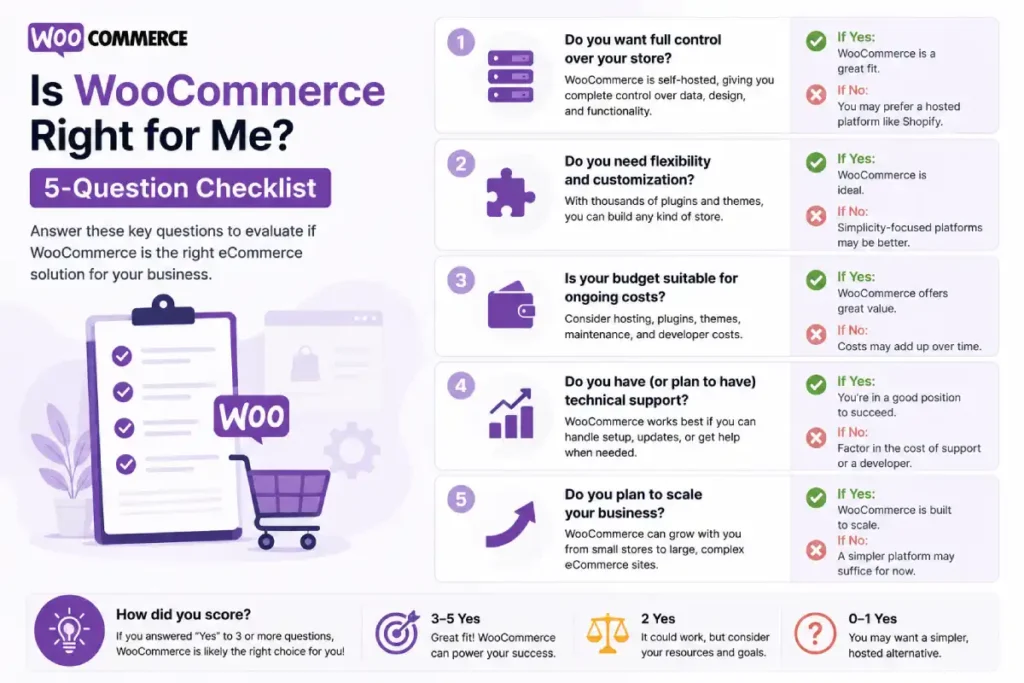
Is WooCommerce Right for Me? Five Questions to Answer First
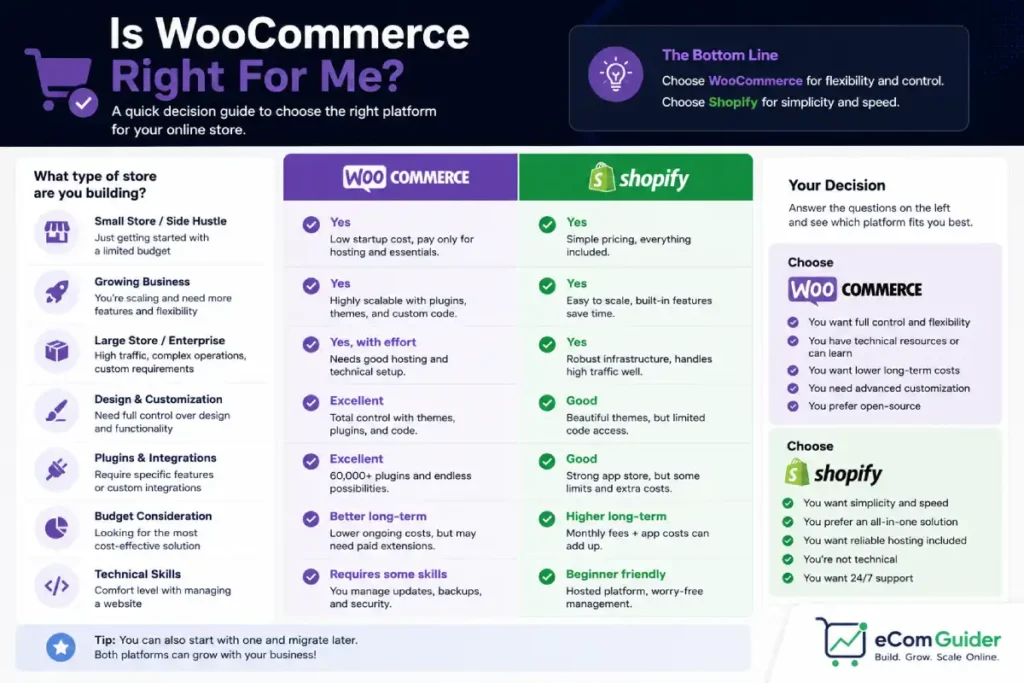
WooCommerce is a good starting point for beginners who meet at least two of the following conditions:
- You already have a WordPress site and want to add eCommerce without migrating your content
- Your store is content-driven: a blog that sells products, a creator monetising downloads, or a media brand
- You have access to basic WordPress skills or a developer you can call
- You want full ownership of your store data with no monthly platform fee
- Your products or pricing need custom logic a standard hosted platform cannot handle
If none of those apply, WooCommerce will likely frustrate you. A beginner running a simple product store with no existing WordPress presence and no developer relationship will spend more time managing the platform than selling.
In that case, a hosted eCommerce platform is the more practical starting point. Our Shopify for small business guide covers the managed alternative in plain terms so you can compare before committing.
What You Need Before You Install WooCommerce
Three things must exist before WooCommerce is installed.
A hosting plan. WooCommerce requires a server running PHP and MySQL. Shared WordPress hosting starts around $3-15 per month. Managed WooCommerce hosting, which handles more performance and security overhead, starts around $25-80 per month.
The hosting decision matters more than most store owners expect. A slow shared hosting plan produces a slow store, and a slow checkout directly reduces the percentage of visitors who complete a purchase.
A domain name. A domain typically costs $10-$20 per year. Many hosting providers include a free domain for the first year, so this cost is often absorbed into the hosting package at the start.
A payment gateway account. WooCommerce connects to payment processors including Stripe, PayPal, and WooPayments (WooCommerce’s own Stripe-based gateway). Each requires a business account.
WooPayments is the easiest to set up for beginners since it is configured inside the WooCommerce dashboard without leaving WordPress. Processing fees are typically 2.9% plus $0.30 per transaction regardless of which gateway you choose.
How WooCommerce Works: The Basics
WooCommerce adds a new layer to WordPress.
In your WordPress admin, you will see a WooCommerce menu with sections for orders, customers, products, analytics, and settings. Your existing WordPress content (pages, posts, menus) remains unchanged.
Products are created as a custom post type. Each product has a title, description, price, stock level, images, and categories.
Variable products, for example, a T-shirt in multiple sizes and colours, use a variation system where each combination of attributes (Size: Medium, Colour: Blue) is a separate variant with its own price and stock.
When a customer places an order, WooCommerce creates an order record and sends a confirmation email.
You fulfil the order manually by packaging and shipping the product, then mark it as complete in the WooCommerce dashboard. Automated fulfilment through a 3PL or dropshipping supplier requires a plugin.
The official WooCommerce documentation covers each of these areas in more detail and is updated with each WooCommerce release.
Realistic Timeline: What to Expect From Zero to First Sale
Most WooCommerce tutorials claim you can be up and running in minutes. That is true for the installation. Here is the honest timeline for a functional store:
| Stage | What Happens | Realistic Time |
|---|---|---|
| Install WordPress and WooCommerce | Hosting provisioned, WordPress installed, WooCommerce plugin activated | 1-2 hours |
| Choose and configure a theme | Select a WooCommerce-compatible theme, adjust layout and colours | 2-4 hours |
| Add essential plugins | SEO plugin, security plugin, backup plugin, caching plugin | 1-2 hours |
| Set up payment processing | Connect Stripe, PayPal, or WooPayments, test checkout | 1-2 hours |
| Configure shipping | Set rates, zones, and carrier connections | 1-3 hours |
| Add products | Write descriptions, upload images, set prices and stock | 1-4 hours per product batch |
| Test everything | Run test orders, check confirmation emails, verify inventory deduction | 2-3 hours |
| Total to launch | 10-20+ hours for a basic store |
That is for a basic store with a handful of products, a single payment method, and simple flat-rate shipping. A store with 50+ products, multiple shipping zones, subscription pricing, or a custom checkout process takes proportionally longer.
Beginners who see a “WooCommerce in 15 minutes” tutorial and expect to be selling at that point are working from an inaccurate benchmark. That timeline is realistic for the software install, not for a store.
What New WooCommerce Store Owners Consistently Underestimate
Updates are your responsibility. Every week or two, your WordPress dashboard will show plugin update notifications. Applying them feels simple. Skipping them accumulates security risk. Applying them without testing on a staging copy first risks breaking something in production.
A store owner who postpones plugin updates for several months faces a choice: apply a backlog of updates with elevated conflict risk, or keep accumulating security debt.
Neither is comfortable. A staging environment and a regular update schedule is the correct approach, but it takes setup time that most store owners do not budget for at the start.
Hosting is not interchangeable. A WooCommerce store on shared hosting at $3 per month and the same store on managed hosting at $25 per month perform very differently.
Page load speed, checkout reliability, and database query performance all vary based on the server. Store owners who choose hosting based on the lowest advertised price often face performance problems within the first six months of real traffic.
Something will break, and nobody owns the problem. When a WooCommerce store develops a bug, the cause might be the WooCommerce plugin, a conflict between two plugins, a WordPress core update, or the hosting environment.
Each has a different support channel. WooCommerce support covers their plugin but not third-party extensions.
Plugin developers cover their own code but not conflicts with other plugins. Hosting providers cover the server but not the application. As a beginner, navigating between those support channels without a technical background is actually difficult.
“Free” refers to the plugin, not the store. The WooCommerce plugin has no licence fee. Running a functional WooCommerce store for a year, hosting, essential plugins, a domain, and basic maintenance, typically costs $500-$2,000 depending on how you configure it. For the full cost breakdown by store type, see our cost to start an online store guide.
WooCommerce Setup Mistakes That Cost Real Money
Choosing the cheapest hosting plan. Shared hosting promotional rates often start below $3 per month, plans built for low-traffic personal sites, not eCommerce checkouts.
The performance difference shows up in checkout abandonment. A store with a 4-second checkout load time loses a real proportion of customers who would have converted on a faster site.
Installing too many plugins. WooCommerce’s plugin ecosystem is one of its strengths and one of its risk factors. Every plugin adds a maintenance obligation, a conflict point, and database query load.
Store owners who install 20 plugins to solve 20 problems often discover that several conflict in ways that only surface under specific conditions, usually during a busy checkout.
Skipping the test order process. A WooCommerce store should always be tested with a real payment method before going live. Stripe’s test mode lets you run a complete checkout using a test card number without processing a real transaction. Skipping this step means the first real customer to check out is also the one who discovers if something is broken.
Not setting up automated backups before launch. A WooCommerce store has value from the moment it has customer and order data: that data lives on your server and nowhere else unless backups are configured.
Setting this up after something goes wrong is too late. UpdraftPlus, available free from the WordPress plugin directory, handles automated off-server backups and should be one of the first plugins installed.
WooCommerce vs Shopify: Which Is Right for Your Situation
The honest comparison for a beginner comes down to one question: do you need to manage the store, or do you also need to manage the platform?
WooCommerce gives you more control and lower platform cost at the expense of managing the infrastructure yourself. Shopify manages the infrastructure for you at the cost of a monthly subscription and platform transaction fees.
| Factor | WooCommerce | Shopify |
|---|---|---|
| Monthly platform cost | $0 (plugin only) | $39-$399 |
| Setup time to first sale | 10-20+ hours | 2-4 hours |
| Technical maintenance | Your responsibility | Handled by Shopify |
| Transaction fees | None (gateway fees only) | 0-2% without Shopify Payments |
| Customisation depth | Unlimited | Limited without Shopify Plus |
| Support when something breaks | Multi-channel, complex | Single support team |
For most beginners without a developer relationship, Shopify removes the infrastructure management layer entirely. You pay more per month but spend less time on problems that are not your product or your customers.
For beginners who already run a WordPress site, who have a developer available, or whose store actually needs the customisation depth that WooCommerce offers, the infrastructure management trade-off is worth accepting.
Our Is Shopify worth it guide and our complete WooCommerce platform guide cover both platforms in comparable depth if you want to go deeper before deciding.
Before You Commit: The WooCommerce Pre-Launch Checklist
Before opening your WooCommerce store to customers, confirm each of the following:
- Test order completed successfully using Stripe test mode or PayPal Sandbox
- Order confirmation email received and content is accurate
- Inventory level decremented correctly after test order
- Shipping rates calculated correctly for your target regions
- Return and refund policy page exists and is linked in the footer
- SSL certificate active (padlock visible in browser address bar)
- Automated backups configured and first backup confirmed
- Security plugin active with firewall enabled
- All plugins updated to current version before launch
- Privacy policy and cookie notice in place for GDPR compliance if selling to EU customers
A store that passes this checklist is ready to receive real orders. A store that skips steps in this list is not, regardless of how well the products or theme look.
For a broader guide to launching an eCommerce store across any platform, see our how to start an eCommerce store guide.
FAQ’s
Is WooCommerce free to use?
The WooCommerce plugin is free. Running a WooCommerce store is not. Beginners should budget for hosting ($100-$600 per year at realistic rates), a domain ($10-$20 per year), essential plugins ($200-$500 per year), and payment processing fees (2.9% plus $0.30 per transaction through Stripe or similar). A basic WooCommerce store costs $300-$1,200 per year before revenue-based processing fees.
How long does WooCommerce actually take to set up?
The WooCommerce plugin installs in minutes. A functional store ready to sell, with hosting configured, a theme set up, payment processing tested, products added, and shipping configured, typically takes 10-20 hours for a basic setup. Beginners who plan for a day or two of focused work will reach launch in a realistic timeframe.
Do I need coding knowledge to use WooCommerce?
Basic WooCommerce setup requires no coding. Adding products, configuring payment gateways, setting shipping rates, and managing orders are all handled through the WordPress admin interface. Coding knowledge becomes useful or necessary for custom checkout behaviour, complex pricing rules, and building integrations with systems that do not have a WooCommerce plugin.
What is the difference between WordPress and WooCommerce?
WordPress is a content management system used to build websites, blogs, and web applications. WooCommerce is a plugin that adds eCommerce functionality to a WordPress site. WooCommerce cannot run without WordPress; WordPress runs fine without WooCommerce. You install WordPress first, then install WooCommerce as a plugin within it.
Is WooCommerce better than Shopify for most store owners?
For most store owners with no existing WordPress presence and no developer relationship, Shopify is the easier starting point. It handles hosting, security, and platform updates automatically.
WooCommerce is the better fit for store owners who already have a WordPress site, want to avoid Shopify’s monthly fees, or need customisation that Shopify cannot provide without moving to Shopify Plus at $2,300 per month.
What hosting do I need for WooCommerce?
WooCommerce requires PHP 7.4 or higher and MySQL 5.6 or higher, which covers most modern WordPress hosting plans.
For a new store under 50 orders per month, managed WordPress hosting from SiteGround, Bluehost, or Hostinger at $10-$25 per month is a practical starting point. As order volume grows, managed WooCommerce hosting from Nexcess or Pressable ($25-$80 per month) provides better performance and less maintenance overhead.
Can I move from WooCommerce to Shopify later?
You can migrate from WooCommerce to Shopify, but it is not simple. Product catalogs and customer records transfer reasonably well using migration tools.
Order history, subscriptions, membership levels, and custom product data often require developer work to map correctly. The more established your store, the more complex the migration. If you expect to want Shopify eventually, starting there is cheaper than migrating later.
WooCommerce is a genuine starting point for the right type of store owner. Get the hosting decision right, keep the plugin stack lean, and have a clear plan for updates and backups before you go live.
Those three decisions determine most of what follows. For the full picture of what WooCommerce costs and what to expect as it grows, the complete WooCommerce platform guide covers it in depth.