
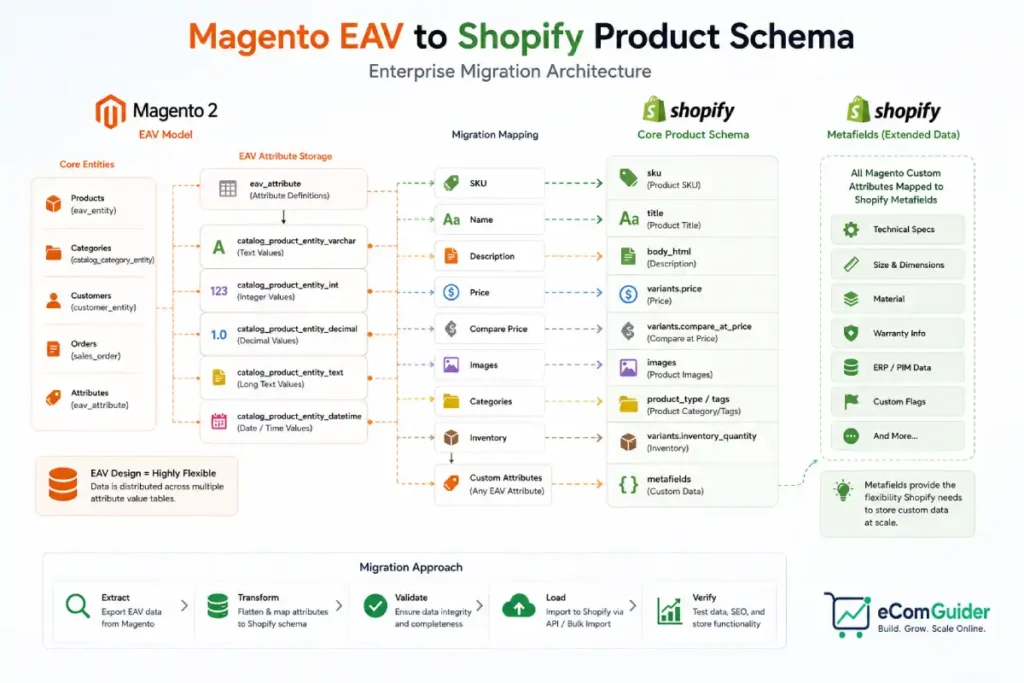
Magento stores product data across separate tables by data type, one for text, one for decimals, one for dates, joined together every time a page loads.
Shopify uses a flat structure instead, a product simply has fields.
That architectural difference, not a missing feature or a broken import button, is what makes this migration meaningfully harder than moving from WooCommerce or BigCommerce.
There is no first-party tool that handles this translation automatically.
Every serious Magento to Shopify migration involves systematically mapping hundreds of custom attributes into Shopify’s schema, deciding case by case how bundle and grouped products should actually work on the new platform, and treating B2B functionality as a real translation project, not a data copy.
This playbook covers all of it.
Key Takeaways
- Magento’s EAV (Entity-Attribute-Value) data model scatters product data across multiple tables. Shopify’s product model has no equivalent structure, every custom attribute needs a deliberate decision: standard field, variant option, metafield, or metaobject.
- Shopify does not offer a dedicated first-party Magento migration tool. Shopify does provide other tools, Transporter for supported content, migration tooling for certain platforms, and its own APIs, but Magento specifically is not one of the platforms with dedicated first-party support.
- Not every Magento migration requires Shopify Plus. Magento Open Source stores without B2B or multi-brand complexity often fit on standard Shopify or Advanced Shopify, Plus is actually necessary specifically for enterprise B2B functionality and multi-store architecture.
- Magento’s multi-store setup does not map to one single Shopify feature. Depending on your actual requirements, this could become Shopify Markets, Expansion Stores, separate Shopify stores, or a Shopify Plus Organization, these are different tools solving different problems, not interchangeable options.
- Real migration cost ranges from $25,000 for the simplest cases to $600,000 or more for full enterprise-scale replatforms, these are typical industry estimates from migration agencies, not published figures from Adobe or Shopify.
Why Now
Several concrete, dated factors are driving this migration path specifically in 2026, not general platform preference.
- Adobe Commerce 2.4.4 support ended in April 2026, with 2.4.5 support ending August 2026, forcing merchants on older Magento versions into a real upgrade-or-migrate decision
- Self-hosted Magento’s real TCO runs $80,000 to $400,000+ a year for a serious store, hosting, security patching, extension licenses, and development hours all included, a cost most merchants underestimate until they add it up directly
- Adobe Commerce Cloud pricing starts around $22,000 a year and climbs quickly with order volume, while Shopify Plus runs a more predictable $2,300 to $2,500 a month
- Adobe’s push to consolidate Magento Open Source users into Adobe Commerce Cloud licensing is prompting many merchants to evaluate alternatives directly rather than accept the new cost structure
Choosing Your Migration Approach
| Method | Best For | Real Trade-off |
|---|---|---|
| Cart2Cart or LitExtension | Standard catalogs without heavy customization, moderate complexity | Handles mechanical data transfer well, and some configurations support SEO metadata migration directly, verify this with your specific tool rather than assuming it is lost |
| Custom scripts against Shopify’s GraphQL Admin API | Large catalogs, heavy customization, complex B2B or ERP integration | Full control over the EAV-to-product-model transformation, requires real development resources and time |
| Managed agency migration | Enterprise-scale, 50,000+ SKUs, multi-store consolidation | Highest cost, but agencies with direct Magento migration experience know where the edge cases hide |
Most real enterprise migrations combine these, a migration tool for the mechanical bulk transfer, custom API work for the attributes and business logic that do not map cleanly, and often an agency relationship to manage the combination.
The EAV-to-Shopify Mapping Process
This is the technical core of the migration for any Magento store, not just enterprise ones.
- Inventory every EAV attribute. Export the full list and categorize each one as critical, variant-worthy, or a metafield candidate.
- Consolidate overlapping attributes before migrating. Multiple duplicate fields for the same concept should be standardized into one before any data moves, not carried forward as debt.
- Create explicit mapping documentation. Specify exactly where each Magento attribute lands, a standard field like title or vendor, a variant option, or a specific metafield or metaobject definition.
- Transform and load using ETL processes or custom scripts against Shopify’s GraphQL Admin API, using bulk operations and staged imports for large catalogs to avoid API rate limits.
- Prune unused attributes during migration, do not import everything as a metafield. Audit first, a real share of stored attributes are unused in practice.
Product-Type Decisions That Do Not Automate
Configurable products map to Shopify’s variant system in most cases, though products exceeding Shopify’s variant or option limits need additional restructuring, this is not automatic for every catalog. The other product types require real decisions, made during planning.
- Bundle products have several possible destinations depending on your specific setup, fixed versus dynamic bundling, inventory tracking needs, and fulfillment requirements all affect the right choice, common outcomes include separate standalone products, Shopify’s native Bundles feature, a dedicated bundle app, or custom development, there is no single default path
- Grouped products have no exact native Shopify equivalent, common recreations include a collection, a custom page template, a bundle app, or custom storefront logic, the right choice depends on how the grouping is actually merchandised
- Virtual and downloadable products map to a dedicated digital-product app, since Shopify treats these as standard products with shipping disabled plus a delivery mechanism layered on top
- CMS blocks and widgets have no direct Shopify parallel, key content needs to be rebuilt natively in Shopify’s own content system
Translating B2B and Multi-Store Complexity
For enterprise Magento stores with real B2B and multi-store needs, this is often a larger project than the product catalog itself, and it does not map as cleanly as a simple feature-to-feature swap.
| Magento Concept | Possible Shopify Destinations | Real Consideration |
|---|---|---|
| Customer groups with tier pricing | Shopify Plus B2B Catalogs, in part | B2B Catalogs cover core tiered pricing well, but Magento B2B often includes shared catalogs, negotiated pricing, approval workflows, purchase orders, and credit limits, some of these need apps or custom development, this is not a direct feature-for-feature replacement |
| Company accounts, shared catalogs | Shopify Plus B2B company profiles | Map every wholesale workflow during planning, confirm approval and purchase order processes specifically, these are common gaps |
| Multi-store setup | Shopify Markets, Expansion Stores, separate Shopify stores, or a Shopify Plus Organization | These solve distinctly different problems, Markets handles international selling from one store, Expansion Stores and separate stores suit distinct brand or regional needs, choose based on your actual multi-store reason, not by default |
| Requisition lists | Shopify Plus B2B equivalents, where supported | Test with real B2B customers before full cutover |
Treat B2B translation as its own project with its own timeline, not a line item inside the general data migration.
Step-by-Step Migration
Step 1: Audit and Document Every Attribute (Magento)
- Export your complete EAV attribute list across all attribute sets
- Categorize each attribute as critical, variant-worthy, or metafield candidate
- Flag duplicate or overlapping attributes for consolidation before migration begins
Step 2: Consolidate and Clean Attribute Data (Magento)
- Standardize any duplicate attributes identified in Step 1 into a single canonical version
- Remove attributes that are actually unused rather than carrying them forward
- Document your final, cleaned attribute list before any data transformation begins
Step 3: Make Product-Type Architecture Decisions (Planning)
- Confirm which configurable products map directly to Shopify variants, and flag any exceeding Shopify’s variant or option limits for additional restructuring
- Decide, product by product or category by category, how bundles will work in Shopify, based on the real factors covered above, not a default assumption
- Decide how grouped products will be represented
- Confirm your approach for virtual and downloadable products and select the corresponding Shopify app
Step 4: Set Up Your Shopify Environment (Shopify)
- Create your Shopify account, standard Shopify or Advanced Shopify for most Magento Open Source stores, Shopify Plus specifically for genuine enterprise B2B or multi-brand needs identified in the section above
- Select and configure a theme matching your brand architecture, there is no direct Magento theme import, this is a rebuild
- Install the apps needed for your product-type decisions from Step 3
Step 5: Run a Test Migration (Migration Tool)
- Configure Cart2Cart or LitExtension with your finalized attribute mapping from Steps 1 and 2
- Run the migration against a limited data set first, verifying results before committing further, large enterprise migrations rarely move everything in a single pass
- Review results against your mapping documentation
Step 6: Run a Delta Migration for Recent Changes (Migration Tool)
- Capture any Magento data that changed since your test migration
- Migrate this incremental data set specifically, rather than repeating a full transfer
- This keeps your Shopify environment current as you continue preparing for full launch
Step 7: Handle What the Migration Tool Does Not Cover (Custom API)
- Identify attributes, business logic, or catalog structures the tool did not migrate correctly
- Build custom scripts against Shopify’s GraphQL Admin API to handle these specifically, using bulk operations and staged imports for large volumes
- Verify results against your original Magento data at each stage
Step 8: Migrate B2B and Multi-Store Configuration (Shopify Plus, Where Applicable)
Skip this step completely if you are not migrating genuine B2B or multi-store complexity, per the guidance earlier in this article.
- Set up Shopify Plus B2B Catalogs matching your customer group and tier pricing structure, confirming directly which Magento B2B features have a real Shopify equivalent versus needing an app or custom work
- Configure company accounts and shared catalogs for your B2B customers
- Choose and configure the right multi-store solution, Markets, Expansion Stores, separate stores, or a Plus Organization, based on your actual requirement, not a default assumption
- Test every B2B workflow with real account data before considering this step complete
Step 9: Run the Full Migration (Migration Tool)
- Once test and delta migrations have validated your mapping, run the complete migration
- Monitor progress and review the completion summary for any entities that failed to migrate
Step 10: Rebuild CMS Content (Shopify)
- Recreate key content blocks and widgets natively in Shopify, since Magento’s content system has no direct equivalent
- Prioritize your highest-traffic and highest-converting content pages first
Step 11: Plan Customer Authentication (Both Platforms)
Magento customer passwords generally cannot migrate directly to Shopify, since the platforms use incompatible password hash formats by default. Most migrations require a password reset communication at launch. Some enterprise projects implement alternative approaches, single sign-on, Shopify Plus Multipass, or a custom authentication bridge, evaluate whether this fits your specific technical resources and customer base before assuming a reset is the only option.
- Prepare a branded announcement email for launch regardless of your chosen approach
- If pursuing SSO, Multipass, or a custom bridge, scope this as its own real technical project, not a checkbox in the main migration
Step 12: Set Up SEO Preservation (Shopify)
- Map your complete Magento URL structure to Shopify’s equivalent URLs
- Set up 301 redirects for every mapped URL, prioritizing your highest-traffic pages first
- Verify whether your migration tool transferred SEO metadata directly, some Cart2Cart, LitExtension, and custom API configurations do support this, confirm rather than assume it needs full manual re-entry
- Migrate any metadata your tool did not cover manually for priority pages
Step 13: Test at Real Scale (Both Platforms)
- Place real test orders covering standard products, bundles, and B2B account checkout separately if applicable
- Verify a representative sample of migrated products against your original attribute mapping documentation
- Confirm redirects function correctly across a meaningful sample of your highest-traffic URLs
Step 14: Execute a Zero-Downtime Cutover (Both Platforms)
- Schedule the DNS cutover during your lowest-traffic window
- Keep your Magento environment fully accessible as a rollback option for a defined period after launch
- Monitor order flow, checkout completion, and search console data closely for the first two to four weeks
Real Cost Ranges
These are typical industry estimates from migration agencies, not figures published directly by Adobe or Shopify. Your actual cost depends heavily on complexity, agency rates, and scope.
| Migration Complexity | Typical Estimate | Typical Timeline |
|---|---|---|
| Simple catalog, no B2B, no multi-store | Around $25,000 | Several weeks to a few months |
| Moderate complexity, some custom attributes | $50,000 to $100,000 | Two to four months |
| B2B, multi-store, ERP-integrated | $80,000 to $250,000+ | Three to six months |
| Enterprise-scale, 50,000+ SKUs, deep customization | $250,000 to $600,000+ | Six months or longer |
FAQ for Magento to Shopify Migration
Why is Magento to Shopify migration harder than other platform migrations?
Magento’s EAV data model stores product data across multiple tables joined together at read time, while Shopify uses a flat schema. Every custom attribute needs a deliberate mapping decision, standard field, variant option, or metafield, rather than a direct one-to-one transfer.
Is there an official tool for Magento to Shopify migration?
No first-party tool exists for Adobe Commerce to Shopify specifically. Cart2Cart and LitExtension handle the mechanical bulk transfer well, but complex catalogs typically need custom scripts against Shopify’s GraphQL Admin API on top of either tool.
How much does a Magento to Shopify migration actually cost?
Roughly $25,000 for the simplest catalogs with no B2B or multi-store complexity, scaling to $80,000 to $250,000 or more for B2B, multi-store, and ERP-integrated replatforms, and up to $600,000 or beyond for the largest enterprise catalogs.
Do bundle and grouped products migrate automatically?
No. Configurable products map cleanly to Shopify variants, but bundle products need a real decision between a bundle app, metafield-driven grouping, or native bundles, and grouped products have no native Shopify equivalent at all, typically becoming a collection instead.
Can Shopify Plus actually replace Magento’s B2B features?
In most cases, yes, but it requires deliberate mapping, not an assumption of feature parity. Customer groups, tier pricing, company accounts, and requisition lists all need to be translated to Shopify Plus B2B Catalogs and tested with real account data before cutover.
How long does an enterprise Magento to Shopify migration take?
Typically three to six months for a real enterprise migration involving B2B and multi-store complexity, though a simple catalog without heavy customization can complete in several weeks to a few months.