
Before you list a product on TikTok Shop, you need to answer one question first: is it allowed, restricted, or banned outright.
Getting this wrong costs you time at best and your selling privileges at worst.
This guide walks through the TikTok Shop product requirements for 2026 in plain language.
You will learn what you can sell, what you cannot sell, and what needs approval before you sell it.
It is based on TikTok Shop’s own US seller policies, not on guesswork.
If you have not set up your shop yet, work through the TikTok Shop guide before you add your first product.
This guide covers TikTok Shop’s US seller policies. Product eligibility and qualification rules can differ by country, so confirm the policy for your market in Seller Center before you list.
What You Can Sell on TikTok Shop
Many everyday products can be sold on TikTok Shop.
Understanding TikTok Shop product requirements starts here: apparel, beauty products, electronics, home goods, pet supplies, toys, and most other consumer goods are allowed, as long as the specific item and listing follow the rules below.
A category being generally open does not mean every product inside it is ready to list.
Some of these same categories, like electronics and beauty, still need category or product-level approval first. The next two sections walk through both sides of that.
Here is the short version of how TikTok Shop sorts products:
| Status | Can you sell it? | Approval needed? |
|---|---|---|
| Allowed | Yes | Not necessarily |
| Restricted | Yes, once qualified | Yes |
| Invite-only | Only if TikTok Shop grants access | Yes |
| Prohibited | No | No approval can override the ban |
Prohibited vs. Restricted: The Core of TikTok Shop Product Requirements
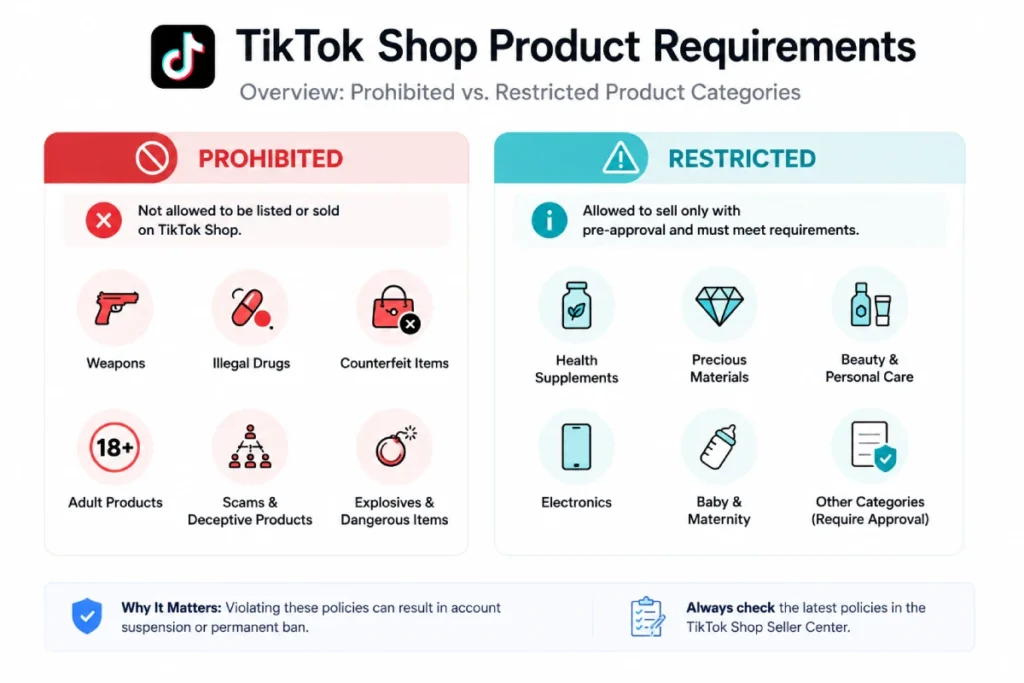
These are TikTok Shop product requirements that split every product into two groups. Most beginners mix them up, and that mix-up causes real damage.
Prohibited products are banned outright. You cannot sell them on TikTok Shop, no matter what documents you have.
Restricted products are different. You can sell them, but only after you clear approval first.
Some need a one-time category approval. Others need approval for every single item.
Knowing which group your product falls into is the foundation of every other TikTok Shop product requirement in this guide.
It saves you from wasting time on a banned product, and it stops you from listing a restricted item without approval.
How to Check a Product Before You List It
These are the TikTok Shop product requirements steps in order, every time you consider a new product:
- Check the prohibited list below. If it’s banned, stop, no approval fixes that.
- Check the restricted tiers. Note whether it needs category, product-level, or invite-only approval.
- Apply through the Qualification Center and wait for approval before you list.
- Gather any category-specific documents, like a Children’s Product Certificate.
- Build the listing itself: images, title, description, and category.
What You Cannot Sell at All: Prohibited Categories
These categories fail every version of TikTok Shop’s Prohibited Products Policy. No document or approval changes that.
TikTok Shop states this list is not exhaustive, so a product can still get flagged even if it is not named here.
Adult Products and Explicit Content
Not allowed on TikTok Shop:
- Vibrators, BDSM gear, and other products made for explicit sexual activity
- Films, comics, or images with explicit sexual content
Some sexual wellness products are different. They fall under a separate, invite-only category covered later in this guide.
Weapons, Ammunition, and Weapon Parts
Not allowed on TikTok Shop:
- Guns, rifles, and ammunition
- Gun parts, like barrels, magazines, and firing pins
- Replica guns, BB guns, and gun-shaped keychains
- Switchblades, butterfly knives, and knives disguised as everyday objects
- Stun guns, pepper spray, and brass knuckles
Drugs and Drug Paraphernalia
Not allowed on TikTok Shop:
- Illegal drugs, including stimulants, opioids, and synthetic substances
- Raw materials used to make illegal drugs
- Bongs, pipes, and other items mainly used to consume controlled substances
- Pill presses
Alcohol, Tobacco, and Vaping Products
Not allowed on TikTok Shop:
- Alcohol
- Cigarettes and other tobacco products
- Synthetic nicotine
- Vapes and e-cigarettes
- Vape parts, like the small batteries used inside vape pens
Hazardous and Dangerous Items
Not allowed on TikTok Shop:
- Fueled lighters and torches
- Strike-anywhere matches
- Fireworks and other explosive materials
- Lithium batteries above 300 watt-hours
- High-power laser pointers
- Products with a large amount of loose magnetic balls
Body, Weight Loss, and Wellness Claims
Health and weight-loss products are an area where sellers need to be especially careful. Not allowed on TikTok Shop:
- Diet pills, fat burners, and appetite suppressants
- Any product using “GLP-1” or “Glucagon-like peptide-1” in its title or branding, unless it is a clear support product for people already using GLP-1 medication
- Products that promote extreme weight loss, disordered eating, or self-harm, even as a joke
Money, Currency, and Financial Products
Not allowed on TikTok Shop:
- Cryptocurrency
- Stocks
- Loans, insurance, and other financial services
- Counterfeit or replica currency, and equipment used to produce it
Secondhand and Used Products
Used and open-box items are banned by default. A few exceptions exist, like certain pre-owned luxury goods, but those need their own separate approval first.
A Few Other Banned Categories
Not allowed on TikTok Shop:
- Human remains and mortuary products
- Lock-picking tools
- Gambling products, like scratch cards
- Items that impersonate government or police equipment
- Endangered animal parts and certain protected plant products
What Needs Approval First: Restricted Products
Restricted products sit at the center of TikTok Shop’s product requirements for most beginners, because they are not banned, just gated under TikTok Shop’s Restricted Products Policy.
TikTok Shop uses three approval levels, and knowing which one applies to your product saves real time.
Category-Level Qualification
Approve the category once, then list any product inside it. You submit documents one time through the Qualification Center in Seller Center, and every future product in that category is covered.
Examples that currently need category-level qualification:
- Electronics
- Beauty and personal care
- Pet supplies
- Toys
- Household appliances
- Live plants
Product-Level Qualification
This tier is stricter. Every single item needs its own approval, not just the category.
Examples that currently need product-level qualification:
- Car seats
- Strollers
- Baby monitors
- Hearing aids
- Dangerous goods that ship under special handling rules
If you sell ten different car seat models, expect to submit documents for each one.
Invite-Only Categories
TikTok Shop only opens these categories to sellers it invites directly.
Examples that are currently invite-only:
- Dietary supplements
- Over-the-counter medications
- Sexual wellness products
- Fresh or frozen packaged food
You can apply for access through the Qualification Center, but approval is not guaranteed. TikTok Shop controls who gets in.
Listing Rules That Slow Down Approval
Even fully allowed products get rejected over basic mistakes. These specific TikTok Shop product requirements split into two groups: hard rules that trigger rejection, and best practices that affect how well your listing performs.
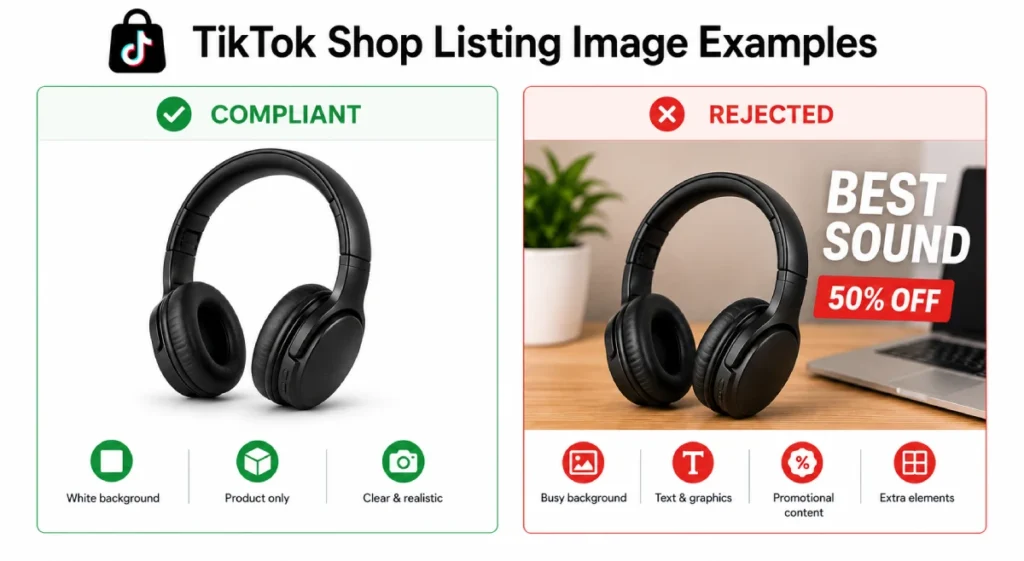
Product Images
Hard rules, required for every listing:
- Main image shows the physical front of the product on a pure white background
- No mockups, renderings, or placeholders
- Every image is at least 600 by 600 pixels
- Up to nine square images total
- No two images show the same angle
- No added text, logos, watermarks, borders, or promotional graphics
Best practice, not required but recommended:
- Upload at least five images per product, since fuller galleries tend to perform better
Product Title and Description
Titles:
- Length between 25 and 200 characters
- Include the brand, product type, and key details
- State quantity for multi-packs, like “Pack of 10”
- Leave size and color out of the title. Those go in the variation fields, not the main title
Descriptions:
- At least 30 words, a hard rule from TikTok Shop’s Product Listing Policy
- At least 500 characters is TikTok’s own guidance, since thin descriptions tend to rank and convert worse
- Cover the product’s features, measurements, care instructions, and warranty details
Category-Specific Documentation You May Need
A handful of categories need extra paperwork on top of the standard qualification tiers.
These specific TikTok Shop product requirements catch beginners off guard because the product itself is allowed, but the listing gets rejected if a document is missing.
- Children’s products. Toys, kids’ fashion, baby items, and other children’s categories often need a Children’s Product Certificate from a CPSC-accepted lab, testing documentation, or tracking-label photos.
The exact documents depend on the specific product and whether you are the manufacturer, importer, or a reseller. - Electronics and some appliances. May need certification showing the product meets safety standards, on top of the category-level qualification covered above. Requirements vary by product and seller type.
- Supplements and cosmetics. Every active ingredient must be listed, and the listing has to meet the standard health and safety rules for that category.
- Manufacturer bundles and multipacks. Need a single GTIN, or barcode, covering the whole package. You cannot combine separate standalone products into one listing without one.
None of this replaces category or product-level qualification. Treat it as an extra document to prepare alongside your approval application, not instead of it.
Other Listing Rules to Know
A few more TikTok Shop product requirements apply to every listing, not just restricted ones:
- No QR codes or website links that redirect customers off TikTok Shop
- No subjective claims like “Best Seller” or “Trending Item” as if they were product attributes
- No references to other e-commerce platforms or their branding
- No misleading claims about a product’s effects, materials, or ingredients
- Always pick the most specific category. The wrong category is its own violation, separate from anything else on this list
Common Mistakes Beginners Make
Watch for these before you list:
- Listing before qualifying. Sellers list restricted products before applying for approval. The listing gets rejected, and the delay costs more time than applying first would have.
- Reusing old photos. Sellers reuse product photos from Amazon or their own website. Those photos rarely meet the white background rule, so they get flagged on review.
- Using risky wording. Sellers make health or weight loss claims without realizing the wording itself breaks policy. A word like “GLP-1” in a title can get a compliant product rejected.
- Assuming local law is enough. Sellers assume a product is fine because it is legal to sell locally. TikTok Shop’s rules go further than local law in several categories, so legal does not always mean allowed.
What Happens If You Break the Rules
TikTok Shop reviews shops for compliance on an ongoing basis, not just at signup. Enforcement depends on the violation. TikTok Shop does not publish a fixed penalty for each one.
Possible actions include:
- Point deductions to your Account Health Rating
- Removed listings
- Forced refunds to customers
- A full loss of access to sell on the platform
- For serious violations, like counterfeit sales, a report to outside authorities
Preventing a violation is far easier than dealing with enforcement after the fact, since a paused shop cannot generate any of the revenue covered in TikTok Shop fees while it is under review.
TikTok Shop’s own systems sometimes remove a compliant listing by mistake, especially if product information was incomplete.
If that happens to you, or if you believe an enforcement action was applied incorrectly, you can appeal through the Shop Health page in Seller Center.
Your Pre-Listing Checklist
Run through this list before you upload a new product. It covers the TikTok Shop product requirements that catch the most beginners, from bans to basic listing details.
- Check if your product is fully banned. If it is, stop here.
- Check if it needs category, product-level, or invite-only approval. Apply before you list.
- Check if your category needs extra documents, like a Children’s Product Certificate.
- Shoot your main image on a clean white background, at least 600 by 600 pixels, and add at least five images total.
- Write a real product description of 30 words or more, ideally 500-plus characters with real detail.
- Confirm you picked the most specific category available, not a broad catch-all one.
- Double-check your brand name matches the product packaging exactly.
This habit takes a few extra minutes per product. It also saves you from the much slower process of appealing a rejected listing or a penalized account.
Frequently Asked Questions
Can I sell dietary supplements on TikTok Shop?
Only with invite-only approval. TikTok Shop does not open this category to every seller, so you need to apply through the Qualification Center and wait for an invitation.
Can I sell secondhand or used items?
Generally no. Secondhand products are banned by default, with narrow exceptions like certain pre-owned luxury goods that go through their own approval process.
What happens if my listing gets rejected?
You can usually fix the issue and resubmit. Most rejections come from image or description problems, not from the product being banned, so check the listing rules before you assume the worst.
Do I need approval for every restricted product, or just once?
It depends on the category. Category-level approval covers everything in that category going forward. Product-level approval means you apply again for every new item, even inside a category you are already approved for.
Can I sell weight loss products on TikTok Shop?
No. Products claiming to aid weight loss, fat reduction, or appetite suppression are banned. Any product using “GLP-1” in its title or branding is banned too, outside of a narrow supportive-product exception.
Is a product legal to sell locally always allowed on TikTok Shop?
No. TikTok Shop’s product requirements can be stricter than local law. A product can be legal where you live and still be banned from the platform, so always check the policy directly instead of assuming.
How do I know if a specific product is restricted?
Check the restricted products policy above, then confirm in the Qualification Center inside Seller Center. The Qualification Center shows the exact tier, category-level, product-level, or invite-only, that applies to your specific item.
How many images can I upload on TikTok Shop?
Up to nine square images per product, and at least one must be the main white-background image. TikTok Shop recommends at least five images per listing for stronger performance, even though only one is technically required.
What is the difference between a prohibited and a restricted product?
A prohibited product cannot be sold on TikTok Shop under any circumstances. A restricted product can be sold, but only after the seller meets the required qualification, whether that is category-level, product-level, or invite-only.
Can I list a product before I get approval?
No, not for anything that needs qualification under TikTok Shop’s product requirements. TikTok Shop requires the approval first, and listing a restricted product without it can trigger enforcement instead of a simple rejection.
Can TikTok Shop ask for more documents after my product is already approved?
Yes. TikTok Shop can request additional documentation during the approval process or after a restricted product is already live. Getting approved once does not end your compliance obligations for that product.
Policy note: this guide covers TikTok Shop’s US seller policies.
The Prohibited Products Policy referenced here is dated July 24, 2026, the Restricted Products Policy is dated June 11, 2026, and the Product Listing Policy is dated June 15, 2026.
TikTok Shop updates these product requirements several times a year, so confirm current rules in the Qualification Center before you list a new product.