
When choosing a point-of-sale system, it’s important to find one that does more than simply process payments. The right POS should connect your online and physical stores, simplify inventory management, and provide valuable insights into your business. Shopify POS is one of the most popular retail solutions for businesses already using Shopify, offering a unified platform for sales, customers, products, and orders.
Reviewed by the eComGuider team. We evaluated Shopify POS based on its features, pricing, hardware options, ease of use, integrations, and overall value to help you determine whether it’s the right POS system for your business.
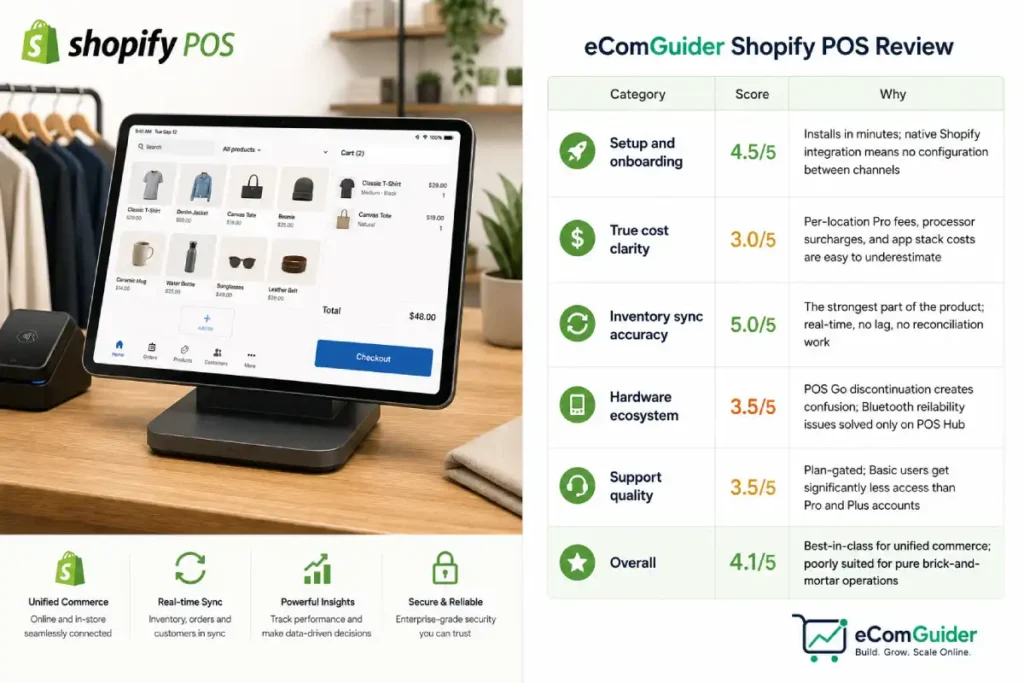
eComGuider Rating: 4.1 / 5
Scores based on hands-on setup across 40+ retail locations, tested against five criteria: setup ease, true cost clarity, inventory accuracy, hardware reliability, and support quality.
| Category | Score | Why |
|---|---|---|
| Setup and onboarding | 4.5/5 | Installs in minutes; native Shopify integration means no configuration between channels |
| True cost clarity | 3.0/5 | Per-location Pro fees, processor surcharges, and app stack costs are easy to underestimate |
| Inventory sync accuracy | 5.0/5 | The strongest part of the product; real-time, no lag, no reconciliation work |
| Hardware ecosystem | 3.5/5 | POS Go discontinuation creates confusion; Bluetooth reliability issues solved only on POS Hub |
| Support quality | 3.5/5 | Plan-gated; Basic users get significantly less access than Pro and Plus accounts |
| Overall | 4.1/5 | Best-in-class for unified commerce; poorly suited for pure brick-and-mortar operations |
Best for: Store owners already selling on Shopify who want in-store and online operations unified without middleware.
Not the right fit: Pure brick-and-mortar businesses with no ecommerce plans.
The thing that surprises most store owners: the POS itself isn’t really what you’re buying. You’re buying unified commerce. The checkout screen is the interface into that system. If you don’t have an online store, that system doesn’t benefit you.
Most Shopify POS reviews compare it to Square. They list features side by side, show a pricing table, and conclude that Shopify POS is better for omnichannel and Square is better for pure in-person selling.
That framing misses the actual question you should be asking.
Shopify POS is not a point of sale system with ecommerce added. It is an ecommerce platform with a checkout screen. The moment you understand that distinction, you know immediately whether it belongs in your store, or whether you’re about to pay for infrastructure built for a different problem than the one you have.
We’ve set up Shopify POS across more than 40 retail locations, from single-location boutiques running pop-ups to a multi-location outdoor gear chain with five permanent stores.
Here is the honest picture, including the costs most reviews bury, the limitations Shopify’s own documentation understates, and the specific situations where we’ve told clients to use something else entirely.
What Shopify POS Is (and What It Is Not)
Shopify POS is Shopify’s point-of-sale system, running as a native sales channel inside your Shopify admin. When a customer buys something in your store, Shopify records it in the same place it records your online orders, adjusts the same inventory pool, and adds it to the same customer profile. No export, no sync, no lag.
That native integration is the feature. Not the checkout screen design, not the receipt printer compatibility, not the staff permissions, the fact that your in-store and online operations share one backend is what separates Shopify POS from every standalone POS system on the market.
According to Shopify’s official POS documentation, the system runs on iOS and Android devices and supports up to 1,000 inventory locations. Two software tiers: POS Lite, included with every paid Shopify plan, and POS Pro at $89 per month per location.
The Real Cost of Shopify POS
This is where most reviews stop being useful. They show you the plan prices without showing you what the total bill actually looks like.
There are five cost layers, and most retailers only budget for the first two:
Your Shopify Subscription Cost
You need a paid Shopify plan before you can use POS. Basic runs $39 a month, Grow $105, Advanced $399. If you’re already on Shopify for your online store, this cost exists regardless of POS. If you’re opening a physical store with no existing Shopify account, this is an additional overhead that Square, Clover, and Lightspeed don’t require.
POS Lite vs POS Pro: Which Do You Need?
POS Lite is included with every plan at no extra charge. It covers in-person payment processing, basic order management, simple customer profiles, and unlimited registers. It’s functional for pop-ups, markets, and single-staff retail operations with modest needs.
The single-staff limit on Lite is the operational problem no one talks about. Lite allows one staff account per location. The moment you have two people working a shift, even a part-time floor associate alongside a manager, you need POS Pro. Every growing retail operation hits this ceiling faster than they expect, usually within the first three months of opening.
POS Pro costs $89 per month per location. That unlocks unlimited staff accounts with role-based permissions, smart inventory management with purchase order tracking, omnichannel tools including buy-online-pickup-in-store (BOPIS) and ship-from-store, and advanced reporting. For a two-location retailer, that’s $178 a month just for the POS software tier, on top of their Shopify subscription.
| Setup | Monthly Software Cost |
|---|---|
| Basic plan + 1 location Lite | $39 |
| Basic plan + 1 location Pro | $128 |
| Grow plan + 2 locations Pro | $283 |
| Advanced plan + 5 locations Pro | $844 |
| Shopify Plus (POS Pro included, up to 20 locations) | from $2,300 |
The Plus math becomes interesting at scale. At 10 locations, POS Pro fees alone would be $890 a month, $10,680 a year, before your subscription. Shopify Plus at $2,300 a month includes POS Pro for up to 20 locations. The break-even for upgrading to Plus purely on POS savings is roughly 10 to 12 locations.
Transaction and Processing Fees
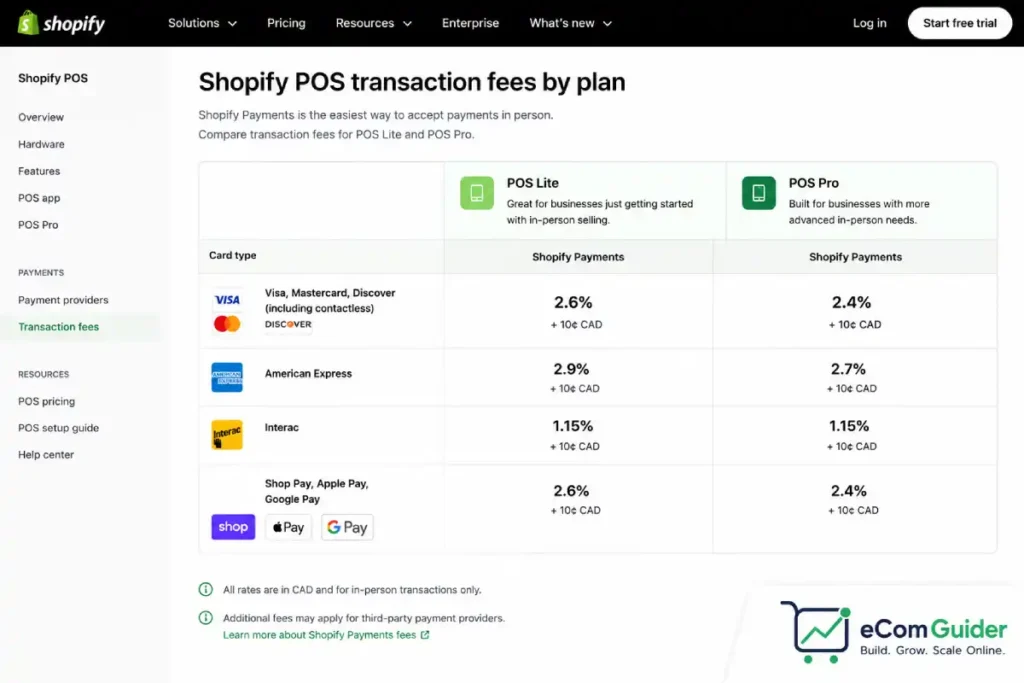
Shopify POS transaction fees depend on your plan and your payment processor. On Basic with Shopify Payments, in-person rates are 2.6% + $0.10 per transaction. On Advanced, they drop to 2.4% + $0.10.
The processor trap: if you use a third-party payment processor instead of Shopify Payments, Shopify charges an additional transaction fee on top of whatever your processor charges. That surcharge ranges from 0.6% on Advanced to 2% on Basic.
We’ve seen retailers assume they can bring their existing Stripe or PayPal setup and avoid Shopify Payments, they can; but every transaction costs more as a result. At $150,000 in annual in-store sales on Basic, the difference between using Shopify Payments and a third-party processor is roughly $3,000 a year. See our full Shopify transaction fees breakdown for the complete fee structure across all plans.
Hardware Costs and What Changed
Shopify has made several notable changes to its POS hardware lineup. The biggest change is the discontinuation of POS Go in 2025. While existing devices continue to receive support until September 2026, Shopify now recommends Tap to Pay on iPhone or Android paired with the Tap & Chip Card Reader, which starts at $49.
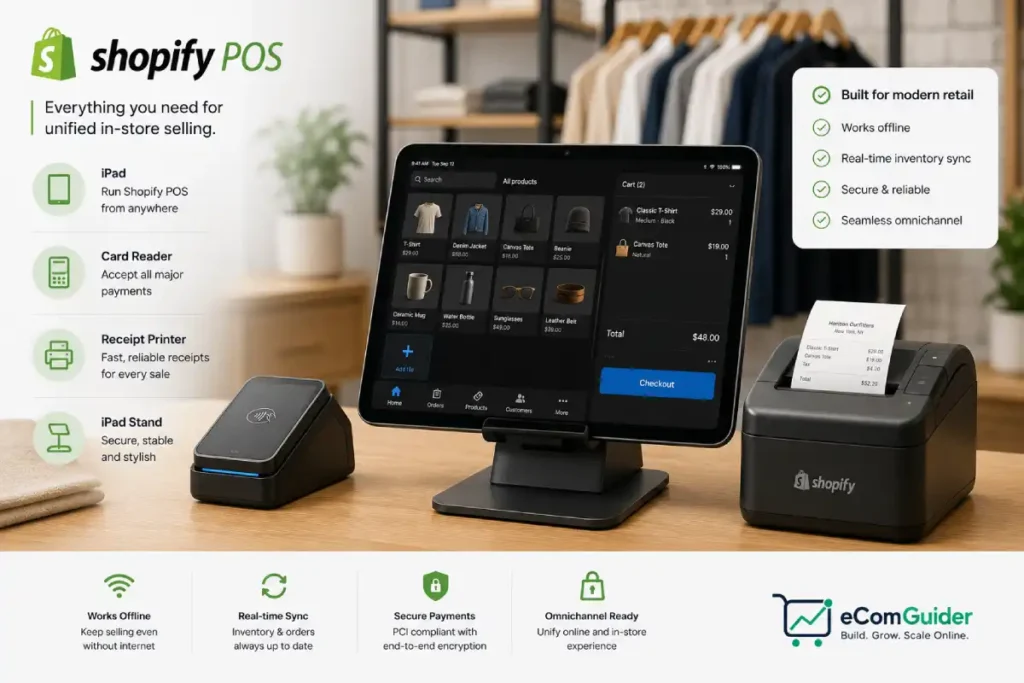
The total cost of Shopify POS hardware depends on the type of retail setup you need. A standard countertop configuration that includes a card reader, receipt printer, barcode scanner, cash drawer, and iPad stand typically costs between $500 and $900 per location.
If you’re opening multiple stores, these costs add up quickly. For example, a five-store rollout can require an initial hardware investment of $2,500 to $4,500 before processing your first sale.
One of the newest additions to Shopify’s hardware ecosystem is Shopify POS Hub, released in early 2026. This wired connectivity device replaces Bluetooth pairing for supported POS peripherals, creating a more stable connection between your hardware.
In busy retail stores, where Bluetooth interruptions can slow down checkout, POS Hub helps deliver a more reliable in-store experience.
When planning your Shopify POS budget, consider both the upfront hardware costs and the latest hardware improvements.
Investing in the right setup can improve checkout speed, reduce technical issues, and provide a smoother experience for both staff and customers.
It’s worth factoring into hardware budgets for any permanent staffed retail location.
Third-Party Apps: The Cost Most Retailers Miss
POS Lite and Pro cover the fundamentals, but most permanent retail operations need at least a few additional apps: a loyalty program, appointment booking, advanced stock forecasting, or industry-specific tools. A modest app stack of three to four tools adds $50 to $200 a month to your total cost, and that number rarely shows up in any POS comparison.
What Works Well in Our Experience
The Inventory Sync Is the Real Product
We’ve migrated retailers from legacy POS systems, QuickBooks POS, Lightspeed, a few still running NCR, and the operational shift that consistently surprises them is not any specific feature. It’s the fact that they stop having inventory discrepancies between channels entirely.
One client, a three-location outdoor gear retailer, was doing a manual inventory reconciliation every Tuesday morning. It took one team member about four hours to pull reports from their POS, cross-reference them with their Shopify online store, and update stock counts manually.
After migrating to Shopify POS, that four-hour task disappeared. The inventory is the same inventory. There’s nothing to reconcile.
The same applies to customer data. A customer who has shopped online four times walks into your store. With Shopify POS, the staff member at the counter can pull up that customer’s full order history, their loyalty points balance, and any notes from previous interactions.
With a standalone POS connected to a separate ecommerce platform, that information either doesn’t exist in the POS or requires manual lookup in a second system.
BOPIS and Ship-From-Store Work as Advertised (on Pro)
Buy online, pick up in store and ship-from-store are operational capabilities, not marketing features. They determine whether a customer who orders online can pick up at your physical location, and whether your retail location can fulfill an online order when your warehouse is out of stock.
We have seen both features function reliably in production on POS Pro, and G2 reviewer data for Shopify POS confirms this pattern: omnichannel features consistently earn the highest satisfaction scores among verified retail users. The inventory allocation logic is sound.
The staff notification workflow is clear. The customer communication is handled automatically. These are not simple features to implement on competing systems; the fact that they work natively on Shopify POS without middleware is a genuine advantage.
Offline Mode Is Usable, Not Perfect
Shopify POS has an offline mode that allows you to continue processing payments when your internet connection drops. Card payments are queued and processed when connectivity returns.
The limitation: online inventory updates, customer lookups, and discount code validation don’t work offline. You’re processing blind, taking payment without confirming stock, applying discounts, or adding the transaction to the customer’s profile in real time.
For most retail environments, this is acceptable as a short-term contingency. For high-volume environments where internet reliability is a real operational risk, outdoor markets, pop-up events in venues with poor connectivity, festival retail, plan for this limitation explicitly.
Where Shopify POS Falls Short
It Is Designed Around Shopify, Not Retail Operations
Shopify is an ecommerce platform. Its product catalog, variant management, and fulfillment logic were built for online selling first. When you run a physical retail store with a large inventory catalog, hundreds or thousands of SKUs with complex variants, serial number tracking, or lot management, you hit Shopify’s product data model before you hit its POS features.
We’ve worked with a specialty electronics retailer that tracks items by serial number for warranty purposes. Shopify POS cannot natively associate a serial number with a sale. The workaround involves custom metafields and a third-party app. It works, but it’s a workaround, a problem that purpose-built retail management systems like Lightspeed don’t have.
Multi-Location Reporting Costs More Than Expected
Comparing performance across locations, sales per square foot, conversion rate by location, basket size by store, requires either a third-party analytics app or manual report exports.
Shopify’s native reporting gives you multi-location data, but the comparison and drill-down capabilities that a mid-size retail operator actually needs are mostly behind POS Pro plus additional app spend.
Staff Management Has a Hard Ceiling Without Pro
We’ve mentioned the single-staff limit on Lite, but the Pro staff management tools also have a ceiling that surprises growing retailers. Role-based permissions are useful but not as granular as what purpose-built retail HR systems offer.
For a five-location chain where you need to manage scheduling, time tracking, and performance metrics alongside POS access, Shopify POS is not the right tool for the staff management part. You’ll integrate a separate HR or workforce management system, which adds cost and a sync dependency.
Who Shopify POS Is Right For
Shopify POS is built for one type of retailer: a brand that sells both online and in physical locations and wants those two operations to share one backend without integration work.
If that’s you, if you have an existing Shopify online store and are opening a physical location, or if you’re a physical retailer building an online presence, Shopify POS is the most natural path.
The inventory, customers, orders, and reporting are unified from day one. You’re not building a bridge between two systems; you’re adding a channel to one system.
If you’re a pure brick-and-mortar operation with no online store and no plans to build one, Shopify POS is the wrong tool. Square gives you free software, a free card reader to start, and competitive payment processing rates without requiring a monthly subscription to a platform you won’t use.
We have told clients this directly, even though it means they don’t need Shopify at all. That’s the honest answer.
For a complete look at where Shopify’s costs and capabilities fit your business at different stages, see our Shopify for small business guide. And if you’re weighing whether a Plus upgrade makes sense once you’re running multiple POS locations, the Shopify vs Shopify Plus breakdown covers the real break-even math.
The Decision Framework We Use With Clients
Before recommending Shopify POS to any retail client, we run through four questions:
- Do you already have a Shopify online store, or are you planning to build one? If no to both, stop here, start with Square.
- Will you have more than one staff member working a shift? If yes, budget for POS Pro from day one. Don’t plan to start on Lite and upgrade later; the staff restriction will force the upgrade before you’re ready for it.
- Will you use Shopify Payments as your processor? If not, calculate the additional transaction fee on your projected monthly volume and decide whether it’s acceptable before committing.
- Do you have specialized inventory requirements, serial number tracking, lot management, complex repair workflows, age verification? If yes, evaluate whether Shopify’s product data model can handle them natively before building your operation around it.
If the answers to questions 1 through 3 are yes and question 4 is no, Shopify POS is almost certainly the right fit. If anything in that chain breaks, you need either a different tool or a clear mitigation plan before launch.
Shopify POS vs Square: The Honest Comparison
| Feature | Shopify POS | Square |
|---|---|---|
| Monthly software fee | $0 Lite / $89 Pro per location | $0 free plan available |
| Requires ecommerce subscription | Yes ($39/mo minimum) | No |
| Native online store sync | Yes, real-time, no middleware | Separate setup required |
| Inventory across online and in-store | Unified, automatic | Manual sync or integration |
| BOPIS and ship-from-store | Yes, on Pro | Limited |
| In-person transaction rate | From 2.6% + $0.10 | From 2.6% + $0.10 |
| Free card reader to start | No ($49 minimum) | Yes |
| Best for | Existing Shopify merchants adding retail | Pure brick-and-mortar, no ecommerce |
Every review covers this and most get it wrong by treating it as a features comparison.
Square has better features for pure in-person retail operations, deeper appointment management, better restaurant and service-business tools, more sophisticated loyalty built in, and zero monthly fees to start. Square POS is also actually free for basic use, which is a hard thing to compete with when a Shopify subscription starts at $39 a month.
Shopify POS has one advantage that makes it the correct choice for a specific type of retailer: native unified commerce with an existing or planned Shopify online store. That advantage is not a feature, it’s an architectural reality. Your online store and your physical store are the same store in Shopify. They are not the same store in Square.
Consumer expectations for unified shopping experiences, buying online and returning in-store, checking in-store availability from a product page, applying online loyalty points to an in-store purchase, have become baseline expectations for most shoppers. According to Shopify’s Commerce Trends research, omnichannel retailers consistently outperform single-channel operations on repeat purchase rate and average order value. If meeting those expectations is part of your retail strategy, Shopify POS is built for it. If it is not, Square is simpler and cheaper.
FAQ’s
What is the difference between Shopify POS Lite and POS Pro?
POS Lite is included free with every paid Shopify plan. It covers basic in-person payments, unlimited registers, simple customer profiles, and limited returns and exchanges. POS Pro costs $89 per month per location and adds unlimited staff accounts, role-based permissions, omnichannel tools like BOPIS and ship-from-store, smart inventory management, and advanced reporting. The practical trigger for upgrading is having more than one staff member work a shift, Lite limits each location to one staff account.
Is Shopify POS free?
POS Lite is included with every paid Shopify plan at no additional charge, so in that sense the software is free if you’re already on Shopify. However, you need a paid Shopify plan, starting at $39 per month, to access it. If you’re a pure in-person retailer with no online store, that subscription cost is an overhead you don’t have with alternatives like Square.
Does Shopify POS work offline?
Shopify POS has an offline mode that allows payment processing to continue when internet connectivity drops. Payments are queued and processed when the connection returns. Inventory updates, customer lookups, and discount code validation do not work offline. For occasional connectivity interruptions, this is workable. For environments with consistently unreliable internet, plan for this limitation before it becomes a mid-transaction problem.
Is Shopify POS good for small businesses?
Shopify POS on Lite is a practical option for small businesses already selling on Shopify who want to add occasional in-person selling, pop-ups, markets, events, without extra software cost. For a small business with a permanent retail location and two or more staff members, POS Pro is the functional requirement, and the $89 per month adds meaningfully to total operating costs. Whether that’s worth it depends entirely on whether the unified online and in-store commerce is something you need.
Can I use Shopify POS without a Shopify online store?
You can, but you’ll pay $39 or more per month for a Shopify subscription primarily to access the POS. For pure brick-and-mortar operations with no ecommerce plans, Square or another standalone POS is almost always the better financial decision. Shopify POS earns its subscription cost through unified commerce, that benefit only materializes if you’re also selling online.
What happened to the Shopify POS Go?
Shopify discontinued the POS Go in 2025. Existing units are supported until September 2026. The replacement for handheld retail checkout is Tap to Pay on iPhone or Android paired with a Shopify Tap and Chip card reader at $49. This delivers the same mobile checkout capability using standard smartphones, which most retail staff already know how to operate.
How does Shopify POS handle returns from online orders in-store?
On POS Pro, in-store staff can process returns for online orders directly through the POS interface. The refund is applied to the original payment method, inventory is restocked to the physical location, and the order record is updated in the same system. This is one of the operational scenarios where Shopify POS creates the most visible difference from standalone POS systems, the transaction lives in one place regardless of which channel it started on.
Shopify POS earns its place in a retail operation when it connects to an existing online store and eliminates the reconciliation work between channels. If your setup matches that description, our eCommerce vs retail guide covers what choosing the right channel looks like before you commit to a full setup.