
Search WooCommerce tutorial and every result walks you through the same nine or ten installation steps: install the plugin, run the setup wizard, add a product, pick a theme. None of them answer the questions worth asking before you click install at all.
This guide covers what WooCommerce actually is, what free really costs once hosting and extensions enter the picture, whether you genuinely need technical skill to run one, and when WooCommerce is the wrong choice for a true beginner. .
In this guide, you will learn the decisions that matter before setup, not just the clicks during it.
Table of Contents
Key Takeaways
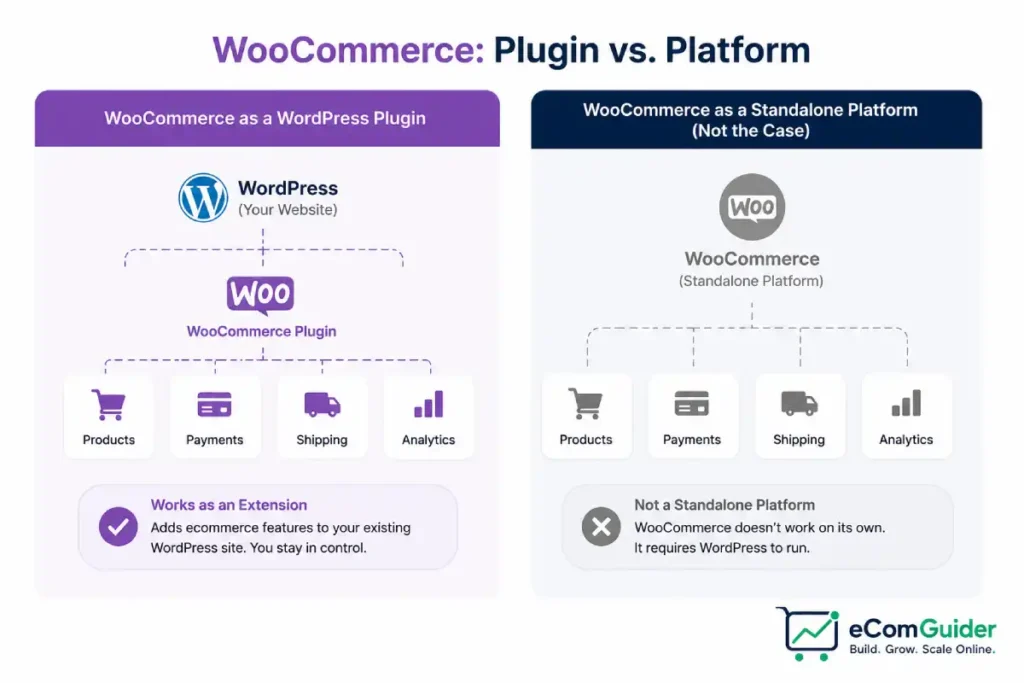
- WooCommerce is a free WordPress plugin, not a standalone platform. It only works on a WordPress site you already have or build separately, unlike Shopify or Wix, which are complete, self-contained systems.
- The plugin itself costs nothing, but a realistic first-year budget runs $300 to $800 once hosting, a domain, and a handful of essential extensions are included.
- Competing beginner guides genuinely disagree on whether technical skill is required. The honest answer is both true: initial setup needs no coding, but ongoing security, backups, and troubleshooting do require real technical comfort or a budget to hire it out.
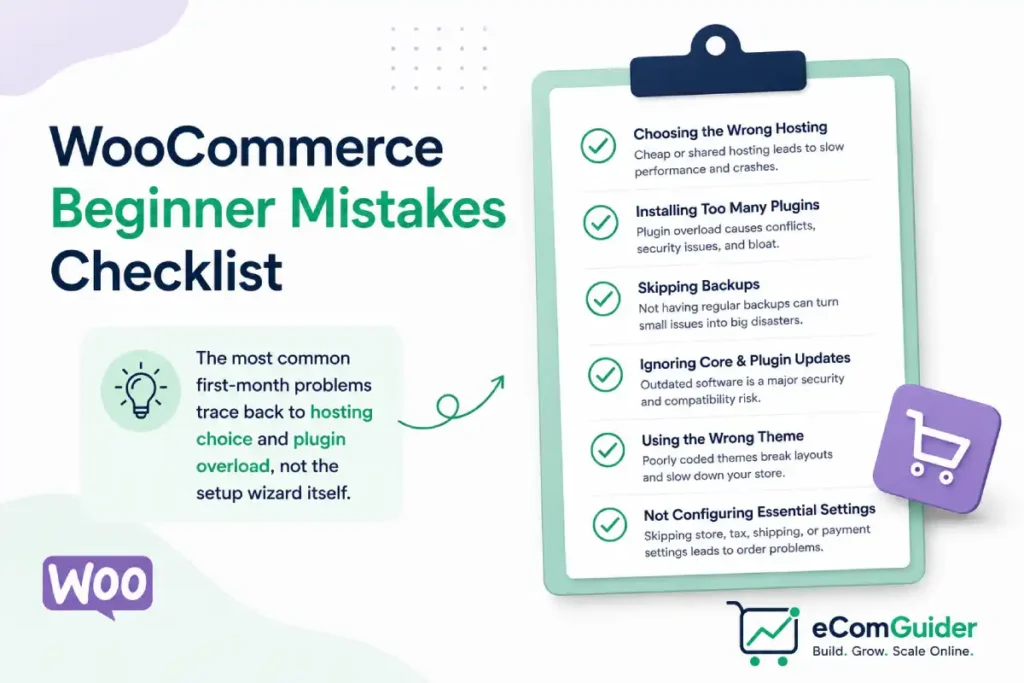
- The most common first-month mistake is not a setup error at all. It is choosing budget shared hosting that cannot handle WooCommerce’s database load once real traffic arrives.
- WooCommerce is the wrong starting point for a true beginner who wants zero technical responsibility. A hosted platform trades some flexibility for someone else managing hosting, security, and updates.
What WooCommerce Actually Is (and Isn’t)
WooCommerce is a free plugin that adds shopping cart, checkout, and product catalog functionality to an existing WordPress website. It does not include hosting, a domain, or WordPress itself.
You need all three in place first, since WooCommerce has nothing to attach itself to otherwise.
This distinction trips up more true beginners than any setup step. A platform like Shopify bundles hosting, security, and the storefront into one subscription, so signing up is the entire technical decision.
WooCommerce requires you to separately choose a host, install WordPress, then install WooCommerce on top, three decisions instead of one.
We reviewed WooCommerce’s own getting started documentation alongside real first-time setup reports to separate what the plugin genuinely handles from what still depends entirely on your own hosting and technical choices.
The plugin handles products, orders, payments, and shipping natively, with thousands of extensions covering everything else.
That flexibility is real, but it exists specifically because you own and manage the underlying WordPress site yourself, not because WooCommerce simplifies that ownership away.
What Free Actually Costs
The WooCommerce plugin itself is genuinely free, and every guide correctly says so. What most skip is what running it actually requires beyond the plugin download.
Hosting runs $5 to $60 a month depending on quality, with budget shared hosting at the low end and managed WooCommerce hosting at the high end.
A domain costs roughly $10 to $15 a year. An SSL certificate is typically free through your host, though some budget providers still charge for it separately.
A realistic first-year budget lands around $300 to $800 once hosting, a domain, and a handful of essential extensions, payment processing, basic SEO, security, are included.
Our cost to start an online store guide breaks down this same math across platforms generally, useful for comparing WooCommerce’s real cost against a hosted alternative directly.
Do You Need Technical Skill? The Honest Answer
Beginner guides give genuinely contradictory answers here. Some call WooCommerce beginner-friendly with zero technical requirement.
Others state plainly that running one requires real technical expertise for security, backups, and troubleshooting. Both are true, just about different parts of the process.
Initial setup needs no coding at all. The built-in setup wizard walks you through store location, currency, and your first product, and following it produces a working store without touching a line of code.
Ongoing operation is where the technical requirement becomes real. WordPress core, your theme, and every plugin need regular updates, and a missed update or a plugin conflict can break your checkout with no warning.
Security monitoring, malware scanning, and backup verification are your responsibility, not something WooCommerce or your host necessarily handles automatically.
The realistic path for a true beginner is either investing time to learn basic WordPress maintenance, budgeting for managed WooCommerce hosting that handles updates and security for you, or budgeting to hire a developer for a few hours a month once the store is live.
What a Real First Month Looks Like
Most tutorials present setup as a single afternoon. A realistic first month looks different once you account for the decisions around the clicks, not just the clicks themselves.
Choosing a host takes longer than expected if you actually compare options rather than picking the first affiliate link in a tutorial. Budget a real day or two for this, not five minutes, since a wrong choice here is expensive to reverse later.
Installing WordPress and WooCommerce, then running the setup wizard, genuinely does take under an hour once hosting is sorted.
Configuring payments correctly, especially testing a real transaction end to end, commonly reveals a setting you got wrong the first time, so build in a testing pass before you consider the store live.
Adding your actual product catalog with real photos and descriptions is usually the single longest task in the first month, and it is the step most tutorials skip entirely since a demo product takes thirty seconds to add.
Mistakes Almost Every Beginner Makes
Choosing hosting based on price alone. The cheapest shared hosting plan often cannot handle WooCommerce’s database load once real traffic and a real product catalog are in place, leading to a slow or crashing store within the first few months, not the first few days.
Installing too many plugins too early. Every plugin adds potential conflicts and slows the site down. Add plugins as specific needs arise, not preemptively because a listicle recommended twenty must-have plugins on day one.
Skipping a staging environment before major changes. Testing a new theme or plugin directly on a live store risks breaking checkout with no way to quickly revert. Most managed WooCommerce hosts include one-click staging specifically to prevent this.
Underestimating ongoing maintenance time. The setup gets most of the attention in every tutorial, but updates, security monitoring, and backup verification are a recurring monthly task, not a one-time step you complete and forget.
When WooCommerce Is the Wrong Choice
WooCommerce is genuinely the wrong starting point for a beginner who wants zero technical responsibility and is not willing to pay someone else to take it on.
The tradeoff that makes WooCommerce flexible, owning your own hosting and technical stack, is the same tradeoff that makes it more work than a hosted platform.
A hosted platform trades some of that flexibility for someone else managing hosting, security, and updates automatically.
Our best ecommerce platform for beginners guide compares WooCommerce against Shopify, Wix, and other hosted options specifically for a first-time seller, useful if you are still deciding between the two approaches rather than committed to WooCommerce already.
FAQ’s
Is WooCommerce good for beginners?
It depends on what beginner means. Someone comfortable learning basic WordPress maintenance, or willing to budget for managed hosting or occasional developer help, does fine on WooCommerce. Someone who wants zero technical responsibility is better served by a fully hosted platform.
How much does WooCommerce really cost to start?
The plugin is free, but a realistic first-year budget including hosting, a domain, and essential extensions runs $300 to $800. Ongoing costs continue at roughly $15 to $60 a month depending on hosting quality and how many paid extensions you run.
Do I need to know how to code to use WooCommerce?
No, not for initial setup. The built-in setup wizard requires no coding. Ongoing maintenance, security updates, and troubleshooting benefit from technical comfort or a budget to hire it out, even though they do not strictly require you to write code yourself.
How long does it take to launch a WooCommerce store?
Installation and basic configuration can be done in under an hour once hosting is in place. A realistic first month, including choosing a host, testing payments properly, and building a real product catalog, is a more honest timeline than the single-afternoon framing most tutorials use.
What is the biggest mistake new WooCommerce users make?
Choosing hosting based on price alone. Budget shared hosting frequently cannot handle WooCommerce’s database load once real traffic arrives, leading to a slow or crashing store within the first few months rather than immediately.
Is WooCommerce or Shopify better for a true beginner?
WooCommerce offers more long-term flexibility and no platform fee, at the cost of managing your own hosting and technical maintenance. Shopify costs more monthly but includes hosting, security, and updates in that fee, which suits a beginner who wants to avoid technical responsibility entirely.
Final Thoughts
WooCommerce is not complicated to set up, and it is not effortless to run long term. Both of those things are true at once, and most beginner content only tells you one of them.
Know what free actually costs, know that technical maintenance is an ongoing responsibility rather than a one-time setup step, and know that a hosted platform is a legitimate alternative if that responsibility is not something you want. Our full WooCommerce review and best WooCommerce plugins guide are good next stops once you have decided WooCommerce is the right starting point.