
Every WooCommerce pricing article covers the plugin (free), the hosting ($50-500/month), and the essential plugins ($500-1,000/year). Almost none of them cover maintenance, the ongoing cost of keeping a WooCommerce store updated, secure, and functional over time.
That omission matters, because maintenance is where the budget surprises happen.
This article breaks down exactly what WooCommerce maintenance involves, what you can do yourself, what actually requires a developer, and what you can expect to pay for each level of support.
What WooCommerce Maintenance Actually Covers
A WooCommerce store is not a set-and-forget system. It is a self-hosted stack of WordPress core, WooCommerce core, a theme, and a collection of plugins, each maintained by a different developer on a different release schedule. When any component updates, it can affect how other components behave.
Maintenance covers four ongoing responsibilities:
Core and plugin updates. WordPress core releases security and feature updates regularly. WooCommerce releases major versions on a roughly quarterly cadence. Each installed plugin has its own release schedule. Applying these updates in the wrong order, or without testing, is how stores break in production.
Security monitoring. Outdated plugins are responsible for approximately 95% of WordPress vulnerability incidents, according to Wordfence’s security research. A store not actively monitored for security vulnerabilities is accumulating risk with every day it runs on unpatched software.
Backups. A WooCommerce store should have automated daily backups stored off-server. If your hosting plan does not include this, a plugin like UpdraftPlus or BackupBuddy handles it. Without backups, a failed update or a successful attack has no recovery path.
Performance and uptime monitoring. As plugin stacks grow and traffic increases, stores need periodic performance review and uptime monitoring. Checkout timeouts and slow admin pages are often the first visible sign of a performance issue that has been building for weeks.
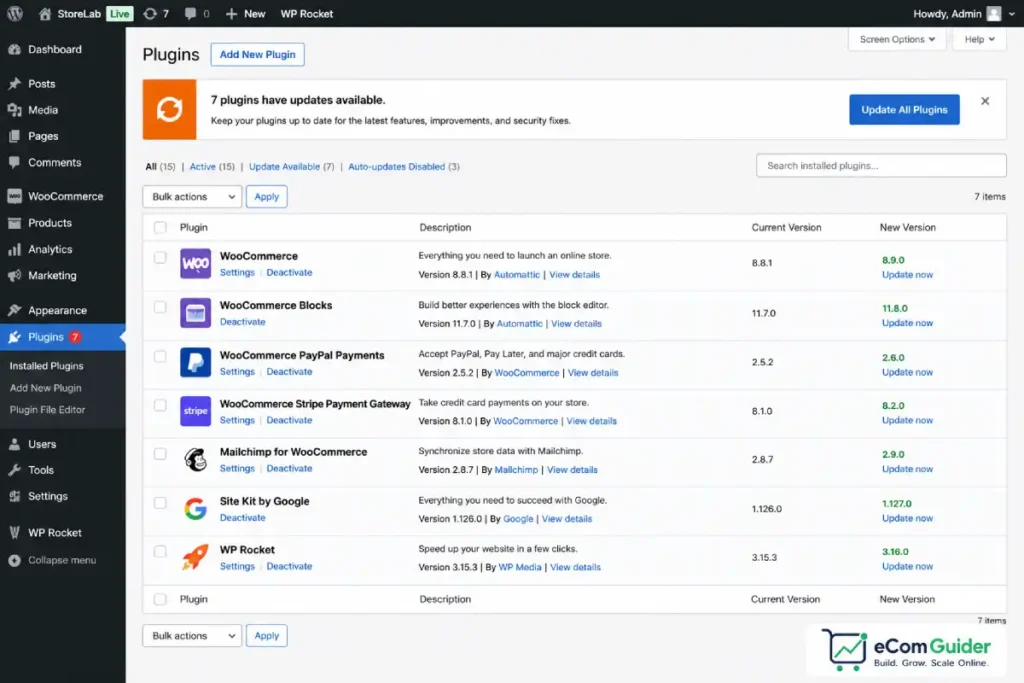
The Task Split: DIY vs Developer
Not everything requires a developer. Here is an honest split based on technical skill level.
A non-technical store owner can manage:
- Applying minor plugin updates in a staging environment and testing before pushing live
- Running automated backups through a plugin
- Monitoring basic uptime through a free service like UptimeRobot
- Responding to WooCommerce’s built-in compatibility warnings (see our WooCommerce HPOS guide for an example of this process)
A developer is required for:
- Diagnosing and resolving plugin conflicts
- Applying major WooCommerce version updates on stores with custom code or non-standard plugin stacks
- Optimising database performance as order volume scales
- Recovering a store from a failed update or security incident
- Maintaining custom code compatibility after core updates
The realistic split for most non-technical WooCommerce store owners: routine updates can be self-managed with discipline. When something goes wrong, a developer is required. The question is whether you pay for a proactive retainer or a reactive emergency.
What Maintenance Retainers Cost
Professional WooCommerce maintenance retainers range significantly depending on service level and provider:
| Service Level | What’s Included | Monthly Cost | Annual Cost |
|---|---|---|---|
| Basic managed updates | Updates, backups, uptime monitoring, email support | $39-$100/month | $468-$1,200/year |
| Standard managed care | Updates, security scanning, performance checks, priority support | $200-$400/month | $2,400-$4,800/year |
| Premium full-service | All of the above plus developer hours for custom code, guaranteed response times | $400-$800/month | $4,800-$10,000/year |
| Enterprise | Dedicated developer, SLA, 24/7 monitoring | $800+/month | $10,000+/year |
Well-known WooCommerce maintenance providers as of mid-2026: GoWP (basic tier around $39/month), WP Buffs (standard tier from $79/month), and dedicated WordPress agencies running custom retainer agreements at $400-$1,500/month for full-service arrangements.
The number that does not appear in any WooCommerce pricing comparison: a store owner without a retainer, managing updates reactively, typically pays $150-$500 per developer incident when something breaks. Stores with complex plugin stacks often see three to five incidents per year. That is $500-$2,500/year in reactive developer fees for a store that believed its maintenance costs were zero.
The $8,000 Weekend
One incident illustrates what skipped maintenance actually costs.
A client running a WooCommerce store with approximately 800 active subscribers had been managing plugin updates manually. Over several months, they delayed a WooCommerce Subscriptions update because they were busy and the store was running fine. A WooCommerce core update pushed in a Thursday evening touched order processing hooks that the outdated subscriptions plugin was still using in an incompatible way.
The subscriptions plugin stopped processing auto-renewals silently. No error message appeared in the store.
No alert fired. The store owner discovered the problem on the following Monday morning when subscription cancellation emails started arriving in bulk.
Four days of missed renewals at their average subscription value, plus one emergency developer callout at an hourly rate to diagnose and resolve the conflict, totalled approximately $8,000. A $39/month managed update service would have caught the dependency conflict before the WooCommerce core update was applied.
That incident is not an edge case. Plugin conflicts during major WooCommerce releases are a documented pattern in the WooCommerce support forums with every major version. The stores that handle it without incident are the ones with a staging environment and a process for testing updates before they go live.
The Minimum Viable Maintenance Setup
If a managed retainer is not in your budget yet, this is the minimum configuration that protects a live WooCommerce store:
- Staging environment. Most managed WordPress hosts include a one-click staging environment. Apply every significant update to staging first, test checkout and your most critical workflows, then push to production.
- Automated daily backups stored off-server. UpdraftPlus free tier handles basic backup to Google Drive or Dropbox. Premium tier ($70/year) adds scheduling control and faster restores.
- Security plugin with file change monitoring. Wordfence free tier covers malware scanning and login protection. It does not require paid upgrades for basic protection on a standard store.
- Uptime monitoring. UptimeRobot free tier monitors your store URL every five minutes and sends an email alert if it goes down. Takes five minutes to set up.
This four-component setup costs $70/year in cash and roughly two hours per month in time. It does not replace a developer when something breaks, but it dramatically reduces how often that happens.
What Maintenance Costs at Different Store Scales
Pulling the full picture together across store size:
| Store Type | Typical Maintenance Approach | Annual Maintenance Cost |
|---|---|---|
| Solo founder, under 100 orders/month | DIY updates, free tools, reactive dev | $0-$700/year |
| Growing brand, 100-1,000 orders/month | Basic managed retainer | $500-$2,400/year |
| Established store, 1,000-5,000 orders/month | Standard managed care | $2,400-$5,000/year |
| High-volume or complex plugin stack | Premium retainer | $5,000-$10,000+/year |
These maintenance costs are in addition to hosting and plugin fees. For a complete picture of WooCommerce’s total annual cost including all five cost layers, see our full WooCommerce review.
For context on how that compares to running a managed eCommerce platform where maintenance is included in the subscription, see our cost to start an online store guide.
The $39/month managed update service we referenced in the $8,000 case study is not a luxury for growing stores. It is the cheapest form of business continuity insurance available for a self-hosted WooCommerce operation.
FAQ’s
Do I need to pay for WooCommerce maintenance?
WooCommerce maintenance is not optional in the sense that the work must happen regardless of who does it. The question is whether you do it yourself or pay a professional. Non-technical store owners who skip maintenance eventually pay for it through emergency developer fees, lost revenue during downtime, or security incidents. A basic managed update service from $39/month is cheaper than most emergency callouts.
What does a WooCommerce maintenance retainer include?
Basic retainers typically cover regular WordPress and WooCommerce core updates, plugin updates, automated backups, and uptime monitoring. Standard and premium tiers add security scanning, performance monitoring, developer hours for custom code, and faster response times when something breaks.
How often does WooCommerce need to be updated?
WordPress core releases minor security updates approximately every few weeks and major versions several times per year. WooCommerce core releases major versions on a roughly quarterly schedule, with smaller patches in between. Plugins vary by developer. A store with 15 active plugins typically receives multiple update notifications per week.
What happens if I do not update WooCommerce?
Running outdated WooCommerce core or plugins creates security vulnerabilities, increases the risk of plugin conflicts when other components update independently, and eventually creates incompatibility with newer hosting infrastructure and PHP versions. Stores that fall significantly behind on updates become expensive to remediate and vulnerable to the attack vectors that outdated plugins expose.
Is a staging environment necessary for WooCommerce maintenance?
A staging environment is not strictly required, but it is the single most effective measure for preventing update-related store breakages. Applying major updates to a staging copy first and testing checkout and critical workflows before pushing to production prevents the majority of incidents we have seen in active WooCommerce stores.
Maintenance is the cost that turns a “$0 platform” into a $5,000-$10,000 annual operating decision for non-technical owners. Build it into your budget before your first sale, not after your first incident. For the complete WooCommerce cost picture across all five layers, see our full WooCommerce review.