
Most WooCommerce content covers the cost of getting in. Almost none of it covers the cost of getting out.
We have managed WooCommerce migrations on both ends, stores moving onto the platform and stores moving off it. The migration-out cost is consistently underestimated, often by a factor of five or ten compared to what the store owner expected when they started the project.
This article gives you the real numbers before you build on WooCommerce, not after you decide you want to leave.
Why Migrating From WooCommerce Is Expensive
WooCommerce stores your business data in a way that reflects the flexibility of the platform. Orders, customers, subscriptions, membership levels, loyalty points, custom product attributes, and custom checkout fields all live in WordPress’s database, often in formats that are unique to specific plugins.
None of those formats have clean equivalents on Shopify, BigCommerce, or any other hosted platform.
When you migrate a simple Shopify store to BigCommerce, you are moving structured data between two systems that were both designed around roughly the same data model.
When you migrate a mature WooCommerce store, you are translating a custom-built data structure into a format that a different platform can understand. That translation takes developer time. Lots of it.
The four factors that determine how expensive your WooCommerce migration will be:
Subscriptions and recurring billing. Active subscriptions have state: billing date, renewal amount, payment method token, trial status. Moving subscription state from WooCommerce Subscriptions to Shopify’s subscription system is not a data export.
It requires mapping every subscription record, validating each one, migrating the payment method tokens (which requires coordination with your payment processor), and testing renewals in the new environment before cutting over. This single factor doubles or triples migration cost for subscription businesses.
Membership and access levels. If your store uses MemberPress, WooCommerce Memberships, or a similar plugin, every member’s access record, expiry date, and membership tier has to be mapped to whatever membership system the destination platform uses. Gaps in membership access during migration mean real revenue impact from churned members.
Order history volume. A store with five years of order history at any meaningful volume has tens or hundreds of thousands of order records.
Migrating order history matters for customer service (can you look up a purchase from three years ago?), tax compliance (do you have accurate historical records?), and loyalty programmes (does a customer’s lifetime value carry over?).
Full order history migration adds time and cost. Partial migration saves money but creates operational gaps.
Custom product data and pricing rules. If your store uses custom fields, complex variant logic, tiered pricing, or wholesale price lists, each of those configurations has to be rebuilt or migrated into the destination platform’s data model.
This is the factor that is hardest to estimate before you start, because it depends entirely on how the original build was done.
Real Migration Cost Ranges
Based on migrations we have managed and industry pricing for WooCommerce migration services:
| Store Type | What Makes It Complex | Migration Cost Range | Typical Timeline |
|---|---|---|---|
| Basic store (no subscriptions, under 5,000 orders) | Product catalog, customer records, order history | $2,000-$5,000 | 2-6 weeks |
| Mid-complexity (subscriptions or memberships, 5,000-50,000 orders) | Subscription state, membership access, order volume | $5,000-$15,000 | 6-12 weeks |
| High complexity (subscriptions + memberships + custom code, 50,000+ orders) | All of the above plus custom development | $15,000-$30,000 | 3-6 months |
| Enterprise (custom ERP integrations, multi-currency, compliance requirements) | System integrations, data governance, testing | $30,000-$100,000+ | 4-12 months |
These ranges assume a professional migration. DIY migration using automated tools like Cart2Cart or LitExtension reduces the cash cost but introduces data quality risk, particularly for subscription state, custom product attributes, and order history completeness.
The $299-$500 automated migration tool is not the same product as the $10,000 professional migration service.
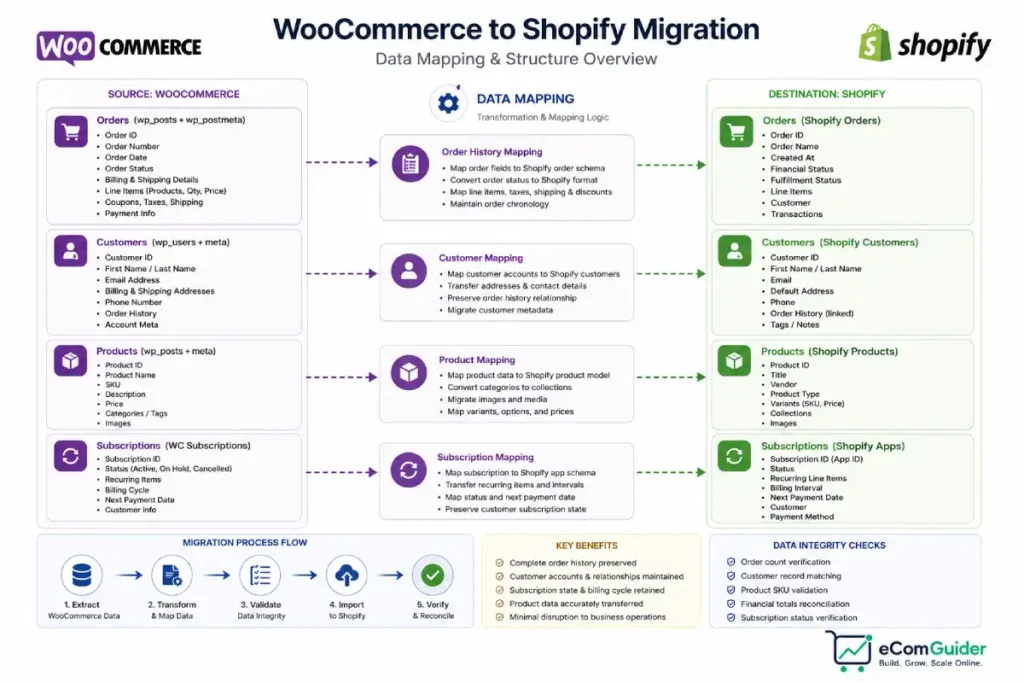
The 12,000-Member Migration: A Real Case Study
We managed a WooCommerce-to-Shopify migration for a subscription-based membership business with approximately 12,000 active members and a five-year order history.
The store had been built on WooCommerce with WooCommerce Subscriptions and a custom membership plugin that had been heavily modified by two different development teams over three years.
Member access levels, renewal schedules, payment method tokens, and loyalty point balances were all stored in a combination of WooCommerce Subscriptions tables, custom post metadata, and a bespoke database table added by the original developers.
Timeline: four months.
The first six weeks were spent mapping the data: understanding exactly what existed in the database, how it was structured, and what the equivalent structure would be in Shopify’s subscriptions ecosystem. This phase alone involved three separate WooCommerce developers and a Shopify expert reviewing the data models.
Weeks seven through twelve were spent building the migration scripts, testing them against a database snapshot, and running validation passes to confirm record counts, subscription states, and membership access matched between source and destination.
The final six weeks ran both platforms in parallel. Shopify processed new subscriptions and orders. WooCommerce continued processing renewals for existing subscriptions while they were migrated in batches. Every batch required validation before the next was migrated.
Cost: $22,000 in development fees.
After cutover, approximately 400 subscriptions required manual reconciliation, records where automated migration had flagged an inconsistency and a human decision was required to resolve it. That reconciliation added another three weeks of work for the client’s internal team.
This is not a failure scenario. It is a realistic outcome for a complex WooCommerce migration. The client anticipated two months and $8,000 based on a preliminary estimate. The reality was four months and $22,000. The gap between expectation and reality is the most consistent feature of complex WooCommerce migrations.
What a DIY Migration Tool Actually Covers
Automated migration services like Cart2Cart advertise WooCommerce migrations starting at a few hundred dollars. What they migrate reliably: product catalog, categories, customer records, and order history for basic stores.
What they do not handle reliably: subscription state, membership levels, custom product fields, loyalty point balances, tiered pricing configurations, and any data stored in custom database tables or plugin-specific metadata.
For a store with only a product catalog and order history, an automated tool is a legitimate option. For any store with subscriptions or memberships, automated tools are a starting point for the data you can migrate automatically, not a complete solution.
How to Reduce Migration Cost
Audit your data before you start. Knowing exactly what you have, how many subscribers, what membership tiers, how many years of order history, which custom fields matter, lets you scope the migration accurately and prioritise what to migrate versus what to recreate.
Accept partial history migration. Migrating the last two years of order history instead of five years can cut migration time significantly. Most customer service queries involve recent orders.
Tax records can be maintained in a separate system. Decide what you actually need in the new platform before committing to full historical migration.
Clean up before you migrate. Cancelled subscriptions, lapsed members, inactive customer records, and discontinued product variants all add migration complexity without adding value. Archiving or deleting inactive records before migration reduces the scope of the project.
Run platforms in parallel during cutover. The parallel running period in our 12,000-member case study was expensive in time, but it meant zero subscriber data was lost. For subscription businesses, the cost of parallel running is almost always lower than the cost of a failed cutover that churns members.
The Decision This Article Is Really About
If you are reading this before building on WooCommerce, that is the right time to read it. The migration cost is not a reason to avoid WooCommerce.
It is a reason to be honest about whether WooCommerce is the right long-term platform for your business model, because the exit cost is higher than most founders account for.
Businesses that are actually best served by WooCommerce, content-first stores, complex B2B operations, compliance-driven use cases, should build on WooCommerce and plan to stay. The migration cost is irrelevant if you are not planning to migrate.
Businesses that are on WooCommerce because it was available and familiar, but whose actual needs are well-served by a managed platform, should evaluate the migration cost against the ongoing maintenance and development overhead of staying on WooCommerce.
At some stage for many stores, the migration cost is smaller than the accumulated cost of self-managed infrastructure.
For the full WooCommerce cost picture including hosting, plugins, and maintenance, see our complete WooCommerce review.
If you are evaluating Shopify as the migration destination, our Shopify for small business guide gives the hosted platform case in comparable depth.
If the decision is still whether to be in eCommerce at all, our eCommerce vs retail guide covers the channel question before the platform one.
Read the migration cost section of this article before you sign up for WooCommerce, not after you decide you want to leave it.
FAQ’s
How much does it cost to migrate from WooCommerce to Shopify?
A WooCommerce-to-Shopify migration costs between $2,000 and $30,000+ depending on store complexity. Basic stores with no subscriptions or memberships and under 5,000 orders can migrate for $2,000-$5,000. Stores with active subscriptions, membership levels, or large order histories typically cost $10,000-$25,000 and take 2-4 months. We managed one migration of a 12,000-member subscription business that cost $22,000 and took four months.
Can I migrate from WooCommerce myself?
Automated tools like Cart2Cart and LitExtension handle basic WooCommerce migrations, product catalogs, customer records, and standard order history, starting at a few hundred dollars. They do not reliably handle subscription state, membership access levels, custom product attributes, or loyalty point balances. If your store has any of these, automated tools cover part of the migration but a developer is required for the rest.
What data is hardest to migrate from WooCommerce?
Active subscription state is consistently the most difficult data to migrate from WooCommerce. Payment method tokens, renewal schedules, trial periods, and subscription-linked access permissions do not have a universal transfer format and require coordination with your payment processor to move correctly. Custom database tables added by bespoke development are the second most common source of migration complexity.
How long does a WooCommerce migration take?
A basic WooCommerce migration with no subscriptions takes 2-6 weeks. A mid-complexity migration with subscriptions or memberships takes 6-12 weeks. Complex migrations with subscriptions, memberships, and custom code take 3-6 months. The timeline is driven by data mapping, testing, and the parallel running period required to validate the new platform before full cutover.
Should I migrate from WooCommerce to Shopify?
Migration makes sense if your ongoing WooCommerce maintenance and development costs exceed what a managed platform would cost including the one-time migration fee. It does not make sense if your store actually benefits from WooCommerce’s flexibility, custom code, or WordPress integration.
Calculate your current annual WooCommerce total cost of ownership, hosting, plugins, developer fees, and maintenance, and compare it to the Shopify subscription plus migration cost amortised over three years.
The WooCommerce migration cost is not the reason to avoid the platform. It is the reason to be honest about your long-term plans before you build. For the complete cost picture of running WooCommerce versus switching away from it, see our full WooCommerce review and our Shopify for small business guide.