
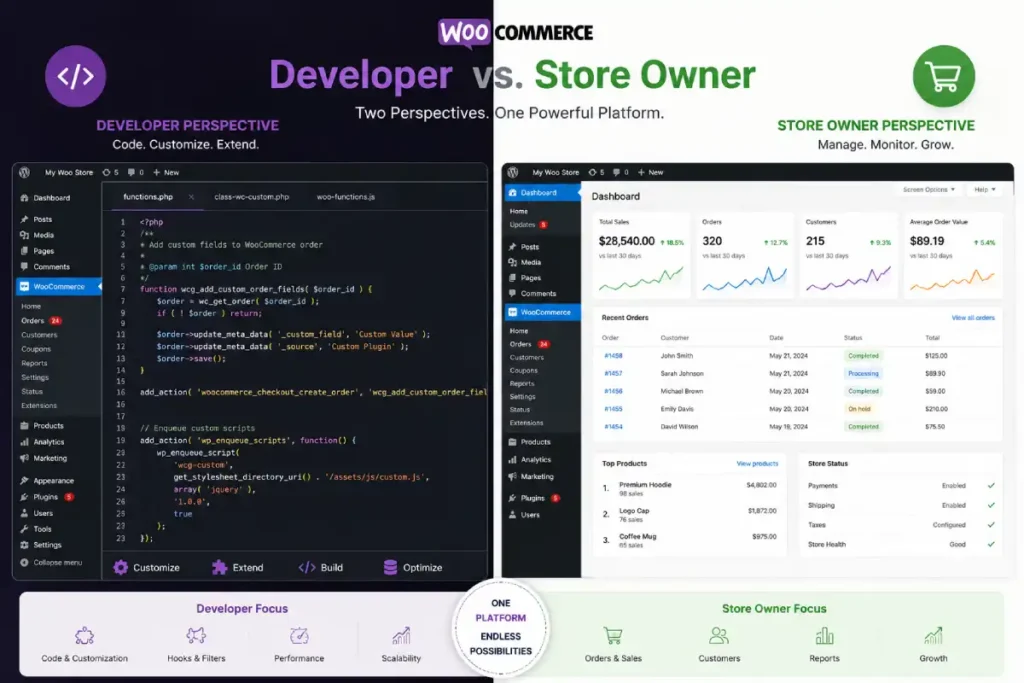
Most WooCommerce pros and cons lists read the same way because they are written from a single, imaginary-neutral point of view. The problem is that the same WooCommerce feature produces completely different experiences depending on who is running the store.
Full codebase access is a genuine pro for a developer. For a non-technical store owner, that same access means they are responsible for maintaining infrastructure they do not fully understand. What reads as a feature in a spec sheet is an operational burden in practice.
This article separates the two perspectives. If you are a developer evaluating WooCommerce for a client build, or a store owner trying to understand what you are getting into, the considerations that matter to you are different.
Table of Contents
Quick Summary
| Factor | Developer View | Store Owner View |
|---|---|---|
| Full codebase access | Pro: build anything | Con: maintain everything |
| No transaction fees | Pro: better for clients | Pro: more margin kept |
| Plugin ecosystem | Pro: extend anything | Con: plugin conflicts break stores |
| Update cycle | Pro: control over timing | Con: responsible for every update |
| Performance | Pro: configurable to any level | Con: depends entirely on hosting choice |
| Support | Pro: community resources are deep | Con: nobody owns your problem |
| Data ownership | Pro: full control | Pro: full control |
| Customisation | Pro: unlimited | Con: most needs a developer |
Developer Perspective: The Genuine Pros
Full Codebase and Database Access
WooCommerce runs on WordPress, which means a developer has direct access to the database, the template files, and every hook in the system. There are no sandboxed APIs, no rate limits on what you can query, and no platform restrictions on what you can build.
This matters in practical terms. A B2B distributor that needs 300 customer-level price lists, tiered wholesale pricing, and approval-based ordering cannot build that on Shopify without expensive middleware.
On WooCommerce, it is a custom plugin and direct database logic. A store that needs to integrate with a legacy ERP using a non-standard data format can do it because the developer controls the entire stack.
The ceiling for what WooCommerce can do is essentially the ceiling of what PHP and a MySQL database can do. For most eCommerce use cases, that ceiling is never reached.
Developer Tooling: WP-CLI and Git Deployment
WooCommerce’s WordPress foundation gives developers access to WP-CLI, a command-line interface for managing WordPress installations (see wp-cli.org).
Developers who work with WP-CLI describe tasks like bulk updating plugins, running database migrations, managing users, and generating test data as actually faster than GUI-based alternatives.
Combined with Git-based deployment workflows, a developer can version-control a WooCommerce store’s codebase, deploy through staging before production, and roll back cleanly if something breaks.
This workflow is well-established in WordPress development and faster to set up than the equivalent infrastructure for some hosted platforms.
No Vendor Lock-In
WooCommerce does not restrict which payment processor you use, which shipping carrier you connect, or which marketing tool you integrate.
There is no platform surcharge for using Stripe instead of the native payment option, no approved-partner list for email marketing, and no certification requirement for app developers.
For a developer building stores for clients, this means the tool selection stays open. The best fit for each client’s budget and needs can be chosen without platform constraints.
HPOS and the Architecture Direction
WooCommerce’s move to High Performance Order Storage, which became the default for new installs in late 2024, is a genuine signal about where the platform is heading. The dedicated order tables perform significantly better than the previous wp_postmeta storage at scale.
For developers building stores intended to handle meaningful order volume, HPOS is the architecture that makes WooCommerce viable at higher throughput without requiring infrastructure overengineering to compensate.
Developer Perspective: The Real Cons
You Own the Update Cycle
On Shopify, platform updates happen in the background. On WooCommerce, the developer is responsible for testing every WordPress core update, every WooCommerce core update, and every plugin update against the full stack before applying them to a live store.
This is not hypothetical overhead. WooCommerce releases major versions on a roughly quarterly schedule. Each one introduces the possibility of compatibility issues with plugins that have not been updated yet.
A subscription plugin that works on WooCommerce 8.9 may produce unexpected behaviour on 9.0. Testing the update path on a staging environment before production is the correct approach, but it requires a staging environment to exist and someone to run the tests.
For a developer managing several client WooCommerce stores, the update cycle is a recurring time cost that does not exist on hosted platforms.
Plugin Conflict Debugging Is Opaque
When a WooCommerce store breaks, the cause is often a conflict between two plugins that each work correctly in isolation but interfere with each other at a specific hook or filter.
Diagnosing these conflicts requires disabling plugins one at a time, reading error logs, and often reviewing the source code of both plugins to find where they overlap.
This debugging process can take an afternoon on a simple conflict and several days on a complex one involving custom code.
The time cost is real and it is not predictable in advance. A store owner asking for a fix quote before the issue is diagnosed will not get an accurate number.
Client Performance Expectations Are Hosting-Dependent
A developer can build a well-optimised WooCommerce store and hand it off to a client who then moves it to cheaper shared hosting to cut costs.
Six months later, the store is slow and the developer is fielding complaints about performance they no longer control.
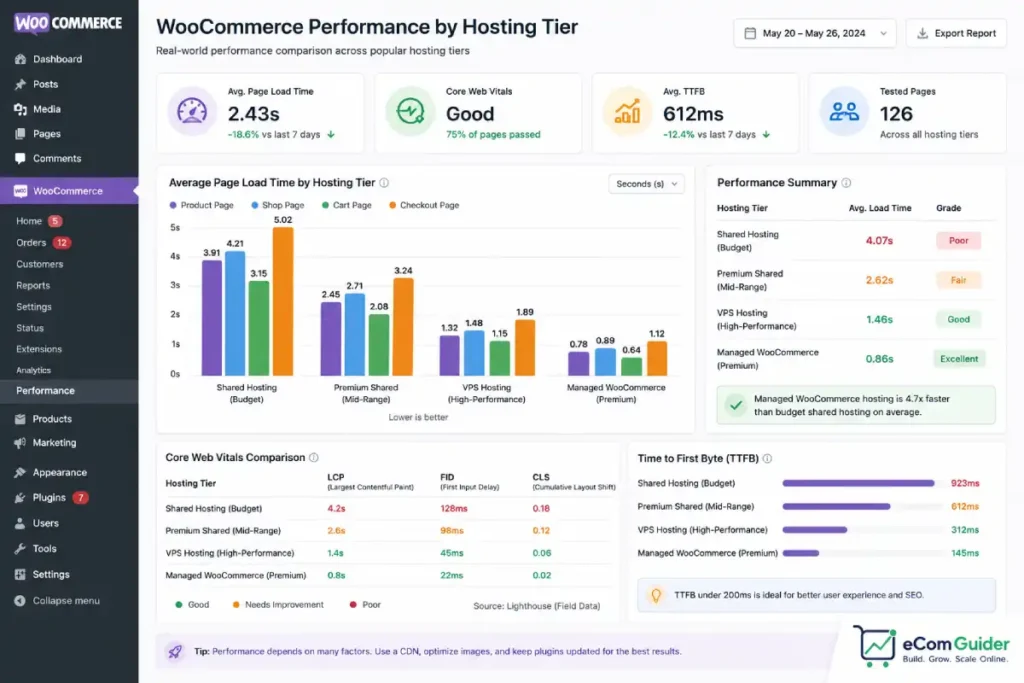
WooCommerce’s performance is not a property of the plugin. It is a property of the hosting environment the plugin runs in.
Developers who want their work to perform correctly long-term need to either control the hosting decision or clearly communicate the hosting requirements at handoff. On a hosted platform the infrastructure is fixed; on WooCommerce it is not.
Store Owner Perspective: The Genuine Pros
No Transaction Fees
WooCommerce charges no platform transaction fees. The only payment processing fee is the one your payment processor charges, typically 2.9% plus a fixed amount per transaction for Stripe or PayPal. There is no additional surcharge for using a non-native processor.
At meaningful revenue, this is a real financial difference. Shopify Basic charges 2% on top of processor fees when you do not use Shopify Payments.
At $8,000 per month in sales, that 2% is $160 per month, $1,920 per year, taken directly from margin. WooCommerce does not take that cut. For a store where margin is tight, this is not a minor consideration.
Content and Commerce in One System
For stores where organic search drives meaningful traffic, being on WordPress gives WooCommerce a structural advantage over purpose-built eCommerce platforms.
WordPress’s content management depth, the quality of WordPress SEO tooling, and the ability to build content clusters around product categories without fighting against a platform built for transactions first, all matter for stores where a blog post drives product discovery.
A skincare brand running an editorial strategy that links to products, a food store that ranks for recipe content, a craft supply retailer with detailed project guides, all of these benefit from the content-commerce integration that WordPress makes natural and that hosted eCommerce platforms treat as secondary.
Full Data Ownership
Your customer data, your order history, your product catalog, your email subscribers, all of it lives on infrastructure you control.
You can export it, back it up, query it, or migrate it on your own terms. No platform agreement governs what happens to your data or under what conditions the platform can restrict access to it.
For businesses in regulated industries, this is not optional. For most store owners, it provides a practical benefit: if a plugin, a hosting provider, or even WooCommerce itself changes in a way that does not suit you, you can move without asking permission or negotiating a data export.
Store Owner Perspective: The Real Cons
The Support Accountability Gap
This is the most consistently frustrating aspect of WooCommerce for non-technical store owners, and it is the one that almost no review documents clearly.
When something breaks on a WooCommerce store, the support landscape for a broken WooCommerce store looks like this:
WooCommerce support covers the core plugin but not third-party plugins. The plugin developer covers their plugin but not conflicts caused by other plugins or hosting configuration.
The hosting provider covers the server environment but not the application running on it. Nobody owns the intersection.
A checkout error that appears after a plugin update might be caused by the plugin, a conflict between plugins, a PHP version mismatch on the hosting environment, or a caching configuration that is not clearing correctly.
Each support channel will reasonably direct you to the others. As a non-technical store owner, you are left navigating between three separate support systems, each of which has a legitimate reason to say the problem is not entirely theirs.
This is not a flaw unique to WooCommerce, it is inherent to self-hosted, multi-vendor software stacks. But store owners coming from hosted platforms, where one support team owns the whole product, find this accountability gap actually disorienting.
The “Free” Label Is a Funnel, Not a Price
The WooCommerce plugin is free. The hosting, the essential plugins, the payment processing, and the maintenance are not.
A realistic annual cost for a functioning WooCommerce store, managed hosting, a core plugin stack, and basic maintenance, starts around $1,500 to $2,500 per year and rises from there.
The gap between the advertised cost (the plugin is free) and the operating cost (the store costs $2,000-$8,000 per year to run professionally) catches store owners who budget from the marketing page rather than from a full cost analysis.
For the detailed breakdown of what WooCommerce actually costs by store type, see our WooCommerce true cost guide.
Performance Depends on a Decision You Make at Setup
A store owner who chooses shared hosting to save money in the first year of operation is making a decision that affects checkout speed, admin load time, and capacity to handle traffic spikes for that entire period.
WooCommerce does not abstract away the hosting layer the way Shopify does. The store owner is responsible for the infrastructure decision, and that decision has a direct, measurable impact on the store’s performance and therefore its conversion rate.
A store owner we worked with noticed their checkout page was taking over four seconds to load. The store itself was well-built. The hosting was a shared plan at $3 per month.
Moving to managed WooCommerce hosting at $25 per month resolved the load time within two weeks. The point is not that shared hosting is always wrong; it is that this decision is entirely the store owner’s to make and live with.
What Both Perspectives Agree On
Some WooCommerce characteristics are consistently seen as positive or negative regardless of technical background.
Data ownership is uniformly valued. Developers appreciate not being dependent on a platform’s API terms. Store owners appreciate knowing their customer data is not subject to a SaaS company’s access policies.
The plugin ecosystem is a double-edged reality for everyone. The depth of available extensions makes WooCommerce capable of almost anything.
The maintenance overhead of that plugin stack is a burden for both developers who have to keep it updated and store owners who have to fund that maintenance.
The learning curve is real for both groups, though for different reasons. Developers learn the WordPress hook system and WooCommerce’s data model. Store owners learn to manage an infrastructure layer that hosted platforms handle invisibly.
When to Use WooCommerce and When Not To
Use WooCommerce if:
- You have reliable access to WordPress development support
- Your store is content-driven and organic search is a meaningful acquisition channel
- You need customisation that hosted platforms cannot deliver at a reasonable price
- Data ownership or compliance requirements make self-hosted infrastructure necessary
- You are adding eCommerce to an existing WordPress site
Do not use WooCommerce if:
- You are a non-technical founder without a developer relationship and a budget for professional maintenance
- You need to be selling within days rather than weeks
- Your store’s needs are standard and well-served by Shopify or BigCommerce
- You cannot absorb the operational risk of update-related downtime
For a comparison of what Shopify offers the store types that are not well-suited to WooCommerce, see our Shopify for small business guide. For the total cost of ownership comparison that helps the platform decision make financial sense, see our cost to start an online store breakdown.
FAQ’s
Is WooCommerce good for beginners?
WooCommerce works for beginners who are comfortable managing a WordPress installation, comfortable applying plugin updates regularly, and comfortable taking responsibility for hosting performance. For beginners who want to focus on selling rather than managing infrastructure, Shopify or another hosted platform is a better starting point.
What are WooCommerce’s biggest disadvantages?
The three most consistently cited disadvantages are the support accountability gap (no single team owns your problem), the hidden cost gap between the free plugin and the real annual operating cost, and the maintenance responsibility for updates, security, and performance that falls entirely on the store owner or their developer.
Is WooCommerce good for developers?
WooCommerce is generally well-regarded by WordPress developers for its full codebase access, Git-compatible deployment workflows, WP-CLI tooling, and unlimited extensibility. The main frustrations are plugin conflict debugging, client performance issues caused by budget hosting decisions, and the ongoing update management burden for client stores.
Why do developers recommend WooCommerce?
Developers who recommend WooCommerce typically do so for clients with specific needs: complex B2B pricing logic, compliance-driven data ownership requirements, content-first stores where WordPress’s publishing capabilities matter, or custom checkout flows that would require Shopify Plus at $2,300 per month minimum. For clients without those specific needs, many developers now recommend managed platforms that reduce their own ongoing maintenance load.
Is WooCommerce secure?
WooCommerce’s security is primarily determined by how current its plugin stack is. Outdated plugins are the leading cause of WordPress security incidents, according to Wordfence’s vulnerability research.
A WooCommerce store running current plugin versions, with a firewall plugin active, and on a host with server-level malware scanning is meaningfully secure. A store running outdated plugins on budget shared hosting is not. The update discipline of whoever manages the store is what determines the actual security posture.
Does WooCommerce work well at scale?
WooCommerce scales well with appropriate hosting infrastructure and the HPOS database architecture, which became the default for new installs in late 2024. Stores processing thousands of orders per day operate on WooCommerce with managed cloud hosting or dedicated infrastructure. The constraint is not the platform but the hosting investment required to support high order volume. Budget shared hosting does not scale; properly provisioned managed hosting does.
What is the difference between WooCommerce Lite and Pro?
There is no official WooCommerce Lite or Pro. WooCommerce is a single free plugin. The tiered costs come from optional paid extensions for subscriptions, bookings, memberships, and other specialist functionality, as well as from the hosting, maintenance, and developer services required to run the store. Some hosting providers and third-party services market WooCommerce-based bundles under “lite” or “pro” labels, but these are not official WooCommerce product tiers.
WooCommerce suits a specific operator profile. If that profile matches yours, the platform delivers on its promises. If it does not, no amount of plugin configuration will compensate for the fundamental mismatch. For the full platform picture including pricing and migration considerations, see our complete WooCommerce review.