
WordPress powers roughly 43% of all websites. WooCommerce is the most installed eCommerce plugin on that platform, with over 7 million active installs.
That scale is why attackers target it. One scanner, pointed at the internet, catches an enormous number of stores because so many share the same file structure and plugin ecosystem.
This is not theoretical. Researchers disclosed over 250 new WordPress plugin vulnerabilities per week heading into 2026. Several specific, real vulnerabilities hit WooCommerce and its extensions in the first half of the year alone.
This guide covers two levels. The general section fixes the mistakes responsible for most real-world compromises. The advanced section covers server-level and payment-data hardening for stores that need it. Every fix includes exact steps, not vague advice.
Key Takeaways
- WooCommerce core is well maintained. Most real incidents come from third-party plugins, not WooCommerce itself.
- A 2026 CSRF flaw in WooCommerce let attackers trick a logged-in admin into unknowingly creating a rogue admin account.
- Weak or stolen passwords contribute to 81% of hacked WordPress sites. Two-factor authentication closes most of that gap.
- Outdated plugins remain the single largest attack surface on any WooCommerce store.
- A firewall blocks most automated attacks but is not a substitute for updates.
- Advanced hardening, disabling XML-RPC, restricting the REST API, and setting security headers, closes gaps a basic setup leaves open.
- If you process card data directly rather than through a hosted payment page, PCI DSS compliance becomes a legal requirement, not an option.
Why WooCommerce Stores Are a Target
WordPress runs on nearly half the internet. WooCommerce is the plugin most of those stores use to sell. That is a target-rich environment with predictable structure.
Automated bots scan for known fingerprints. An exposed version number. A specific plugin’s file signature.
A login page sitting at the default /wp-admin path. Most attacks are not aimed at your store specifically. They are aimed at every site matching a pattern, and yours matches it.
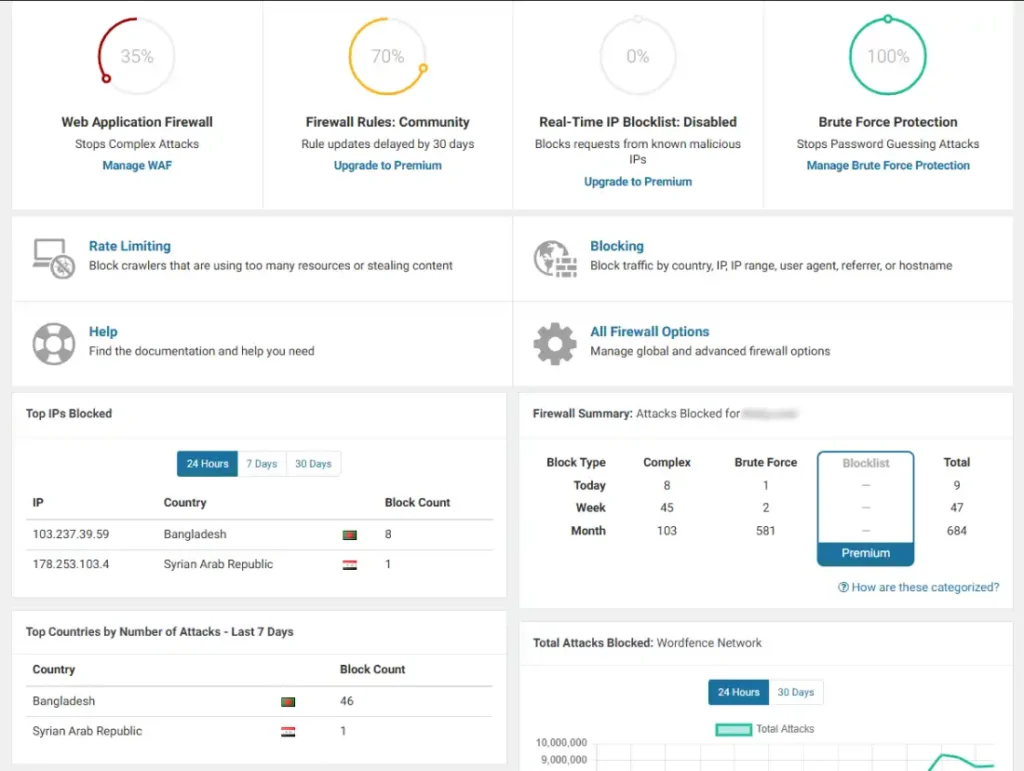
Wordfence’s network blocks over 6 billion brute force attempts and 55 million exploit attempts every month. That is the permanent baseline, not a spike.
If your store has been live more than a few weeks, automated scanners have already probed it.
Part 1: General Security, The Fixes That Stop Most Attacks
Real WooCommerce Vulnerabilities From This Year
These are actual disclosed vulnerabilities. Each is explained in plain language with the exact fix.
1. WooCommerce core: rogue admin account creation (CSRF)
A flaw in WooCommerce’s REST API batch request handling let attackers trick a logged-in administrator into unknowingly triggering a new admin account. The attacker needed the admin to visit a malicious link while still logged into WooCommerce in another tab.
Once an attacker holds an admin account, they control the store fully. Customer data, payment routing, additional malicious plugins, all exposed.
Affected: WooCommerce 5.4.0 through 10.5.2. Fixed in 10.5.3.
Fix it in three steps:
- Update WooCommerce immediately. Check your version under WooCommerce, then Status, then System Status.
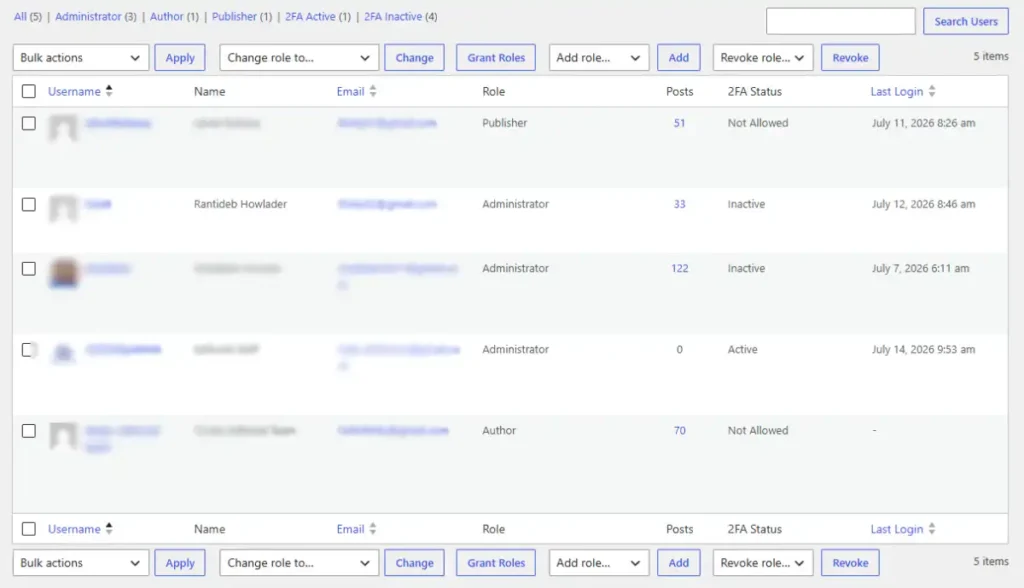
- Go to Users, filter by Administrator, and confirm every account belongs to someone you recognize. Remove anything unfamiliar and force a password reset on every remaining admin.
- Enable two-factor authentication on every admin account.
2. Third-party plugin: stored XSS through review fields
A widely used customer reviews plugin failed to clean input in a review field. Attackers, sometimes without an account, could submit a review containing JavaScript that ran in the browser of anyone viewing the page, including your staff.
Stored cross-site scripting is dangerous because the code sits on your site permanently until removed. It can steal login session cookies, letting an attacker impersonate an admin without ever knowing the password.
Affected: a customer reviews plugin, versions up to 5.97.0 and a related flaw up to 5.113.0.
Fix it:
- Update the plugin to the latest version.
- If guest reviews are allowed without moderation, turn on manual approval.
- Check existing reviews for angle brackets, the word script, or unfamiliar HTML. Delete anything suspicious.
3. Third-party plugin: remote code execution through pricing formulas
A product customization plugin let store owners build custom pricing formulas using PHP’s eval() function, without checking what was passed into it. Attackers could submit a crafted value that executed as real PHP code on the server.
This is the most severe category. Remote code execution means an attacker runs arbitrary code on your server, not just inside WordPress.
Affected: a product add-ons plugin, versions up to 5.4.1. Rated critical, 9.8 out of 10.
Fix it:
- Update immediately if you run this plugin or any plugin with a formula builder.
- If no patch exists, disable the formula feature or deactivate the plugin.
- Ask any plugin vendor with calculator or custom-field logic how user input is sanitized before processing.
4. Third-party plugin: missing permission checks
A product specifications plugin exposed two backend functions that let any logged-in user modify product data, without checking whether they had permission. Even a basic Subscriber account, created automatically at checkout, could exploit it.
This pattern, a missing capability check, is one of the most common in WordPress plugin flaws. A developer builds an admin feature and forgets to verify the caller is actually an admin.
Affected: a product specifications plugin, versions up to 0.8.9.
Fix it:
- Update the plugin, or deactivate it if no patch exists.
- Disable open user registration under Settings, then General, if your store does not need customer accounts. Guest checkout does not create the account type this flaw depends on.
The Patterns Behind Every WooCommerce Vulnerability
The same root causes repeat across nearly every disclosed flaw.
| Vulnerability Type | Plain English | How Common |
|---|---|---|
| Missing permission checks | Admin-only feature accessible to anyone logged in | Very common |
| Cross-site scripting (XSS) | User input displayed without cleaning | Very common |
| CSRF | Admin tricked into an action without knowing it | Common |
| SQL injection | Database queries built from unclean input | Less common, high severity |
| Remote code execution | User input executed as server code | Rare, most severe |
Nearly all of these trace back to one source: a plugin not built with security in mind, waiting for an attacker to find it.
The General Defense Checklist
Five layers stop the overwhelming majority of real-world attacks.
Updates. The vulnerabilities above were all patched within days of disclosure. Set a weekly schedule to check WordPress core, WooCommerce, and every plugin. Test on staging first if your host offers it.
A firewall. Wordfence is the most widely deployed option, with a free tier covering firewall, malware scanning, and login security. It inspects requests before they reach WordPress and blocks known attack patterns.
Strong authentication. Enable two-factor authentication on every account with admin or editing access. Move your login page off the default /wp-login.php path using a plugin like WPS Hide Login, since most automated password-guessing bots target that exact path.
Managed hosting. Server-level malware scanning and account isolation sit outside WordPress entirely, which means a compromised plugin cannot disable them. Budget shared hosting at $3-10 a month typically skips this layer.
Tested backups. Automated daily backups stored off-server are the baseline. A backup you have never restored from is a backup you do not actually know works.
Part 2: Advanced Hardening
The fixes above stop most attacks. These close the gaps a standard setup leaves open, and matter more as your store grows or handles sensitive data directly.
Disable XML-RPC
XML-RPC is a legacy WordPress feature that allows remote publishing and pingbacks. Almost no modern WooCommerce store uses it, and it is a common target for brute force and DDoS amplification attacks.
Add this to your site’s .htaccess file on Apache servers:
<Files xmlrpc.php>
Order Deny,Allow
Deny from all
</Files>
On Nginx, add this to your server block:
location = /xmlrpc.php {
    deny all;
}
If a specific integration you use depends on XML-RPC (some older mobile apps do), confirm before disabling it fully.
Restrict the REST API
WooCommerce’s REST API is powerful and, by default, some endpoints are more exposed than store owners realize. If you are not using the API for an external integration, restrict it.
Install a plugin like Disable REST API, or add this to functions.php to require authentication for all REST requests:
add_filter( 'rest_authentication_errors', function( $result ) {
    if ( ! empty( $result ) ) {
        return $result;
    }
    if ( ! is_user_logged_in() ) {
        return new WP_Error( 'rest_not_logged_in', 'REST API requires authentication.', array( 'status' => 401 ) );
    }
    return $result;
});
Test this carefully. If you use a headless frontend, a mobile app, or any service that calls the REST API without a logged-in session, this will break it. Adjust the condition to allow specific authenticated API keys instead of blocking all unauthenticated access.
Set Security Headers
HTTP security headers instruct the browser to enforce additional protection that server-side code alone cannot guarantee.
| Header | What It Does |
|---|---|
| Content-Security-Policy | Restricts which scripts and resources a page can load, limiting XSS impact |
| X-Frame-Options | Prevents your store being embedded in a hidden iframe on another site (clickjacking) |
| Strict-Transport-Security | Forces browsers to only connect over HTTPS |
| X-Content-Type-Options | Stops browsers from guessing file types in ways attackers can exploit |
Add these through your host’s control panel if it offers a headers editor, or via .htaccess:
Header set X-Frame-Options "SAMEORIGIN"
Header set X-Content-Type-Options "nosniff"
Header set Strict-Transport-Security "max-age=31536000; includeSubDomains"
Content-Security-Policy is more complex to configure correctly on a WooCommerce store because of the number of scripts checkout and payment gateways load.
Test thoroughly in a staging environment before applying it to production, since an overly strict policy can silently break your checkout.
Change the Database Table Prefix
WordPress installs with a default table prefix of wp_. Automated SQL injection attacks frequently assume this prefix. Changing it removes an easy assumption from a large share of automated attack scripts.
This is not a fix for an existing store to attempt manually without a plugin. Use a tool like the WP-Optimize table prefix changer, or set a custom prefix (such as a random 6-character string) at installation time for any new WooCommerce build.
Lock Down File Permissions
Incorrect file permissions let attackers write or execute files they should not have access to.
| File or Folder | Recommended Permission |
|---|---|
| wp-config.php | 440 or 400 |
| All other files | 644 |
| All directories | 755 |
| wp-content/uploads | No PHP execution allowed |
Prevent PHP execution inside the uploads directory specifically, since it is one of the most common places attackers plant a backdoor after gaining any file upload access. Add this to a .htaccess file inside wp-content/uploads:
<Files *.php>
Deny from all
</Files>
Rate Limit wc-ajax Endpoints
WooCommerce’s AJAX endpoints, including cart, checkout, and coupon application, can be abused for automated card testing (attackers checking stolen card numbers against your payment gateway) or brute-force coupon guessing.
A web application firewall with rate limiting rules, or a plugin offering endpoint-specific throttling, reduces this risk.
If you use Cloudflare, its rate limiting rules can specifically target wc-ajax requests exceeding a threshold from a single IP address in a short window.
PCI DSS: What Applies to Your Store
If your store ever touches raw card numbers, even briefly, PCI DSS compliance is a contractual requirement from your payment processor, not optional guidance.
Most WooCommerce stores using Stripe, WooPayments, or PayPal’s hosted checkout never touch raw card data.
The payment form is either an iframe or a redirect controlled entirely by the processor, which places you in a lower compliance tier (SAQ A) with minimal requirements.
Stores using older, self-hosted card fields (a checkout form built to collect card numbers directly before passing them to a gateway) carry significantly more compliance burden and risk.
If you are unsure which category your store falls into, check your payment gateway’s integration method against the PCI Security Standards Council’s SAQ eligibility criteria.
The most direct security decision most stores can make here: use a hosted or embedded checkout field from your processor rather than a custom-built card form. It shifts most of the compliance burden and most of the risk to the processor.
Audit Logging
A security incident without logs is difficult to investigate. Standard WordPress logging is minimal.
Install a dedicated activity log plugin (WP Activity Log or Wordfence’s activity log feature) and confirm it captures: login attempts, plugin activations and deactivations, user role changes, and file edits through the theme editor.
Store logs off-server or export them regularly. An attacker with admin access can delete on-server logs to cover their tracks.
What to Do If Your Store Is Already Compromised
Act in this order if you suspect a breach.
- Change every password: WordPress admin, hosting account, database, and FTP credentials. Assume all are compromised.
- Put the site in maintenance mode or take it offline while you investigate. Continuing to process orders on a compromised store risks customer payment data.
- Scan with Wordfence’s malware scanner or contact your host’s security team. Look for unfamiliar admin accounts, unexpected files in uploads, and unrecognized scheduled tasks.
- Restore from a clean backup taken before the compromise, if available. This is faster and more reliable than manually cleaning an infected site.
- Update everything before bringing the site back online. If the original vulnerability is still present, a clean restore only delays the next attack.
- Notify affected customers if payment or personal data may have been exposed. This may be a legal requirement depending on your location.
Ongoing Maintenance Schedule
| Frequency | Tasks |
|---|---|
| Weekly | Apply WordPress, WooCommerce, and plugin updates. Review firewall activity logs. |
| Monthly | Audit admin and editor accounts. Run a full malware scan. Test a backup restore. |
| Quarterly | Review the full plugin list and remove anything unused. Audit user role permissions. Review security headers and REST API restrictions for anything that has drifted. |
Security spend is part of running WooCommerce well, alongside hosting, plugins, and maintenance in your total operating budget.
If who owns security responsibility matters to your platform decision, that trade-off is worth weighing before you build.
Comparing WooCommerce against Shopify and reading our guide to starting an eCommerce store cover that decision from two angles, and whether Shopify is worth it looks specifically at the platform where most of this layer is owned for you.
FAQ’s
Is WooCommerce secure?
WooCommerce core is actively maintained and patched quickly. Most real compromises come from third-party plugins, not WooCommerce itself. A maintained store with updated plugins and a firewall is reasonably secure.
What is the most common way WooCommerce stores get hacked?
Outdated plugins with known vulnerabilities are the most common entry point. Weak or stolen passwords are second, involved in the majority of hacked WordPress sites.
Do I need PCI DSS compliance for my WooCommerce store?
Only if your checkout ever handles raw card numbers directly. Stores using Stripe, WooPayments, or PayPal’s hosted checkout fields typically qualify for the simplest compliance tier with minimal requirements.
Should I disable XML-RPC on WooCommerce?
Yes, unless a specific integration depends on it. Almost no modern WooCommerce store needs it, and it is a common target for brute force and amplification attacks.
How do I know if my WooCommerce store has a vulnerable plugin?
Check each plugin against the Wordfence vulnerability database by searching the plugin name. Security plugins also flag known vulnerabilities automatically once activated.
Is a web application firewall enough on its own?
No. A firewall blocks a meaningful share of automated attacks but is not a complete solution. Combine it with regular updates, two-factor authentication, and tested backups.
What should I do if I find an admin account I do not recognize?
Remove it immediately, force a password reset on every remaining admin account, and enable two-factor authentication on all of them. Check for other signs of compromise, since a rogue account is rarely the only change made.
Security is not a setting you configure once. Update on a schedule, run a firewall, enable two-factor authentication, and test your backups. Those habits, done consistently, stop the overwhelming majority of real attacks against WooCommerce stores.