
Most platform comparison guides hand you a 20-row feature table and leave you to figure out what actually matters for your store.
That’s not a decision framework, it’s homework. The questions below skip the feature-by-feature comparison and get straight to the handful of things that actually determine which platforms are even in your running.
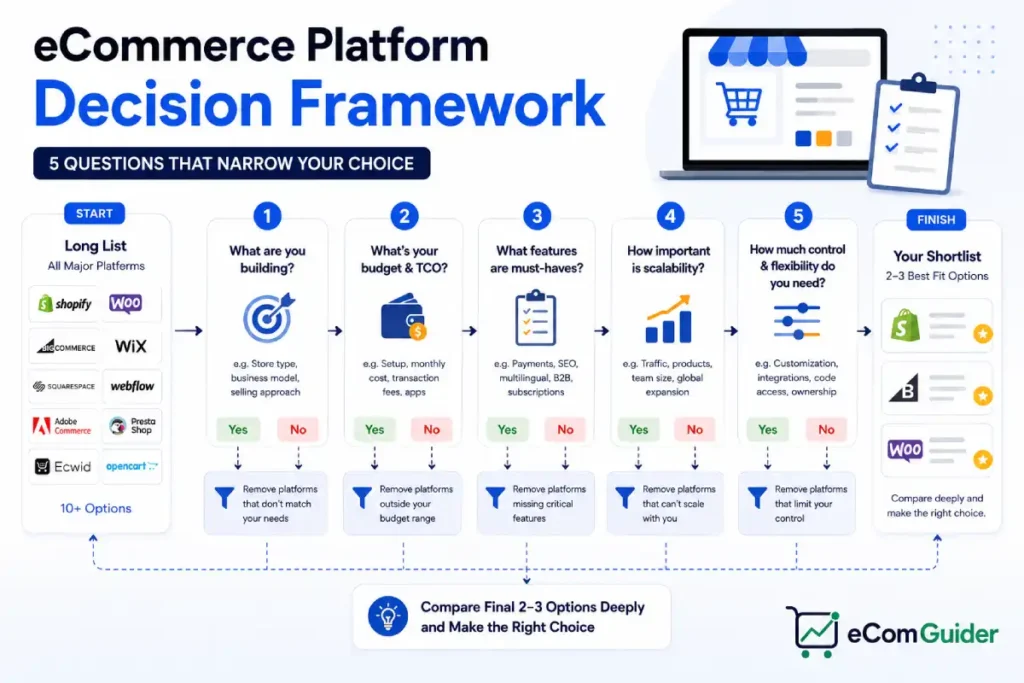
In this guide, you’ll walk through five questions, in order, that eliminate platforms you shouldn’t be considering and narrow the field down to two or three real options worth demoing.
Table of Contents
Key Takeaways
- Most platform decisions come down to five factors: catalog complexity, technical comfort, budget structure, growth trajectory, and required integrations, though the deciding factor for some businesses is international selling, B2B needs, or omnichannel requirements instead.
- Answering these questions in order matters, because early answers eliminate entire categories of platform before you waste time comparing features that don’t apply to you.
- Total cost of ownership, not the advertised monthly price, is what actually separates platforms once you factor in apps, extensions, and transaction fees.
- The right platform for where your business is today isn’t always the right platform for where it’ll be in two years, and this framework accounts for both.
- A platform decision you can reverse without rebuilding your entire store is lower risk than one framed as permanent.
Why Feature Comparisons Alone Don’t Answer This Question
Every platform comparison article lists the same categories: pricing, themes, apps, SEO tools, checkout options. The problem isn’t that this information is wrong. It’s that almost every platform on the market checks most of those boxes at a basic level now, which makes a feature table look decisive without actually being decisive.
What separates platforms in practice is less visible than a feature list: how your catalog is structured, how much custom development you’re willing to take on, and how your costs behave as you scale. Answer those questions first, and most feature comparisons become a formality rather than the main event.
Question 1: How Complex Is Your Catalog?
Catalog complexity is often one of the first major filters, and it’s one most comparison guides skip entirely. It’s not always the deciding factor. For businesses with heavy international, B2B, or omnichannel requirements, those needs can matter more than catalog size alone, and the section further down this guide covers when that’s the case.
If you’re selling a small number of simple products (under a few hundred SKUs, minimal variants), most major platforms handle this without strain. Shopify, Wix eCommerce, and Squarespace all manage small, straightforward catalogs well out of the box.
If you’re selling a large or highly variant-heavy catalog (thousands of SKUs, complex bundles, B2B pricing tiers), the field narrows fast. BigCommerce and Adobe Commerce are particularly well suited to this kind of complexity, while Shopify, WooCommerce, and other platforms can also support it with the right architecture.
WooCommerce can handle large catalogs too, but often requires additional extensions or custom development depending on your specific workflows, which can push its true cost well past the advertised free price tag.
If you’re selling digital products, subscriptions, or a mixed catalog of physical and digital items, check platform-native support before assuming an app will bridge the gap cleanly. Some platforms treat this as a core feature; others treat it as an afterthought handled entirely through third-party apps.
Question 2: How Much Technical Involvement Do You Actually Want?
This question isn’t about how technical you are. It’s about how much time and attention you want to spend on platform maintenance versus running your business.
Hosted platforms (Shopify, Wix, Squarespace, BigCommerce) manage the underlying infrastructure, platform updates, and much of the security for you. You still remain responsible for account security, apps, and store configuration, but you trade most of the deeper infrastructure work for predictability.
Self-hosted platforms (WooCommerce, Adobe Commerce) give you more control over customization and data ownership, but that control comes with real responsibility. You or someone you hire is managing backups, performance, security, and any PCI compliance responsibilities that fall outside your payment provider, not just initial setup.
Hosted platforms trade some control for convenience and operational simplicity. It’s worth knowing where those limits actually sit, since even Shopify’s limitations show up eventually for stores that outgrow the basics.
Be honest here. A self-hosted platform chosen mainly because it looks cheaper often ends up costing more once you account for developer time, especially if something breaks during a busy sales period and you’re not equipped to fix it yourself.
Checkout customization is worth checking too, since hosted platforms differ significantly in how much of the checkout experience can be changed. This can matter for subscription businesses or highly optimized conversion funnels.
Question 3: What Does Your Real Budget Structure Look Like?
The advertised monthly price is rarely the number that matters. What matters is total cost of ownership: the base plan, plus apps or extensions, plus payment processing fees from your gateway.
Add to that any platform transaction fee charged on top, if you’re not using the platform’s own payment processing. These last two are separate charges that beginners commonly confuse as one fee.
Beyond apps and fees, budget for theme or design costs, agency or developer help at launch, staff training time, and migration costs if you’re moving from an existing store. Apps aren’t the only hidden cost, and skipping this step is a common reason launch budgets run over.
A rough way to stress-test this: take the base plan price, then estimate the apps or extensions your catalog complexity from Question 1 will require, then check both payment processing and platform transaction fees. Add those together, along with any one-time launch costs, not just the sticker price, before comparing platforms head-to-head.
Question 4: Where Will Your Business Be in Two Years, Not Just Today?
The platform that’s perfect for a 50-product store launching next month isn’t automatically the right long-term home if you’re planning to scale into wholesale, international markets, or a much larger catalog within two years.
This doesn’t mean you should over-build for a future that might not happen. It means checking, before you commit, whether your likely growth path is something the platform handles natively.
If it isn’t, that path would require a full replatform later. Migrating an established store is a bigger project than most people expect, so it’s worth avoiding when a different initial choice would have made it unnecessary.
It’s also worth a quick check on the platform itself: recent acquisitions, major direction changes, or a pattern of deprecating features without much notice. Vendor stability doesn’t show up in a comparison table, but it affects how safe a long-term bet the platform actually is.
If you’re already running a store and unsure whether it’s time to consider a change, watching for warning signs first can save a premature migration.
Question 5: What Do You Already Depend On?
The last question is often the most decisive one in practice: what tools, systems, or workflows does your business already run on that a new platform needs to work with?
That might be an existing accounting system, a specific email marketing tool, a POS system for a physical retail location, or a fulfillment partner with particular integration requirements. Check native integrations first, then third-party app availability, before assuming a custom integration is something you’ll build later.
Don’t just check whether an integration exists. Check whether the platform’s API and webhook support are mature enough to keep that integration reliable over time, including any API rate limits that could matter once your catalog or order volume grows.
Building a custom integration once is rarely the expensive part; keeping it working through platform updates is. Assuming a custom integration will get built eventually is one of the most common reasons a platform launch stalls out past its original timeline.
It’s also worth checking how easy it is to hire developers, agencies, or freelancers for the platform you’re considering, along with the size and quality of its theme ecosystem. A platform with a large support and theme ecosystem is a lower-risk long-term choice than one where qualified help or design options are hard to find. If your integrations lean heavily on the platform’s API, check whether API usage is metered or priced separately, since some SaaS platforms monetize this beyond the base plan.
Factors That Deserve a Look Even When They’re Not Top of Mind
The five questions above cover what decides most platform choices. A handful of other factors don’t apply to every business, but when they apply, they can outweigh everything else on this list.
International selling: If you’re shipping across borders or plan to, check native support for multiple currencies, multiple languages, VAT or GST handling, and regional payment gateways. Bolting this on later through apps is possible, but a platform with weak native support here creates ongoing friction.
B2B capability: Company accounts, custom pricing tiers, purchase orders, and quote requests are built into some platforms and entirely absent from others, requiring an app or workaround. If wholesale or B2B is part of your model, confirm this before assuming a consumer-focused platform will stretch to fit.
Omnichannel selling: Selling through Amazon, TikTok Shop, Facebook, Instagram, Google Shopping, or an in-person POS alongside your own store is increasingly the norm rather than the exception. Some businesses choose a platform primarily for how well it syncs inventory and orders across these channels.
SEO and technical control: URL structure flexibility (some platforms lock you into a fixed /products/ or /collections/ prefix), canonical tag control, and sitemap or robots.txt access vary more between platforms than most comparison guides mention. Structured data support and metadata flexibility matter here too, and if you’re running a multilingual store, check hreflang support specifically. If organic search is a core acquisition channel for you, review this specifically rather than assuming all platforms handle it equally.
On-site search: How well a platform handles faceted search, semantic or AI-assisted search, and search result relevance affects conversion on larger catalogs, and it’s a feature area where quality varies more than people expect.
Data ownership and exportability: Confirm who owns your order history, customer data, and content, and how easily products, orders, redirects, blog content, and customer records can be exported if you decide to migrate later. Also check whether data from platform-specific apps can be exported, since not every integration stores its data in a portable format. This matters most at the point you least want to think about it, which is exactly why it’s worth checking now.
Security and compliance: PCI compliance handling, automatic security updates, backup frequency, and fraud protection differ meaningfully between hosted and self-hosted setups, and between platforms within each category.
Mobile commerce and performance: Mobile checkout quality, native app support, and how a platform’s themes handle Core Web Vitals affect both conversion and SEO, especially since mobile traffic makes up the majority of most stores’ visits.
Headless commerce and platform-native AI: If you’re planning a headless architecture, verify API maturity before committing, since not all platforms treat their API as a first-class product. Platform-native AI features, such as AI-assisted product descriptions, AI search, AI merchandising, and AI customer support, are also worth a look if that’s part of how you plan to run the store.
None of these are among the original five questions because they don’t apply to every business. When one of them does apply to yours, treat it as a filter alongside catalog complexity, not an afterthought.
A Simple Way to Map Your Answers
Once you’ve worked through the questions above, many businesses land in one of a few broad patterns:
- Small catalog, limited technical involvement, tighter budget: Shopify, Wix eCommerce, and Squarespace are usually the realistic starting points.
- Large or complex catalog, higher customization needs: WooCommerce, BigCommerce, and Adobe Commerce tend to fit better, with the tradeoff of more technical involvement.
- Heavy B2B, international, or omnichannel requirements: narrow first by which platforms handle those specific needs natively, since this often matters more than catalog size alone.
These are common patterns, not hard rules. Treat this as a starting point for research, not a final answer, and validate it against your specific answers to the five questions above.
What to Do Once You’ve Narrowed to Two or Three Platforms
Framework and research only get you so far. Before committing, it’s worth testing the shortlist directly:
- Create trial accounts on each remaining platform
- Import a small sample of your real products, not demo data
- Test the actual checkout flow from a customer’s perspective
- Install the two or three apps or extensions you know you’ll need and check how they behave together
- Spend time in the admin dashboard doing a routine task, like updating inventory or issuing a refund
- Check load times on a product and category page, not just the homepage
- Confirm your Question 5 integrations actually connect, rather than trusting the feature list
This step catches the mismatches that research alone tends to miss.
A Few Risks Worth Planning For
No platform is risk-free, and it’s worth going in aware of the common ones rather than being surprised by them later:
- Vendor outages, where hosted platforms expose you to platform-wide outages, while self-hosted stores depend instead on the reliability of your own hosting, server, and CDN setup
- App or extension abandonment, where a tool you depend on stops being maintained
- Breaking updates, more common on self-hosted platforms with a large plugin stack
- Platform policy changes, such as fee structure changes or feature deprecations with limited notice
- Vendor lock-in through proprietary apps, where deep reliance on a platform’s own app ecosystem makes a future migration more disruptive than it would be with more portable, standards-based tools
None of these should stop you from choosing a platform. They’re a reason to keep at least a loose exit plan in mind, informed by the data ownership and exportability check covered above.
Putting the Five Answers Together
Run through the five questions in order, and you’ll usually find that two or three platforms remain realistic candidates, not the full list of a dozen you started with.
At that point, comparison tables and demos actually earn their place, because you’re comparing options that all actually fit your situation.
Once you’ve narrowed your list, a side-by-side platform comparison covers pricing and tradeoffs across the major options.
If you’re still weighing a broader set of factors beyond these five questions, a fuller choosing guide walks through that decision process from the ground up.
Common Mistakes That Undo a Good Framework
- Starting with brand familiarity instead of catalog fit. Choosing a platform because it’s the one you’ve heard of most often, rather than the one that matches your catalog and budget structure, is one of the most common regret patterns.
- Comparing advertised prices without factoring in apps and fees. A platform that looks cheaper on paper can end up more expensive once your specific catalog needs are added in.
- Ignoring Question 5 until after launch. Discovering a critical integration doesn’t exist natively after you’ve already built your store is a far more expensive problem to solve than checking for it upfront.
- Treating the decision as permanent. It’s a real cost to migrate later, but it’s rarely as catastrophic as fear of the decision suggests. A platform choice you can live with for two to three years is a reasonable bar, not a lifetime commitment.
FAQ’s
Which eCommerce platform is best overall?
There isn’t one best platform for every business. The right answer depends on catalog complexity, technical comfort, budget structure, growth plans, and existing tool dependencies, which is exactly what this five-question framework is built to sort through.
Should I choose a platform based on price alone?
No. The advertised monthly price rarely reflects total cost of ownership once apps, extensions, and transaction fees are factored in. A cheaper base plan can end up costing more once your actual catalog needs are added.
How do I know if I need a self-hosted platform like WooCommerce or Adobe Commerce?
If you want maximum customization and control and are prepared to manage hosting, updates, and security yourself (or hire someone who will), self-hosted platforms make sense. If you’d rather not think about server management at all, a hosted platform is usually the better fit.
Is it risky to choose the wrong platform?
It’s a real cost, mainly in migration time and effort if you need to switch later, but it’s rarely catastrophic. Most stores can operate on a reasonably well-matched platform for a few years without needing to replatform.
How long should I expect to use the same platform?
There’s no fixed answer, but planning around a two-to-three-year horizon is a reasonable way to balance current needs against future flexibility without over-engineering a decision for a future that might not materialize as planned.
What if my business doesn’t fit neatly into any of these five questions?
That’s common, especially for unusual business models. In that case, weight the questions by which ones carry the most risk for your specific situation. A business with an unusual integration requirement should treat Question 5 as the deciding factor even if the other four point elsewhere.
Can I switch eCommerce platforms later if I choose wrong?
Yes. It’s a real project involving product data, customer data, and often a design rebuild, but it’s a solvable one, not a permanent trap. The warning-signs guide referenced earlier in this article covers how to recognize when it’s worth doing.
Will I lose my domain if I switch platforms?
No, in most cases. Domains are typically registered separately from your eCommerce platform, so you can usually point the same domain at a new platform during a migration, though the specifics depend on where your domain is currently registered.
Will changing platforms hurt my SEO?
It can, if redirects and URL structure aren’t handled carefully during the move. A well-planned migration with proper 301 redirects from old URLs to new ones typically preserves most existing rankings, but this is one of the most common places migrations go wrong.
Can I migrate my store myself, or do I need a developer?
For a small catalog with simple content, many platforms offer built-in or app-based migration tools that a non-developer can use. Larger or more customized stores, especially anything involving custom fields, complex redirects, or non-standard integrations, usually benefit from developer help to avoid data loss or broken URLs.
Do I need to change my payment provider if I switch platforms?
Not always. Some payment providers work across multiple platforms, so you may be able to keep the same one. It depends on which provider you use and which platforms it integrates with, so it’s worth checking before assuming either way.
Start With the Questions, Not the Platform List
The instinct when choosing an eCommerce platform is to start browsing options and comparing feature tables. Working through these five questions first does the opposite: it narrows the list before you ever open a comparison chart.
That saves the time usually spent evaluating platforms that were never a realistic fit. Once your list is down to a couple of contenders, matching each one against your business stage helps confirm the final call.