
Where to sell digital downloads depends less on the platform’s reputation than on what you are actually selling and what you already have running.
For most first-time creators selling a single PDF or a small template pack with no existing site, Gumroad is the fastest way to start, you can be selling in an afternoon with no website to build.
If you already have a WordPress site, an established Shopify store, or an SEO strategy tied to an existing domain, staying on that platform and adding digital products to it usually beats moving your catalog somewhere new, Shopify or WooCommerce both handle this well.
If you are building a course or a membership specifically, Squarespace’s dedicated Digital Products plan and Gumroad’s memberships both fit that shape better than a general ecommerce platform bolted on.
That is the short answer for the best platform to sell digital products on in most situations.
The rest of this guide is the reasoning behind it, five platforms including Wix compared on file hosting, license keys, PDF protection, pricing, and setup, based on official documentation and long-standing seller and community reports.
We reviewed each platform’s documentation, pricing, supported features, and seller experiences to compare the parts that actually affect a digital product business.
A shorter, scenario-based cut of this same decision lives in our platform breakdown for digital products specifically, and if you are looking at print-on-demand instead of pure digital files, that guide covers the physical-meets-digital fulfillment side directly.
A few specific figures below change across platform versions, that is flagged once here rather than repeated at every mention: confirm exact file limits and current pricing directly with each platform before you build around a number from any article, including this one.
Key Takeaways
- Gumroad is the fastest real path to a first sale. No website required, basic license keys included, built-in memberships, the tradeoff is a per-sale fee instead of a flat monthly cost.
- WooCommerce has native downloadable product support built into its core, unlike Shopify, which requires an app even for the basics.
- Squarespace runs two separate systems both loosely called digital products. A simple Download product type in your regular store, and a completely different Digital Products plan built for gated, subscription content. Confusing these two costs setup time.
- None of the five platforms reviewed include native PDF stamping. If per-buyer watermarking matters to your product, budget for a dedicated app or plugin regardless of which platform you choose.
- A frequent early mistake across every platform is not testing your actual delivery flow before launch. A broken download link is invisible until a real customer hits it, and it is a common, avoidable cause of first-week support tickets.
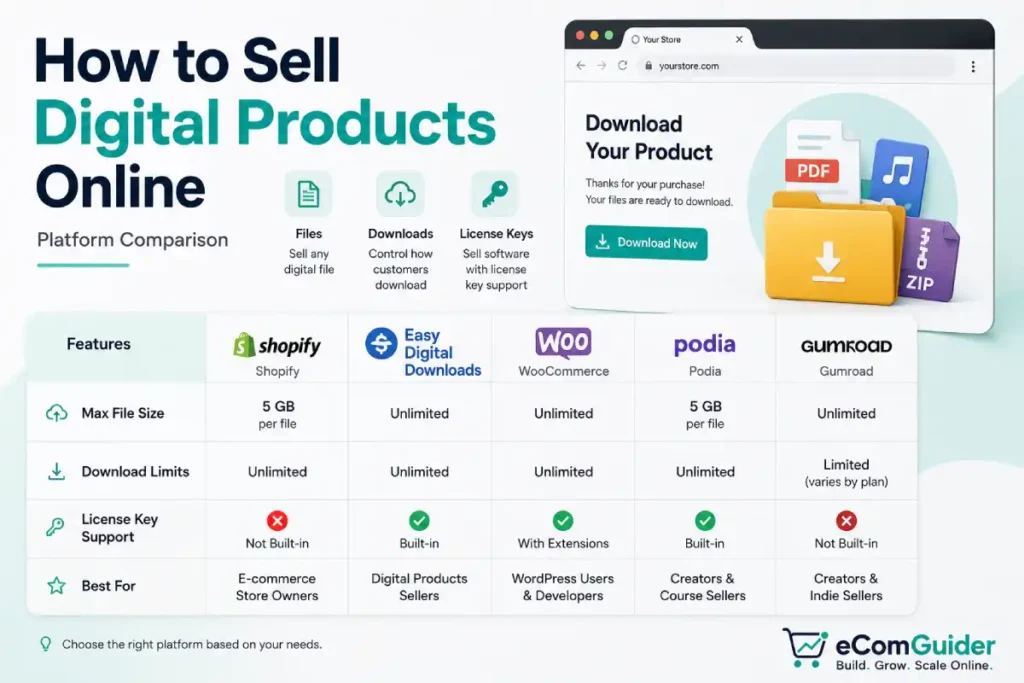
Feature Matrix at a Glance
| Feature | Shopify | WooCommerce | Squarespace | Wix | Gumroad |
|---|---|---|---|---|---|
| Native downloads | Limited, free app | Yes, core | Yes, Download type | Yes, Digital File type | Yes, core |
| License keys | App required | Plugin required | No | No | Basic, native |
| Subscriptions | Via app | Via plugin | Separate plan | Native | Native |
| PDF stamping | App required | Plugin required | No | No | No |
| Hosted checkout | No | No | No | No | Yes |
| Apps & plugins | Extensive app ecosystem | Largest plugin library | Smallest | Moderate | Purpose-built, narrower |
| Best for | Full ecommerce alongside other products | WordPress-comfortable sellers | Existing Squarespace sites | Simple visual stores | Fastest first sale |
Best Platform by Product Type
- A single PDF, template, or preset pack: Gumroad. You do not need a full store for one file, and the built-in checkout removes the biggest setup friction.
- A course or membership with recurring access: Gumroad’s native memberships or Squarespace’s dedicated Digital Products plan, both are built for gated content rather than a download bolted onto a product page.
- Software with license keys: Gumroad covers basic cases natively. Anything beyond a simple key, per-device limits, activation tracking, renewal automation, needs WooCommerce or Shopify with a dedicated licensing plugin.
- Digital products alongside a physical catalog: Whatever platform already runs your physical store. Running two separate platforms for one business creates more real problems than it solves.
- Large files, sample packs, or software libraries over a few hundred megabytes: WooCommerce, where your real ceiling is your hosting’s upload limit, not a fixed app cap. Squarespace’s 300MB limit rules it out here.
When Each Platform Is the Wrong Choice
Every recommendation above assumes the platform fits. These are editorial judgment calls based on where each platform’s real limitations show up in practice, not fixed rules, but they are where the recommendations above stop applying.
- Gumroad is a harder fit if you want a real storefront. It is built for a single product page and a checkout link, not a browsable catalog. Sellers with more than a handful of products, or who want their own branded storefront and SEO presence, tend to outgrow it.
- For many creators selling only digital downloads, Shopify’s monthly subscription and app costs are harder to justify than Gumroad or WooCommerce. If you already know Shopify, expect to add physical products later, or want Shop Pay and POS down the line, that calculation can flip the other way.
- WooCommerce asks more of you if you are not comfortable managing WordPress and hosting. Native downloadable support is genuinely good, but you own updates, security, and your host’s upload limits yourself, there is no vendor to call when something breaks.
- Squarespace becomes a poor fit once you need license keys, PDF stamping, or files over 300MB. The platform has no path to any of these without switching, not just adding an app. Confirm your product fits inside that ceiling before you build a store around it.
- Wix is a weaker fit if you need mature licensing or subscription tooling. Its digital product feature set covers straightforward downloads well, but it is shallower than WooCommerce or Shopify once your needs get more specific than “sell a file.”
The Real Comparison, Platform by Platform
File Hosting and Size Limits
- Shopify: as of this writing, the free Digital Downloads app tops out around 5GB per product. A paid app removes that ceiling for larger libraries. This is a version-sensitive figure, confirm the current limit and file-count rules for the specific app version in Shopify’s own documentation before you build around either number.
- WooCommerce: no fixed limit of its own. Your actual ceiling is whatever your hosting’s PHP upload settings allow.
- Squarespace: as of this writing, every digital product is capped at 300MB, a limit that has held steady across years of seller reports but is still worth confirming in Squarespace’s current documentation before you commit a large file library to the platform. There is no native option to link a Download-type product to externally hosted files instead. Some sellers work around this manually by selling access to a page that contains an external link, but that is not a supported delivery method and is worth testing carefully before relying on it.
- Wix: supports multiple files per product. The exact current count is worth a quick check in your own dashboard before you plan around it.
- Gumroad: built specifically around digital delivery from the start, and handles large libraries more comfortably than a general-purpose store with a bolted-on app.
Download Limits and License Keys
Download limits and link expiration:
- WooCommerce: set download limits and expiration directly in product settings, no plugin required.
- Squarespace: links expire 24 hours after purchase and auto-resend a fresh one to the checkout email if a customer clicks late, one of the smoother experiences of the five.
- Gumroad: skips the expiring-link problem completely, customers get permanent access through their Gumroad account.
License keys:
- Gumroad: the only platform here with basic license keys built in natively, its real advantage for simple software.
- Shopify: needs an app, such as DPL or Digitally.
- WooCommerce: needs a dedicated licensing plugin.
If you are selling anything more complex than a single activation key, per-device limits, activation tracking, renewal automation, budget real time to configure whichever tool you add. License management is a place where digital sellers commonly underestimate setup time.
PDF Stamping
None of the five platforms reviewed include this natively. Every one requires a separate app or plugin specifically for per-buyer watermarking. This is a gap in the category, not one platform, plan for it as a real line item if protecting your files matters to your business model.
Pricing and Payments
| Platform | Starting Cost | Transaction Fees | Payment Options |
|---|---|---|---|
| Shopify | Basic around $39/month, pricing varies by region and billing cycle | Lower with Shopify Payments, higher with third-party gateways | Shopify Payments, PayPal Express Checkout, other regional gateways. Shopify Payments runs on Stripe’s own infrastructure, so Stripe is not typically offered as a separate, additional gateway alongside it, though this varies by region |
| WooCommerce | Free plugin, hosting cost varies widely by provider | Set by your payment processor, not WooCommerce itself | WooCommerce Payments, Stripe, PayPal |
| Squarespace | Business plan required for digital products | Varies by plan tier | Squarespace Payments where available, a newer, regionally limited option, plus Stripe and PayPal |
| Wix | Free site builder, paid plan required for commerce | Varies by plan and payment method | Wix Payments natively, plus regional third-party options |
| Gumroad | Free to start, no fixed monthly fee | Per-sale pricing, check Gumroad’s current pricing page directly for the exact figure | Built-in, no separate gateway setup |
If you’re comparing WooCommerce’s payment gateways specifically, fees and setup differ enough between Stripe, PayPal, and WooCommerce Payments to be worth a closer look before you pick one.
Who Manages the Customer Relationship
Pricing and file limits are not the only thing that changes by platform. How much of the customer relationship, email address, purchase history, the ability to remarket directly, you manage yourself versus the platform varies too, and it is easy to overlook until you want to run your own email list or offer a repeat-purchase discount.
| Platform | Customer relationship |
|---|---|
| Shopify | You manage it directly, customer data lives in your own store |
| WooCommerce | You manage it directly, customer data lives in your own database |
| Squarespace | You manage it directly, customer data lives in your own store |
| Wix | You manage it directly, customer data lives in your own store |
| Gumroad | More platform-managed than self-hosted, buyers still purchase through a Gumroad account |
This is one more reason a growing catalog eventually outgrows Gumroad: it still gives you access to buyer information and ways to reach them, but it manages more of the customer experience than a self-hosted storefront does, which reduces your control over branding and parts of the buyer journey.
A Note on VAT and Sales Tax
Digital products carry real tax obligations that differ from physical goods.
EU VAT rules generally require collecting and remitting VAT on digital sales to EU consumers regardless of where your business is based, the UK has its own comparable requirement, and US obligations depend on your specific nexus in each state.
Rates and thresholds shift, and nexus rules in particular get complicated once you’re selling in multiple states, our sales tax guide breaks down what triggers it and which platforms automate collection.
This is still worth a real conversation with a tax professional for your specific situation rather than general guidance alone.
Setting Up Digital Products on Shopify
Shopify’s free Digital Downloads app covers the basics, but its real limitation shows up the moment you need license keys, PDF protection, or files past a few gigabytes, at that point a paid app is worth the cost, not an optional upgrade.
- Choose your delivery app based on your actual product. Examples include SendOwl, which handles PDF stamping and license keys well, Sky Pilot, commonly used for secure delivery of video and audio files (though it is not the only option for that use case), and Digitally, which focuses on license keys and secure fulfillment. Check the Shopify App Store for current alternatives before committing to one
- Install it from the Shopify App Store and connect it to your store
- Create your product and mark it as digital or non-physical, this setting has been relabeled across admin versions, it lives in your product’s shipping settings either way
- Upload your file or connect your license key source through the app, not Shopify’s native product editor directly
A mistake worth watching for: sellers test the checkout button but never actually complete a real purchase and download the file themselves.
A broken sync between your app and your product is invisible until a paying customer hits it. Buy your own product once before launch.
Setting Up Digital Products on WooCommerce
WooCommerce is the only platform here where digital delivery is native, no app required for the basics.
- Go to Products, then Add New, and under Product data select Downloadable
- Upload your file directly, or link to one already hosted elsewhere if it exceeds your server’s upload limit
- Set your download limit and an expiration window if you want access to end after a set time
- For license keys or PDF stamping, add a dedicated plugin, WooCommerce’s core does not cover either
An easy-to-miss detail: your file size ceiling is not a WooCommerce number, it is whatever your hosting provider allows through PHP’s upload settings.
A store that works fine for a 50MB PDF can reject a 2GB software bundle outright, confirm this with your host before you promise customers a large file.
Setting Up Digital Products on Squarespace
Squarespace actually runs two different systems here, and mixing them up is a common mistake sellers make on this platform.
For a one-time download: add a store page if you have not already, then add a product and choose Download as the type. Upload your file, set your price, done, this is the simple path for a PDF or template pack.
For gated, subscription content: this is the separate Digital Products plan, built for courses and membership libraries, not a single file. Confirm your current plan actually supports this before building anything, plan names and inclusions have shifted over time.
Set up pricing plans through the Content and Memberships panel, create the content you are gating, then build a sign-up page with a pricing plan block so visitors can compare and purchase.
Setting Up Digital Products on Wix
- Confirm the Wix Stores app is installed, App Market, search Wix Stores, Add to Site if it is not already there
- Go to Products, then Store Products, and click New Product
- Select Digital File as the type and upload your file, confirm your current plan’s file count and size limits in your own dashboard, these have shifted across updates
- Add your title, description, price, and image, then set expiration or download limits under store settings if the defaults are not tight enough for your product
Setting Up Digital Products on Gumroad
- From Gumroad’s homepage, click Start selling and provide your email, your full legal name as it appears on your ID, your country of residence, and a password, changing your country later may affect payouts or your existing balance, worth getting right the first time
- Verify your email, then add a payout method, direct bank deposit or PayPal, and complete identity verification, requirements vary by country
- Choose your product type, prepare your files, and build your product page with a title, description, visuals, and price
- Publish and share your product link directly, this is the entire setup, no separate website step exists
Which Platform Actually Wins
- Easiest to start: Gumroad, nothing else here gets you to a live product faster, because there is no site to build first.
- Best if you are already selling physical products too: whichever platform runs that store, Shopify or WooCommerce both handle mixed catalogs well without forcing a second platform into your stack.
- Best ecosystem for scaling add-ons later: Shopify, its app store gives you a licensing, stamping, or streaming option for nearly any product type as your catalog grows.
- Best for someone comfortable with WordPress wanting full control: WooCommerce, native downloadable support plus no platform lock-in, at the cost of owning your own hosting and upkeep.
- Best if you already have a Squarespace or Wix site for other reasons: use it, know the real file size and plan limits going in rather than discovering them mid-upload.
Getting Started
Every platform here can sell a digital product well, the real risk is not picking the wrong one, it is spending weeks comparing platforms instead of shipping a first product on any of them.
Pick based on what you are actually selling using the guidance above, set it up, buy your own product once to confirm delivery actually works, and launch.
You can always add a second platform or switch later once you know what your specific catalog and customers actually need.
Frequently Asked Questions: How to Sell Digital Products Online
What is Shopify’s file size limit for digital products?
As of this writing, around 5GB total through the free Digital Downloads app. This is version-sensitive, confirm the current number and per-product file rules directly in Shopify’s documentation, and use a paid app for anything larger regardless.
Which platform is best for beginners?
Gumroad, for most first-time sellers with a single file or small pack. There is no website to build and no app to configure, you can publish a product page and start selling the same day.
Can I sell digital downloads on Shopify without an app?
Not comfortably. Shopify’s core product editor is built around physical inventory, so even the free Digital Downloads app is close to a requirement for basic file delivery, and license keys or PDF stamping need a separate paid app on top of that.
Why does Squarespace seem to have two different digital product systems?
Because it does. A simple Download product type handles one-time files inside your regular store, while a separate Digital Products plan handles gated, subscription content like courses. Confirm which one your product actually needs before building.
Does any platform offer PDF stamping natively?
No, this is a gap across the entire category, not one platform. All five require a dedicated app or plugin for per-buyer watermarking.
How much does Gumroad actually cost?
Gumroad emphasizes per-sale pricing rather than a fixed monthly fee, and its exact structure has changed before. Check Gumroad’s current pricing page directly rather than relying on a specific percentage from any article.
Can I sell digital products without a website?
Yes, Gumroad and similar hosted platforms let you sell directly from a product page and checkout link, no separate website required. You trade long-term branding control for the fastest possible path to a first sale.